
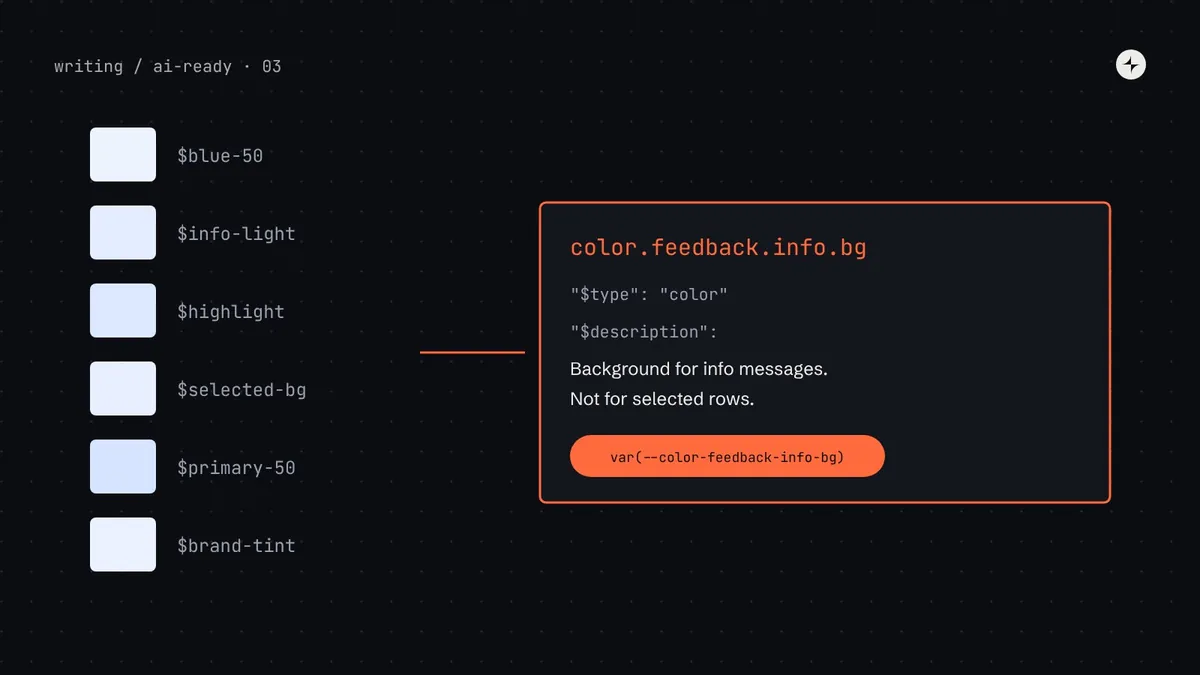
The short answer
To make design tokens usable by AI agents, store them in the W3C DTCG format (stable since version 2025.10), name semantic tokens by their job (color.feedback.danger.text, not red-600), give every semantic token a one-sentence $description that says what it's for and what to use instead, mark retired tokens with $deprecated, and keep primitives out of product code. Then generate an agent-friendly token list from the same source, and restrict what agents can write (for example, a Tailwind theme with only semantic colours). Agents pick tokens by matching your words to their task. Give them words worth matching.
- A good description: "Use for X. Don't use for Y; use Z instead."
- Agents should only ever see and use semantic tokens. Primitives are for the system team.
- Part 3 of 20 in the series on AI-ready design systems.
The problem: fourteen blues and no explanations
Hard-coded values are the most common way AI-generated UI drifts off-system. In part 2 we saw why: if an agent can't find your tokens, or finds them but can't tell them apart, it uses a raw value it saw nearby or a Tailwind default it knows from training. Here's what that looks like in Harbor, the made-up system we follow through this series.
An illustration: the info banner
"Add an info banner above the payroll table saying the next pay run is locked." The agent opens Harbor's _colors.scss to find a background colour for the banner.
$blue-50, $blue-100 … $blue-900, $primary, $brand-main, $link-color, $highlight, $info-light, $selected-bg. No comments. Six of them are almost the same pale blue.
It chooses $blue-50 because the name looks like "a light blue", which is a primitive. When dark mode ships, the banner stays pale blue on a dark page. Nobody notices until a customer does.
A human designer would have asked "which one is for info banners?". The agent can't ask, so the answer has to be written down, next to the token, in a format the agent will read.
Design token: a named design decision, such as a colour, a spacing value or a font size, stored once and used everywhere. Primitive token: a raw value with a neutral name (blue.600). Semantic token: a name for a job that points to a primitive (color.action.primary.bg → blue.600). If tokens are new to you, start with our design tokens guide.
Why tokens matter even more to agents
For people, tokens are a convenience. For agents, they're the vocabulary. An agent chooses a token by matching words: the task says "error message", the token is called feedback.danger.text and its description says "Text for error messages", so it's a match. Three properties of your tokens decide whether that matching works:
Say the job
color.feedback.info.bg matches "info banner". blue-50 matches nothing except "blue".
Say when, and when not
Names can't hold every rule. A sentence can: "Background for neutral information messages. Not for selected states."
Be parseable
JSON with predictable fields can be read by any tool, converted for any platform and served by an MCP server.
The DTCG format, explained
The Design Tokens Community Group (DTCG), a W3C community group, publishes a vendor-neutral JSON format for tokens. Its first stable version, 2025.10, was released in October 2025, and tools such as Style Dictionary, Tokens Studio and Terrazzo support it. Using it means your tokens aren't tied to any single tool, and agents (which have seen the format in public code) can read it without explanation.
Here's what a token looks like. Each property starting with $ is defined by the format:
{
  "color": {
    "feedback": {
      "info": {
        "bg": {
          "$type": "color",
          "$value": "{color.palette.blue.50}",
          "$description": "Background for neutral information messages and banners. Not for selected rows or active states; use color.selection.bg."
        }
      }
    }
  }
}| Property | What it does | Why agents care |
|---|---|---|
$value | The value, or a reference to another token in curly braces | References show the relationship between semantic and primitive tokens |
$type | What kind of value: color, dimension, fontFamily, shadow, typography… | Lets a tool filter: "give me only spacing tokens" |
$description | Plain-language explanation | The single most useful field for an agent choosing between similar tokens |
$deprecated | true, or a string explaining what to use instead | Stops agents copying retired tokens; the string gives them the replacement |
$extensions | Tool-specific extra data, under a reverse-domain key | A place for your own metadata, like "not for direct use" |
$value) can also carry $type and $description, which tokens inside inherit.Alias (or reference): a token whose value is another token, written as {group.token}. Resolving an alias means following the chain to the final value. The DTCG Resolver Module, published alongside 2025.10, describes how to combine token sets for contexts such as light and dark mode.
Step by step: making Harbor's tokens agent-ready
Here's the full process Kestrel's team followed, from a SCSS file of unexplained variables to tokens an agent can choose between. Each step is something you can do in your own system.
Step 1: Inventory and classify every token
List every token, then mark each as a primitive (a raw value), a semantic token (a job), or unclear. For Harbor that produced 212 tokens: 140 primitives, 38 semantic, 34 unclear. The unclear ones ($highlight, $brand-main) are exactly the ones agents choose wrongly, because their names promise a job without saying which.
Step 2: Give every job one semantic name
For each unclear token, find where it's used and decide what job it's doing. Some tokens turn out to do two jobs ($highlight was used for both search matches and selected rows); split them. Some jobs turn out to have three tokens; merge them.
| Before (SCSS) | Used for | After (DTCG semantic name) |
|---|---|---|
$primary, $brand-main | Main action buttons | color.action.primary.bg |
$link-color | Inline links | color.text.link |
$highlight | Search matches and selected rows | color.highlight.match and color.selection.bg |
$info-light, $blue-50 (in banners) | Info messages | color.feedback.info.bg |
$selected-bg | Selected rows | merged into color.selection.bg |
Step 3: Write a description for every semantic token
This is the step with the biggest payoff, and the one most teams skip. A good description has up to three parts: what it's for, what it's not for, and what to use instead. Keep it to one or two sentences. Write it for a new team member who has never seen your product.
| Token | Weak description | Strong description |
|---|---|---|
color.action.primary.bg | "Primary colour" | "Background of the single main action on a screen. Not for destructive actions; use color.action.danger.bg." |
color.text.secondary | "Grey text" | "Supporting text: helper text, metadata, timestamps. Meets 4.5:1 on bg.surface. Not for disabled text; use color.text.disabled." |
space.inset.md | "16px" | "Default padding inside cards, dialogs and panels. Use space.inset.sm for dense tables." |
color.border.strong | "Dark border" | "Borders of form inputs and other interactive outlines (3:1 contrast). For dividers use color.border.subtle." |
You can use an AI assistant to draft descriptions: give it each token's name, value and a list of files where it's used, and ask for "Use for… Not for…" sentences. Then have a designer review every one. The usage list makes the drafts surprisingly accurate; the review catches the cases where usage was itself wrong.
Step 4: Mark primitives as off-limits
Primitives are building blocks for the system team, not for product code. Say so in the group's description and in an extension, so tools (and the agent manifest in step 6) can filter them out.
{
  "color": {
    "palette": {
      "$description": "Primitive colours. Never use directly in product code; use a semantic color token.",
      "$extensions": { "com.kestrel.harbor": { "tier": "primitive" } },
      "blue": {
        "50":  { "$type": "color", "$value": "#EEF4FF" },
        "600": { "$type": "color", "$value": "#2456D6" }
      }
    }
  }
}
The DTCG 2025.10 format also defines richer structured colour values (a colour space plus components), which you may prefer; hex strings remain common and are fine for this purpose.
Step 5: Deprecate, don't delete
Old token names are scattered through the codebase, so agents will keep finding them. Keep them for a release or two, pointing at the new name, with a $deprecated string that says what to do:
"brand-main": {
  "$type": "color",
  "$value": "{color.action.primary.bg}",
  "$deprecated": "Use color.action.primary.bg. Will be removed in Harbor 7.0."
}
The string matters. A plain true tells an agent not to use the token; the string tells it what to use instead, so it can fix the code rather than just avoid it. See design system versioning for how to schedule removals.
Step 6: Generate an agent manifest from the same source
Your token JSON is the source of truth, but it's nested and full of references, and the agent ultimately needs to know what to type in code. So the build generates, alongside CSS and other platform outputs, a flat list of just the tokens an agent should use, with the exact CSS variable name.
Here's a working Style Dictionary (version 4 or later) configuration with a custom format that writes the agent manifest. It reads DTCG files, skips primitives, and keeps each token's description, deprecation and alias.
// build-tokens.mjs · run with: node build-tokens.mjs
import StyleDictionary from "style-dictionary";

StyleDictionary.registerFormat({
  name: "harbor/agent-manifest",
  format: ({ dictionary }) => {
    const tokens = dictionary.allTokens
      .filter((t) => !t.filePath.includes("primitives"))   // semantic only
      .map((t) => ({
        name: t.path.join("."),                 // color.feedback.info.bg
        cssVar: `--${t.name}`,                    // --color-feedback-info-bg
        type: t.$type,
        value: t.$value,                               // resolved: #EEF4FF
        aliasOf: t.original.$value,                    // {color.palette.blue.50}
        description: t.$description ?? null,
        deprecated: t.$deprecated ?? false,
      }));
    return JSON.stringify({ version: "6.4.0", tokens }, null, 2);
  },
});

const sd = new StyleDictionary({
  source: ["tokens/**/*.json"],
  platforms: {
    css: {
      transformGroup: "css",
      buildPath: "dist/",
      files: [{ destination: "tokens.css", format: "css/variables", options: { outputReferences: true } }],
    },
    agent: {
      transformGroup: "css",                  // same names as the CSS output
      buildPath: "dist/",
      files: [{ destination: "tokens.agent.json", format: "harbor/agent-manifest" }],
    },
  },
});

await sd.buildAllPlatforms();
And one entry of the result:
{
  "name": "color.feedback.info.bg",
  "cssVar": "--color-feedback-info-bg",
  "type": "color",
  "value": "#EEF4FF",
  "aliasOf": "{color.palette.blue.50}",
  "description": "Background for neutral information messages and banners. Not for selected rows or active states; use color.selection.bg.",
  "deprecated": false
}Style Dictionary's property names have shifted between major versions (for example value versus $value on tokens, and how the original token is exposed). The code above follows version 4 conventions with DTCG source files. Check the migration notes for the version you install, and test the output once by eye.
Step 7: Limit what agents can write
Descriptions help an agent choose. Restrictions stop it choosing badly. If your product uses Tailwind, its default palette (bg-blue-600 and friends) is exactly what agents reach for from training. In Tailwind v4 you can remove the defaults and expose only semantic names:
/* theme.css: generated from tokens, Tailwind v4 */
@import "tailwindcss";
@import "@kestrel/harbor/tokens.css";

@theme {
  --color-*: initial;   /* remove Tailwind's default palette */
  --color-surface: var(--color-bg-surface);
  --color-info: var(--color-feedback-info-bg);
  --color-primary: var(--color-action-primary-bg);
  /* … one line per semantic colour */
}
Now bg-blue-50 simply doesn't exist in the build, while bg-info does. Agents that try the default classes get no styles, which shows up in visual review, and lint can flag unknown classes. Without Tailwind, the equivalent is a lint rule that rejects raw colour values; see part 9.
How an agent finds the right token
With the work above done, here's what happens when an agent needs the info banner's background. The same flow works whether the agent reads the manifest file directly or asks an MCP server.
Compare this with the original scenario. The agent still never "understands" colour. It matches words. The difference is that the words now carry the design decision.
Modes and themes: what the agent needs to know
Light and dark mode, brands and densities are handled by giving the same semantic token different values in different contexts. The agent doesn't need to know any of those values. It needs to know one rule: use semantic tokens and never branch on the theme in component code.
Theme-proof
.banner {
  background: var(--color-feedback-info-bg);
  color: var(--color-feedback-info-text);
}Theme-aware
.banner { background: #EEF4FF; }
[data-theme="dark"] .banner {
  background: #10243F;
}
Put that rule in your rules file. If you use the DTCG Resolver Module or a tool such as Tokens Studio to manage themes, keep that complexity in the build; the agent manifest should list each semantic token once, perhaps with its value per mode for reference. More in dark mode with design tokens.
How to check it works
Don't assume the descriptions help; test it. Three checks, from quickest to most thorough:
| Check | How | Pass when |
|---|---|---|
| Coverage | A script in CI that fails if any semantic token has no $description, or any alias points to a missing token | 100% of semantic tokens described; zero broken aliases |
| Choice test | Give an agent the manifest and 20 plain-language needs ("disabled button text", "divider between list items"); compare its picks with a designer's answers | 18 or more of 20 match |
| Build test | Rerun your baseline tasks from part 2 and count hard-coded values | The count drops to zero, or every remaining one is flagged by lint |
// check-token-descriptions.mjs: fail CI when a semantic token isn't described
import { readFileSync } from "node:fs";
const { tokens } = JSON.parse(readFileSync("dist/tokens.agent.json", "utf8"));
const missing = tokens.filter((t) => !t.deprecated && (!t.description || t.description.length < 20));
if (missing.length) {
  console.error("Tokens need a description:\n" + missing.map((t) => "  " + t.name).join("\n"));
  process.exit(1);
}
Common mistakes
Describing the value, not the job
"#2456D6, blue" adds nothing the agent can't read from $value. Describe when to use it.
Exposing primitives to agents
If the manifest lists blue.50 alongside feedback.info.bg, agents will sometimes pick the primitive. Filter primitives out.
Descriptions in a separate doc
Token explanations in Confluence drift from the tokens within months. Keep them in $description, next to the value.
Deleting old names overnight
Agents keep copying old names from existing code. Deprecate with a replacement first, then remove after a migration.
Too many near-identical tokens
Five greys for five slightly different jobs confuse people and agents alike. Merge where the difference isn't a real decision.
Figma variables named differently
If Figma says Info/Background and code says feedback.info.bg, design-to-code agents can't connect them. See part 8.
The short version
- Store tokens in DTCG JSON:
$value,$type,$description,$deprecated. - Name semantic tokens by job, and describe each: what it's for, what it's not for, what to use instead.
- Keep primitives out of product code and out of what agents see.
- Generate a flat agent manifest from the same source as your CSS, so it can't drift.
- Restrict what can be written (semantic-only Tailwind theme, lint), and test token choice with real needs.
Next: Component metadata for AI agents, where we do the same for components: props, variants and usage rules as data.
Frequently asked questions
What format should design tokens be in for AI agents?
The W3C Design Tokens Community Group (DTCG) JSON format, stable since version 2025.10. It's vendor-neutral, widely supported by token tools, and includes fields for descriptions and deprecation that agents use to choose tokens correctly.
What should a design token description say?
What the token is for, what it isn't for, and what to use instead, in one or two sentences. For example: "Background of the single main action on a screen. Not for destructive actions; use color.action.danger.bg."
Should AI agents use primitive tokens?
No. Product code, whether written by people or agents, should use semantic tokens so themes and modes work. Hide primitives from agent-facing manifests and flag them with lint.
How do I stop AI from using Tailwind's default colours?
In Tailwind v4, reset the default palette in your theme with --color-*: initial; and define only semantic colour names. Default classes like bg-blue-600 then no longer exist in the build.
How do I mark a design token as deprecated?
In DTCG, add $deprecated with either true or, better, a string naming the replacement, such as "Use color.action.primary.bg". Keep the old token pointing at the new one until products have migrated.
Further reading
- Design Tokens Technical Reports 2025.10The stable Format, Color and Resolver modules.
- Style DictionaryThe open-source build tool used in the example, with DTCG support.
- Tailwind CSS: theme variablesHow
@themeand resetting namespaces work in v4. - Design tokens: the complete guideThe three tiers and how tokens reach code.
- Design token naming conventionsA naming structure people, and agents, can guess.