
The short answer
Make a legacy design system AI-ready in phases, without a rewrite, while it stays in use. Phase 0: measure how agents do today. Phase 1: establish one source of truth: tokens in DTCG JSON, one current component per job, deprecations marked. Phase 2: make it machine-readable: token descriptions, component metadata, structured docs. Phase 3: give agents access: rules files in every repo, then an MCP server. Phase 4: align Figma: variables, component properties, Code Connect. Phase 5, throughout: guardrails and migration: lint that ratchets, codemods for the mechanical work, evals to prove progress. Each phase is useful on its own, and the order matters: access before cleanup just helps agents find the mess faster.
- A mid-sized system can reach "reliably useful" in about three months of part-time work. The full migration of old code takes longer, and that's fine.
- Prioritise by usage: the 20 components and 50 tokens agents touch most cover most screens.
- Part 10 of 20 in the series on AI-ready design systems.
The situation most teams are in
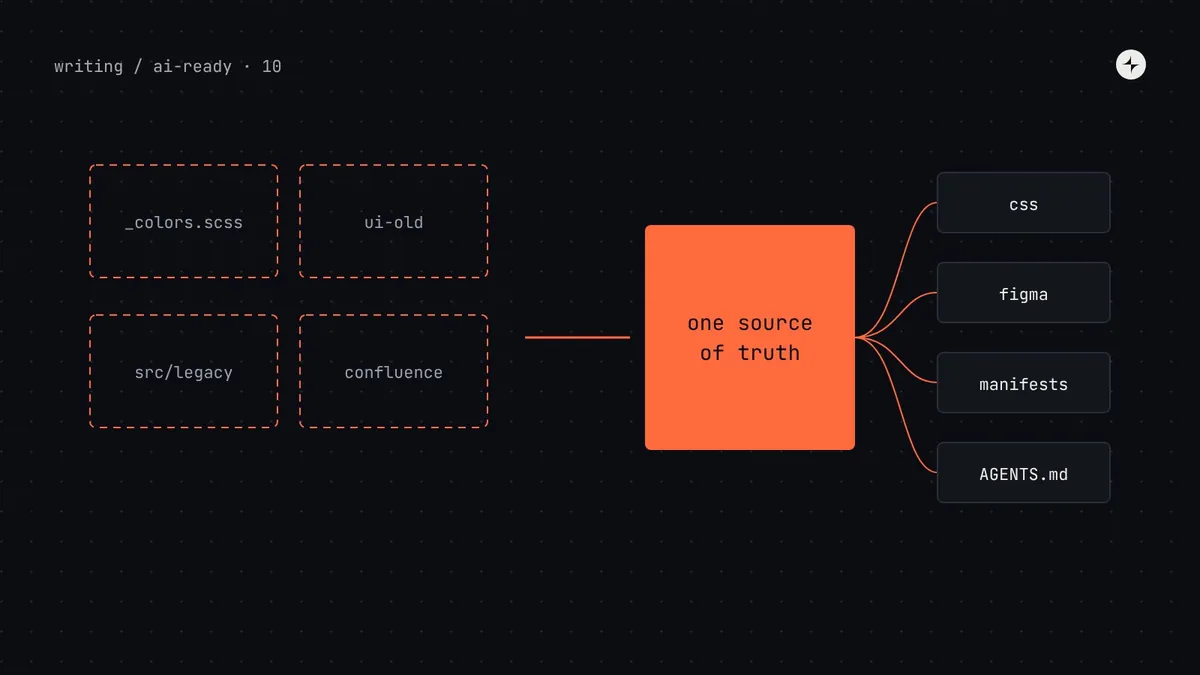
If you've read the first nine parts, you know what an AI-ready design system looks like. But almost nobody starts from a blank page. Most teams have a system that's five or more years old, used by every product, with history baked in. That's where Kestrel's Harbor, our running example, started. Here's its starting point, drawn the same way as the target architecture in part 1.
And here's where it ended up after the work in this article. Nothing was rewritten from scratch. Most of the change is in where things live and what's generated from what.
Four principles for the migration
Don't rewrite; re-home
Most legacy knowledge is fine; it's just in the wrong place. Move tokens into JSON, docs next to code, rules into metadata. Rewrites stall; moves finish.
One truth before many doors
An MCP server over three conflicting token files serves conflicts. Fix the source of truth (phase 1) before adding access (phase 3).
New code first, old code later
Hold new code, including all agent code, to the standard immediately. Migrate old code gradually, with codemods and a lint ratchet.
Measure every phase
Run the same evals before and after each phase. The numbers decide what's next, and they're what keeps sponsors interested.
The phased plan at a glance
| Phase | Weeks | Main work | Done when |
|---|---|---|---|
| 0 · Baseline | 1–2 | Agent's-eye audit, inventory, eval set | Scores recorded for 10–15 tasks |
| 1 · One source of truth | 2–6 | Tokens to DTCG, duplicates resolved, deprecations marked | Every job has one token and one component; old ones say what replaces them |
| 2 · Machine-readable | 5–10 | Token descriptions, component metadata, docs moved and restructured | Manifests build in CI; coverage checks pass for the top 20 components |
| 3 · Access | 8–12 | AGENTS.md snippet in all repos, MCP server, llms.txt | Agents call the tools in every eval run |
| 4 · Figma | 8–14 | Variables synced from tokens, properties mirror props, Code Connect for top components | Five sample frames generate on-system code |
| 5 · Guardrails & migration | Start week 3, ongoing | Lint on new code, codemods, ratchet, monthly evals | Deprecated usage falls every month; pass rates hold |
Phase 0: baseline (weeks 1–2)
You can't show improvement without a starting number, and you can't prioritise without knowing where agents fail.
Run the agent's-eye audit
Three tasks, fresh sessions, transcripts saved, as in part 2. Note which files the agent found and which it never did.
Inventory duplicates and drift
List every component and its lookalikes across packages and legacy folders, with how often each is imported. List every token and where its values also appear raw. A design system audit covers the method.
Build the eval set
10–15 golden tasks from real tickets, scored with the script in part 9. Run each three times. Save the results with the date.
Score readiness
Use the 12-statement self-assessment in part 1. The lowest-scoring layer is usually where phase 1 should focus.
Illustration Harbor's numbers are made up but typical.
Phase 1: one source of truth (weeks 2–6)
This phase has the biggest effect on agents and on people, and it's mostly decisions, not code.
Decide where each kind of knowledge lives
| Knowledge | Lives in (edited by people) | Generated from it |
|---|---|---|
| Token values and descriptions | tokens/*.json (DTCG) | CSS, Tailwind theme, Figma variables, agent manifest |
| Component API | TypeScript types and JSDoc | Props tables, metadata props, Storybook controls |
| Usage judgement | <Name>.meta.json | Agent detail files, "Never use" list, lint config |
| Patterns and explanations | docs/**/*.md | Docs site, .md pages, llms.txt |
| Examples | Stories | Docs examples, metadata examples, visual tests |
| Figma ↔ code mapping | *.figma.tsx (Code Connect) | Dev Mode snippets, Figma MCP context |
Resolve duplicates with a simple decision
For each group of lookalike components (three buttons, four dialogs), decide once and record the decision in the metadata:
| Component | Imports | Decision | Replacement |
|---|---|---|---|
Button (harbor) | 1,240 | Keep | – |
BtnPrimary (harbor) | 310 | Deprecate, keep as wrapper | Button variant="primary" |
Button (ui-old) | 890 | Deprecate; codemod | Button (harbor) |
Modal (harbor) | 205 | Deprecate | Dialog or ConfirmDialog |
AlertDialog (harbor) | 48 | Merge into ConfirmDialog | ConfirmDialog |
Move tokens into DTCG
Convert the SCSS variables to DTCG JSON, keeping the old names as deprecated aliases so nothing breaks (the steps are in part 3). Make the generated CSS the only place product code gets values from. Then delete the old Tailwind palette and replace it with the semantic theme.
Tell agents to stay out of legacy folders now
Before any metadata exists, add a nested AGENTS.md in each legacy folder ("This folder is being removed. Don't copy patterns from here.") and the deprecated list in each repo's root AGENTS.md. This is an hour's work that stops agents spreading old code while the rest of the migration happens.
Phase 2: machine-readable (weeks 5–10)
Now make the single source of truth readable by machines. Work through the system in order of usage, not alphabetically: the 20 most-imported components and the 50 most-used tokens cover most screens.
Describe semantic tokens
"Use for… Not for… Use instead…" for every semantic token. Draft with an AI assistant from usage data, then have a designer review. CI fails on missing descriptions. (Part 3.)
Tighten component types
Union types for every option prop, JSDoc on every component and prop, safe defaults,
@deprecatedtags. (Part 4.)Write metadata files
Purpose, useWhen, avoidWhen and rules for the top 20 components, validated against the schema. Merge duplicates you couldn't distinguish. (Part 4.)
Move and restructure docs
Move component docs from Confluence into
docs/next to the code, rewrite them to the template with self-contained sections, and delete or mark the old pages. (Part 5.)Build the manifests
Add the agent-manifest outputs to the build and coverage checks to CI. From now on, deprecating something updates every output in one release.
Phase 3: access (weeks 8–12)
Ship the AGENTS.md snippet
Generate it from metadata, ship it in the package, and insert it into every product repo with the marker command. Add CLAUDE.md, Cursor and Copilot pointers where teams use those tools. (Part 6.)
Add the MCP server
If you're on React with good stories, try Storybook's MCP addon. Either way, add the small custom server for tokens, patterns and usage rules, and commit the MCP configs. (Part 7.)
Publish llms.txt
Add
.mdversions of docs pages and a generated llms.txt to the docs site, if it's reachable by the tools your teams use. (Part 6.)Rerun the evals
This is usually where the biggest jump appears. Check transcripts: agents should call the tools before writing UI.
Phase 4: Figma (weeks 8–14)
Run this in parallel with phase 3, led by the system designer.
Sync variables from tokens
Replace hand-made styles with variables generated from the DTCG source, with code syntax and descriptions set; hide primitives from publishing. (Part 8.)
Rename properties to mirror props
Variant values and boolean properties named like code, for the top 20 components first. This is a breaking change for Figma files, so announce it and give designers a swap guide.
Add Code Connect
Mappings for the top 10–20 components, published from CI with each release.
Introduce the "ready for build" checklist
Attached instances, auto layout, bound variables, named frames, for frames that will be implemented.
Phase 5: guardrails and migrating old code (from week 3, ongoing)
Start guardrails early and keep them going. The migration of old code is the longest part of the work, and it doesn't need to finish before agents are useful. It needs to move steadily in the right direction.
The lint ratchet
Codemods for the mechanical part
A codemod is a script that rewrites code automatically. For renames and simple replacements it's faster and more reliable than either people or agents doing it file by file. Here's one, using jscodeshift, that replaces Harbor's deprecated BtnPrimary with Button variant="primary":
// codemods/btn-primary.js
// Run: npx jscodeshift -t codemods/btn-primary.js src --parser=tsx --extensions=tsx
export default function transformer(file, api) {
  const j = api.jscodeshift;
  const root = j(file.source);
  const uses = root.findJSXElements("BtnPrimary");
  if (uses.length === 0) return file.source;

  // <BtnPrimary …> → <Button variant="primary" …>
  uses.forEach((path) => {
    const { openingElement, closingElement } = path.node;
    openingElement.name = j.jsxIdentifier("Button");
    openingElement.attributes.unshift(j.jsxAttribute(j.jsxIdentifier("variant"), j.stringLiteral("primary")));
    if (closingElement) closingElement.name = j.jsxIdentifier("Button");
  });

  // import { BtnPrimary } from "@kestrel/harbor" → import { Button } …
  root.find(j.ImportDeclaration, { source: { value: "@kestrel/harbor" } }).forEach((decl) => {
    const specs = decl.node.specifiers;
    const hasButton = specs.some((s) => s.imported?.name === "Button");
    decl.node.specifiers = specs
      .filter((s) => !(hasButton && s.imported?.name === "BtnPrimary"))
      .map((s) => (s.imported?.name === "BtnPrimary" ? j.importSpecifier(j.identifier("Button")) : s));
  });
  return root.toSource();
}
Run it on a branch, review the diff, run the check command, and merge. Then ship the codemod in the design system package (npx harbor codemod btn-primary) so product teams can run it themselves. Agents are good at the judgement cases codemods can't handle, such as choosing between Dialog and ConfirmDialog for each old Modal, especially with a skill that explains the decision (part 6). Review those changes like any other. More in design system migration.
Who does what
| Role | Owns | Time, roughly |
|---|---|---|
| Design system lead | Decisions on duplicates and deprecations; the plan; reporting eval results to sponsors | 20–30% for the duration |
| Design technologist or system engineer | Token pipeline, manifests, MCP server, lint, codemods, evals | 50–80% for phases 1–3 |
| System designer | Token descriptions, usage rules, Figma variables and properties, Code Connect review | 40–60% for phases 2 and 4 |
| Champions in product teams | Running codemods, reviewing agent output in their area, reporting gaps | A few hours a month |
Troubleshooting
| Symptom | Likely cause | What to do |
|---|---|---|
| Agents still use legacy components after phase 3 | Legacy code vastly outnumbers new code, so search keeps surfacing it | Nested AGENTS.md in legacy folders; lint errors on changed files; prioritise codemods for the most-imported legacy items |
| Agents ignore the MCP tools | Descriptions don't say when to call them; rules file doesn't name them | "Call before writing any UI" in the description; name the tools in AGENTS.md |
| Agents pick the wrong one of two similar components | Purposes overlap | Rewrite both purposes with avoidWhen pointing at each other; consider merging |
| Token choices still wrong for some jobs | Missing or vague descriptions for near-identical tokens | Run the choice test from part 3; sharpen or merge |
| Figma-to-code ignores the system | Detached instances, raw values, no Code Connect for those components | Ready-for-build checklist; Code Connect for the components in that frame |
| Eval scores jump around between runs | Too few runs; tasks too vague | Run each task more times; make the expected result specific |
| Teams see the lint rules as blockers | Errors on old code they didn't touch | Errors on changed files only; give them codemods, not just errors |
The final checklist
When these are true, your system is AI-ready in the sense defined in part 1: agents can find the right thing, understand it, use it correctly, and know when they got it wrong.
- One source of truth for tokens (DTCG JSON) and components (one current component per job), with everything else generated.
- Every semantic token described, and primitives hidden from product code, agents and Figma publishing.
- Every stable component has metadata: precise types, purpose, when to use, when not to, rules, example. Every deprecated one names its replacement.
- Docs live next to the code, follow the template, and old pages are gone or excluded from search.
- Every product repo has the generated AGENTS.md section and the MCP config.
- Figma variables and properties match code, and the most-used components have Code Connect.
- Lint, types and tests run in the agent's loop and in CI, with fix-it messages.
- Evals run monthly, and the results are shared.
The whole series in one paragraph
AI agents amplify whatever your design system already is. They read literally, can't ask, forget everything between sessions, and copy what they find first. So write your decisions down where machines can read them (described tokens, typed and annotated components, self-contained docs), point every agent at them (rules files, MCP servers, Figma's server with Code Connect), and check the result automatically (lint with fix-it messages, tests and evals). Do it in phases, starting with one source of truth, and measure each step. The same work makes the system clearer for every person who uses it.
The short version
- Migrate in phases, without a rewrite: baseline, one source of truth, machine-readable, access, Figma, with guardrails throughout.
- Fix the source of truth before adding doors to it.
- Prioritise by usage: the most-used components and tokens first.
- Hold new code to the standard now; migrate old code with codemods and a lint ratchet.
- Measure every phase with the same evals, and share the numbers.
Next: parts 11–20 answer the questions teams ask most, starting with Why does AI ignore my design system? Or see the whole collection under AI-ready design systems.
Frequently asked questions
How do I make an existing design system AI-ready?
In phases: measure how agents do today, establish one source of truth (DTCG tokens, one current component per job, deprecations), make it machine-readable (descriptions, metadata, structured docs), add access (AGENTS.md, an MCP server), align Figma (variables, Code Connect), and add guardrails and codemods throughout.
Do I need to rebuild my design system for AI?
No. Most of the work is moving knowledge into the right places and formats, resolving duplicates, and adding generated outputs and checks. Rewrites tend to stall; phased changes keep the system in use while it improves.
How long does it take to make a legacy design system AI-ready?
For a system of around 60 components and 200 tokens with two part-time maintainers, about three months to reach the point where agents are reliably useful. Migrating all old code to the new standard takes longer and can continue gradually.
What should I do first?
Run three real tasks with a coding agent and record what goes wrong, then add an AGENTS.md with your package name and a "never use" list. It takes about a day and usually fixes the worst failures.
How do I migrate legacy components safely?
Deprecate rather than delete: keep old components working with a warning that names the replacement, use codemods for mechanical changes, have people or agents handle judgement cases with review, and use a lint ratchet so the count of old usages can only go down.
Further reading
- jscodeshiftThe codemod toolkit used in the example.
- Design Tokens Community GroupThe DTCG format used for the token source.
- Model Context ProtocolThe standard behind design system and Figma MCP servers.
- Design system migrationBringing older products along, in general.
- Design system auditThe inventory method for phase 0.