
The short answer
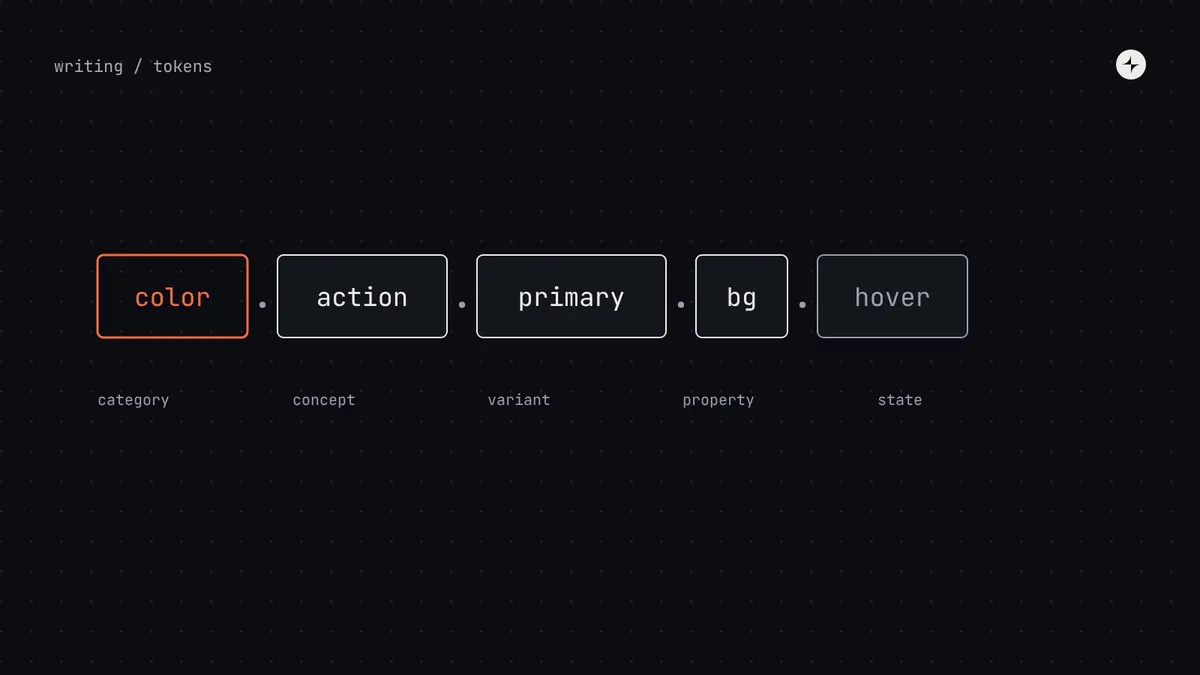
Good design token names follow one structure that people can guess: category → concept → variant → state, from general to specific, using the same words everywhere. Primitives are named by what they are (color.blue.600, space.4); semantic tokens by the job they do (color.text.secondary, color.action.primary.bg-hover); component tokens by where they're used (button.primary.container.background).
- Name by job, not by appearance. Appearance changes; jobs don't.
- One word per idea across the whole system: never
bgin one place andbackgroundin another. - Test names on a newcomer: if they can guess a token without looking, the structure works.
Why naming matters more than it looks
Token names are an interface. Designers pick them from a variable list in Figma; engineers type them hundreds of times a day. Every inconsistency costs a lookup, and every lookup is a chance to pick the wrong one. A good naming structure means people can guess the right token from what they're trying to do.
Names also carry the logic of the system. If a token is called grey-600, nobody knows whether it's for text, borders or icons, so nobody can change it safely. If it's called color.text.secondary, its job is clear, and dark mode can point it somewhere else without anyone checking every use. See design tokens: the complete guide for the tiers behind this.
The parts of a token name
Most naming structures are built from the same handful of parts, read from general to specific. Not every token uses every part.
l1color, space, radiustext, action, blueprimary, secondary, dangerbg, border, texthover, pressed, disabledcolor.action.primary.bg.hover uses five of them.Two decisions shape everything else. First, the separator: dots in the token source (color.text.primary) map naturally to nested JSON groups in the DTCG format and to slashes in Figma (color/text/primary) and hyphens in CSS (--color-text-primary). Pick one source form and let the build translate it. Second, the order: general first, so related tokens sort together in every list.
Naming primitives: what they are
Primitives hold raw values. Name them by what they are, with numeric steps for scales so new steps can slot in without renaming.
color.blue.50 … color.blue.950      // 11 steps on one lightness curve
color.neutral.50 … color.neutral.950
space.0.5  space.1  space.2 … space.24   // count of 4px units: space.6 = 24px
radius.0  radius.1  radius.2  radius.full
font.size.100 … font.size.900
duration.fast duration.base duration.slow| Scale style | Example | Good | Watch out |
|---|---|---|---|
| Numeric steps | blue.600, space.6 | Sortable; room to add steps; maths in the name | Changing the base unit renames everything |
| Multiplier × 100 | space.300 (Atlassian) | Room for in-between steps | Less obvious at a glance |
| T-shirt sizes | space.md | Friendly | Runs out (xxxl?); hard to add a size in between |
Naming semantic tokens: the job they do
This is the tier that needs the most care, because it's the one components and product teams actually use. Name every token by the job it does in the interface.
color.bg.canvas            color.bg.surface          color.bg.subtle
color.text.primary         color.text.secondary      color.text.disabled     color.text.link
color.border.default       color.border.strong       color.focus.ring
color.action.primary.bg    color.action.primary.bg-hover    color.action.primary.text
color.feedback.danger.bg   color.feedback.danger.text       color.feedback.success.bg
space.inset.md space.stack.lg space.inline.sm // inset, stack and inline spaceNamed by job
color.text.secondary survives a rebrand, a dark theme and a palette change. Its meaning never moves.
Named by appearance
color.grey-dark, color.brand-orange. The first dark-mode or rebrand change makes the name a lie.
Naming component tokens: where they're used
If you use a component tier, follow the component's anatomy so token names, documentation and Figma layers all match:
// {component}.{variant}.{part}.{property}.{state}
button.primary.container.background          // default state left out
button.primary.container.background.hover
button.primary.label.color
input.container.border.error                 // no variant needed
table.row.background.selected
Leave out levels that don't apply rather than inventing filler like default or base. And use the same property words everywhere: if one component says background, none should say bg or fill.
A naming vocabulary
Write down the allowed words for each part and stick to them. This short list prevents most naming drift:
| Part | Use | Don't mix in |
|---|---|---|
| Emphasis | primary, secondary, tertiary | main, alt, default |
| Tone | info, success, warning, danger | error in one place and critical in another |
| Property | bg, text, border, icon | background, fg, stroke, fill |
| State | hover, pressed, focus, disabled, selected | active (it means different things on different platforms) |
| Size | sm, md, lg | small, s, regular |
Common naming mistakes
Values in semantic names
color.text.grey-700 mixes tiers. If the value changes, the name lies.
Screen-specific semantic tokens
color.checkout.header.bg is a one-off, not a shared job. It belongs in a component or product layer, if anywhere.
Brand names in shared tokens
color.acme.primary in a multi-brand system defeats theming. Brands change values, not names.
Abbreviation drift
btn, button and b in the same system. Pick full words or one fixed abbreviation list.
Test and enforce your names
- The newcomer test: show a new designer or engineer a component's anatomy and ask them to guess a token. If most guess right, the structure works.
- A lint rule that checks token names against your vocabulary and structure in every pull request.
- Names in the decision log: renaming a token is a breaking change, so new names deserve a short review. See versioning.
The Lab has a free token name linter that checks a list of names against rules like these and suggests fixes. At CARS24, a four-layer token structure carried one palette across 10+ products in three countries. Read the case study.
The short version
- One structure, general to specific: category, concept, variant, property, state.
- Primitives by what they are; semantic tokens by job; component tokens by anatomy.
- A written vocabulary, one word per idea, enforced by a lint rule.
- Never put values, screens or brand names in shared semantic tokens.
- Test names on newcomers; treat renames as breaking changes.
Frequently asked questions
Should token names use dots, slashes or hyphens?
Store them with dots (or nested groups) in the source file, which maps to DTCG JSON, and let your build output slashes for Figma variables and hyphens for CSS custom properties.
Should I prefix tokens with the system name?
Only if your tokens will live alongside other systems' variables, for example in CSS on a page that also loads a third-party widget. A short prefix avoids collisions.
How do I name states like hover?
Put the state last: color.action.primary.bg-hover or …bg.hover. Leave the default state out of the name.
What about tokens for dark mode?
Don't create separate dark names. The same semantic token points to a different primitive in dark mode. That's the point of semantic names.
Further reading
- Design Tokens Format Module 2025.10The DTCG specification, including groups and aliases.
- Atlassian design tokensA well-documented public naming structure.
- Adobe Spectrum design tokensAnother mature example.
- Design tokens: the complete guideThe three tiers and how tokens reach code.