
The short answer
An AI-ready design system is one an AI agent can find, read and follow without a person explaining it. In practice that means four things: one source of truth for tokens, components and docs; machine-readable formats (DTCG token JSON, component metadata, structured docs); a way for agents to reach it (rules files like AGENTS.md, and often an MCP server); and checks that catch mistakes (lint rules, tests and evals). Most teams don't need new technology to start. They need to fix the ambiguity people have been working around for years: duplicate components, unexplained tokens, out-of-date docs.
- If a new engineer can't tell which of three buttons to use, an agent can't either. It will just guess faster.
- Start by writing things down and removing duplicates. Add MCP servers and retrieval later.
- This is part 1 of a 20-part series. Parts 2–10 cover one layer each; parts 11–20 answer the questions teams ask most.
Why this matters now
Until recently, everyone who used a design system was a person. People are good at filling gaps. When the docs say nothing about which button to use on a confirmation dialog, a designer asks on Slack, checks a similar screen, or remembers what the system lead said last quarter. A design system can survive a lot of ambiguity because its users absorb it.
That's changing. Engineers now ask coding assistants such as Claude Code, Cursor, GitHub Copilot and Codex to build screens. Designers use tools that generate UI from a prompt or a Figma frame. Product managers prototype with AI app builders. Each of these tools is a new user of your design system. It's a user that reads everything literally, can't ask a colleague, forgets everything between sessions, and works very fast.
An illustration: the same request, two systems
An engineer asks a coding agent: "Add a settings page with a form for the company's name, payroll currency and a save button. Use our design system."
The agent searches the repo and finds Button, BtnPrimary and LegacyButton. It picks the one that appears most often, which is the deprecated one. It hard-codes #2563EB because it saw it in an old file, and invents a currency dropdown.
The agent reads the repo's AGENTS.md, which points it to the component list. It asks the design system's MCP server for "form", gets the Form, TextField and Select components with their props and examples, uses color.action.primary.bg, and the lint check passes on the first try.
The difference isn't the AI model. It's the system. That's the most important idea in this series: agents amplify whatever your design system already is. A clear, consistent system becomes faster to use. An ambiguous one produces wrong UI faster than any human could.
AI agent: a program built around a large language model (LLM) that can take actions in a loop: read files, run commands, call tools, look at the results, and decide what to do next. A chatbot only answers; an agent does work. Coding agent: an agent that works in a code repository, like Claude Code, Cursor's agent, GitHub Copilot's agent mode or OpenAI Codex.
The running example used in this series
To keep things concrete, all ten articles follow one made-up design system through the work of becoming AI-ready. It is an illustration, but every problem in it is one we've seen in real systems.
Kestrel, a payroll SaaS
Four product teams, about 40 engineers and 9 designers. A web app in React, an admin console, and a marketing site.
Harbor, five years old
Published as @kestrel/harbor. A Figma library, a Storybook, docs in Confluence, tokens in a SCSS file. Two part-time maintainers.
The usual history
- Three button components from three eras
- 14 blues, 6 of them named
- Figma components called "Card copy 2"
- Docs last updated in 2024
Agents build on-system UI
An engineer or designer asking an agent for a screen should get one built from Harbor's real parts, using real tokens, that passes review.
What "AI-ready" actually means
"AI-ready" gets used loosely, so here is a definition you can check against. A design system is AI-ready when an agent with no prior knowledge of it can do four things reliably:
Find the right thing
Given a task ("a destructive confirmation dialog"), it can discover which components, tokens and patterns apply, without stumbling onto deprecated or duplicate versions first.
Understand how to use it
It can read each part's purpose, its props and allowed values, when to use it and when not to, and see a correct example.
Use it correctly
It produces code (or a design) that uses those parts the way the system intends: correct variants, semantic tokens, accessible markup.
Know when it got it wrong
Automated checks tell it, and the person reviewing, when the output drifts off-system, so it can fix the problem before anyone else sees it.
Notice that none of these mention a specific AI product. Tools change every few months. These four abilities stay the same. They're also exactly what a new human team member needs, which is why work on AI-readiness almost always improves the system for people too.
The architecture of an AI-ready design system
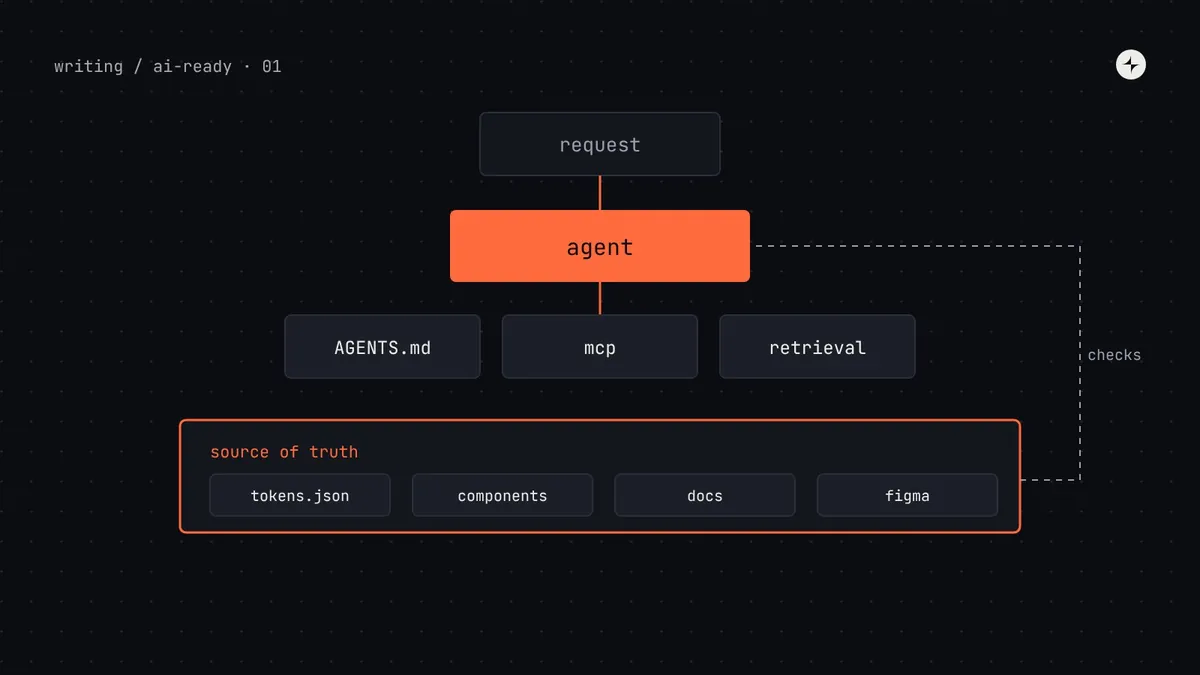
Here's the whole picture in one diagram. Read it from the top: a person asks for something, an agent does the work, and the agent reaches into the design system through a few well-defined doors. Everything below the agent is your design system, arranged so a machine can use it.
Three things about this diagram are worth noticing:
- The source of truth is at the bottom, not the AI. If the tokens, metadata and docs disagree with each other, no amount of clever tooling on top will make the agent reliable.
- The access layer is thin. Rules files are plain text. An MCP server is usually a few hundred lines of code that reads the files below it. Neither should contain design decisions of its own.
- Guardrails close the loop. Without checks, you find out the agent used the wrong button when a customer does.
How agents get information: a five-minute primer
You don't need to know how language models work inside to make a system AI-ready. You need four ideas, because every decision in this series follows from them. We'll go deeper in part 2.
| Idea | In plain words | What it means for your system |
|---|---|---|
| Context window | The text the model can "see" at one time: the prompt, files it opened, tool results. Everything else might as well not exist. | Your system has to be found and loaded into that window. Clear, compact information wins over long, rambling pages. |
| Training data | What the model learned before you ever used it: public code, docs, websites. | The model knows Material UI and Tailwind well. It has never seen your private system. Without guidance, it falls back to what it knows. |
| Tool calling | The model can ask the program running it to do something, like "read this file" or "search the component list", and get the result back. | You can give agents tools that answer design system questions exactly, instead of hoping they find the right file. This is what MCP standardises. |
| Retrieval (RAG) | Searching a knowledge base for the passages most relevant to a question, then putting just those into the context window. | Your docs need to be split into self-contained sections that make sense when read alone. |
MCP (Model Context Protocol): an open standard, first published by Anthropic in November 2024 and now stewarded by the Linux Foundation's Agentic AI Foundation, for connecting AI tools to data and actions. Write one MCP server for your design system and any MCP-capable agent can use it. RAG (retrieval-augmented generation): look up relevant information first, then generate an answer using it.
The six most common reasons agents go off-system
When teams first try agents on their design system, the same failures appear again and again. Each one traces back to something in the system, not the model. Use this table to diagnose what you're seeing.
| What you see | The real cause | The fix | Article |
|---|---|---|---|
| Agent uses a deprecated component | Old and new versions both look valid; nothing marks one as retired | Deprecation metadata, rules file "never use" list, lint | 4, 6, 9 |
| Hard-coded colours and spacing | Tokens have no descriptions, or the agent can't find the token list | DTCG tokens with $description, a token lookup tool | 3, 7 |
| Wrong variant (primary button for "Delete") | The docs show variants but don't say when to use each | Usage rules in component metadata | 4, 5 |
| Invented components or props | The agent never saw the real list, so it fell back on training data | An inventory the agent can query; type-checking | 4, 7, 9 |
| Correct parts, wrong layout | Patterns (forms, empty states) aren't written down | Pattern docs with examples, retrievable by task | 5 |
| Figma-to-code output ignores the system | Figma layers use raw values; no mapping from Figma components to code | Variables, clean names, Code Connect | 8 |
A readiness self-assessment
Before changing anything, score your system. Give each statement 0 (not true), 1 (partly) or 2 (true). Be honest; the point is to find your weakest layer, because that's where an agent will fail first.
| Layer | Statement | Score |
|---|---|---|
| Tokens | All colours, spacing, type and radius in code come from named tokens, stored in one source file | 0–2 |
| Semantic tokens have a written description of their job | 0–2 | |
| Components | There is exactly one current component for each job; old ones are marked deprecated | 0–2 |
| Each component's props, variants and allowed values are available as data (types, JSON), not only prose | 0–2 | |
| Docs | Every component page says when to use it and when not to | 0–2 |
| Docs are generated from, or checked against, the code, so they can't silently go stale | 0–2 | |
| Access | Product repos have a rules file (AGENTS.md or similar) that points to the design system | 0–2 |
| Agents can query components and tokens through a tool (MCP or similar) | 0–2 | |
| Figma | Library components use variables, not raw values, and have clear names | 0–2 |
| Figma components are mapped to code components (Code Connect or equivalent) | 0–2 | |
| Guardrails | Lint rules flag hard-coded values and deprecated imports | 0–2 |
| You have a repeatable test of how well agents build with the system | 0–2 |
Four levels of AI-readiness
You don't need to reach the top level in one go. Most teams move up one level at a time, and each level is useful on its own.
Where to start: a 30-day plan
If you only do one thing after reading this, do this sequence. It's ordered so each step makes the next one easier, and so you get value even if you stop halfway.
Week 1: watch an agent fail
Pick three real tasks from your backlog (a form, a table, a dialog). Ask a coding agent to build each with your design system and save the results. Note every off-system choice. This is your baseline, and it tells you which layer to fix first.
Week 1: write a rules file
Add an
AGENTS.mdto one product repo with the package name, the "never use" list of deprecated components, and where tokens live. It takes an hour and usually fixes the worst failures. See part 6.Week 2: describe your semantic tokens
Add a one-sentence
$descriptionto every semantic token: what it's for and when not to use it. See part 3.Week 3: mark what's deprecated
Every old component gets a
@deprecatedtag pointing to its replacement, and a lint rule blocks new imports of it. See part 4 and part 9.Week 4: rerun the three tasks
Same prompts, same agent. Compare. If things improved, you have your case for investing in metadata, an MCP server and Figma cleanup next.
Keep the three baseline prompts and outputs in a folder in your design system repo. They become your first evaluation set in part 9, and they're the most convincing evidence you can show a sponsor.
Common misconceptions
"We need to fine-tune a model on our design system"
Almost never. Fine-tuning is expensive and goes stale with every release. Giving the agent your current system at the moment it works (through files, tools and retrieval) is cheaper and always up to date.
"An MCP server will fix it"
An MCP server is a door. If what's behind it is three conflicting button docs, the agent gets three conflicting answers, faster. Clean the source first.
"AI-ready means writing docs for robots"
The structure that helps agents (clear purpose, when-not-to-use, examples, one version) is what people have always needed. You write it once, for both.
"Agents will replace the design system team"
Agents make the system's decisions more important, not less: every unclear decision now gets copied at machine speed. Someone has to own those decisions.
The series, in order
Each article stands on its own, but they're written to be read in sequence. Parts 1–10 build an AI-ready system layer by layer; parts 11–20 answer the questions and problems teams run into along the way.
| Part | Article | You'll be able to… |
|---|---|---|
| 1 | What is an AI-ready design system? (this article) | Explain the goal and score your system |
| 2 | How AI coding agents use your design system | Predict what an agent will read and where it will go wrong |
| 3 | Design tokens for AI agents | Write DTCG tokens an agent can choose between correctly |
| 4 | Component metadata for AI agents | Describe each component as data an agent can check against |
| 5 | Documentation AI agents can use | Structure docs so search and retrieval return the right section |
| 6 | AGENTS.md, llms.txt and rules files | Give every agent the essentials before it starts |
| 7 | Build an MCP server for your design system | Let agents query components and tokens directly |
| 8 | Figma to code with AI | Prepare your Figma library for agents |
| 9 | Guardrails for AI-generated UI | Catch and measure off-system output |
| 10 | Make a legacy design system AI-ready | Plan the whole change for an existing system |
| 11 | Why does AI ignore my design system? | Diagnose and fix the ten most common causes |
| 12 | How much context does an agent need? | Keep rules and tools small; load detail on demand |
| 13 | Why is AI-generated UI inaccessible? | Build accessibility into components and checks |
| 14 | Figma variables out of sync with tokens? | Reconcile, automate one direction, check for drift |
| 15 | Figma Make, v0 and Lovable with your system | Set up kits, registries and guidelines |
| 16 | Is shadcn/ui better for AI? | Decide whether to switch, and publish a registry |
| 17 | Can designers do this without coding? | Own the decisions agents need written down |
| 18 | Who owns the AI rules? | Assign owners, review rules, use agent feedback |
| 19 | Is it safe to connect AI tools? | Manage data, prompt injection and credentials |
| 20 | How do you prove the ROI? | Build a business case from your own numbers |
The short version
- An AI-ready design system is one an agent can find, understand, use correctly and get checked against.
- Agents amplify what your system already is: clarity becomes speed; ambiguity becomes fast mistakes.
- The layers: one source of truth, machine-readable formats, an access layer (rules files, MCP, retrieval), and guardrails.
- Start by watching an agent fail on three real tasks, then fix the cheapest causes: a rules file, token descriptions, deprecations.
- Everything that helps agents also helps new people on your team.
Next: How AI coding agents use your design system, a step-by-step look at what an agent actually does when you ask it to build a screen.
Frequently asked questions
What is an AI-ready design system?
A design system that AI agents can discover, understand and use correctly without human help: one source of truth for tokens, components and docs, stored in machine-readable formats, reachable through rules files or an MCP server, and backed by automated checks.
Do I need an MCP server to make my design system AI-ready?
Not to start. A rules file such as AGENTS.md, described tokens and clear deprecations fix most early failures. An MCP server becomes worthwhile when you have many components, several repos, or want agents to look things up precisely rather than search files.
Should we fine-tune a model on our design system?
Rarely. Fine-tuning is costly and goes out of date with every release. Supplying current information at the time of the task, through files, tools and retrieval, is cheaper and stays accurate.
How long does it take to make a design system AI-ready?
A first useful level (a rules file, token descriptions, deprecations) takes a few weeks. Machine-readable metadata, an MCP server and Figma cleanup typically take one to three months for a mid-sized system, done in phases alongside normal work.
Does making a design system AI-ready help human users too?
Yes. Clear purposes, when-not-to-use guidance, one current version of each component and automated checks are what new designers and engineers need as well.
Further reading
- Model Context ProtocolThe official specification and guides for MCP.
- Design Tokens Community GroupThe DTCG format, stable since version 2025.10.
- AGENTS.mdThe open format for instructions to coding agents.
- Anthropic: tool useHow models call tools, from the model provider's side.
- AI in design systems: where it helps, and where to keep a humanOur earlier, broader look at AI in design system work.
- Design tokens: the complete guideThe basics of tokens, if they're new to you.