
The short answer
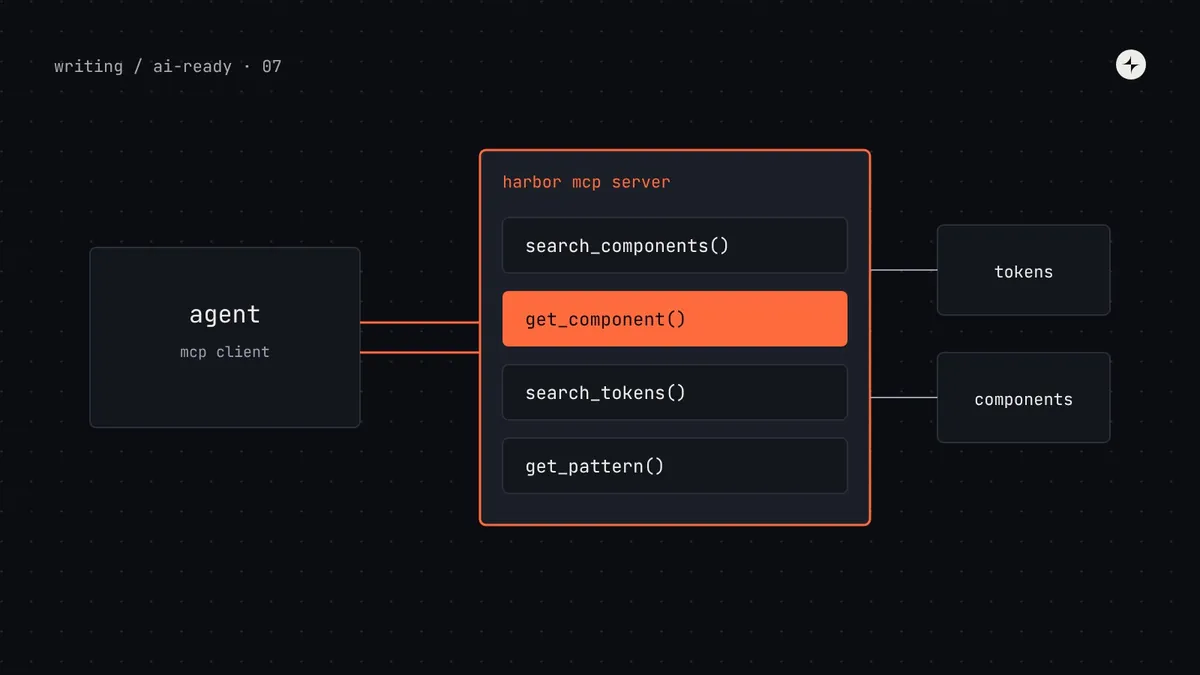
An MCP server for your design system is a small program that gives AI agents a few precise tools, such as search_components, get_component and search_tokens, so they can ask your system questions instead of searching files and guessing. MCP (Model Context Protocol) is an open standard, so one server works with Claude Code, Cursor, VS Code with Copilot, Codex and other MCP clients. You can start with a ready-made server (Storybook's MCP addon for React, shadcn's for registry-based systems) or build your own in about 150 lines with the official SDK, reading the token and component manifests from parts 3 and 4. Keep it read-only, keep tools few and task-shaped, write tool descriptions as carefully as docs, and run it from the installed package so its answers match the version each repo uses.
- The server shouldn't hold design decisions. It serves the manifests your build already makes.
- Three to six tools is plenty. Every extra tool is something the agent has to choose between.
- Part 7 of 20 in the series on AI-ready design systems.
The problem: searching is guessing
With a rules file (part 6), an agent knows your component index exists. But it still has to find the right file, open it, scan a long JSON list and decide. That works for small systems. With 90 components, 300 tokens and 40 pattern pages, an agent reading files will miss things, load too much, or skip the lookup altogether when it's in a hurry.
An MCP server replaces "go and find it" with "ask and get one clear answer". Here's the difference for a single question.
Five steps, 40,000 tokens
Search the repo for "date" → open a 2,000-line component index → open DatePicker.tsx → open DateRangePicker.tsx → open an old story that imports the legacy picker. Choose based on what it read last.
Two calls, 1,500 tokens
search_components("pick a date range for a report") → DateRangePicker, with purpose. get_component("DateRangePicker") → props, rules and an example. Deprecated pickers never appear.
Illustration Token counts are illustrative; the shape of the difference is typical.
MCP in plain words
The Model Context Protocol is an open standard for connecting AI applications to data and actions. Anthropic introduced it in November 2024; it's now stewarded by the Agentic AI Foundation under the Linux Foundation, and supported by most major AI coding tools. The idea is the same as a USB port: build one connector and it works with every device that has the port.
Tool: a function the model decides to call, with a name, a description and typed inputs. Resource: read-only data identified by a URI, usually attached by the app or the user rather than chosen by the model. Prompt: a template a person picks from a menu. stdio: the server runs as a local process and talks through standard input and output. Streamable HTTP: the server runs at a URL, so it can be hosted centrally.
For design systems, tools do almost all of the work, because they're what the model can reach for on its own in the middle of a task.
Use a ready-made server, or build your own?
| Option | What it gives agents | Best when | Limits |
|---|---|---|---|
Storybook MCP addon (@storybook/addon-mcp) | Tools to list documented components and get their props, docs and story examples from Storybook's component manifest | React system with good stories and Storybook 10.3+ | React-first at the time of writing; knows what's in Storybook, not your tokens or patterns |
| shadcn MCP | Browse, search and install items from shadcn-compatible registries | Your system is distributed as a shadcn registry | Built for installing source code, not for usage rules |
| Figma MCP server | Design context, variables and Code Connect mappings from Figma files | Design-to-code from Figma frames | About the design file, not your code package; see part 8 |
| Your own server | Exactly the tools you design, over your manifests, docs and rules | Several frameworks, rich usage rules, tokens and patterns you want served together | You maintain it (but it's small) |
If you use Storybook with React, try its addon first. It takes minutes:
npx storybook add @storybook/addon-mcp
# then, with Storybook running, the server is at http://localhost:6006/mcp
Its documentation tools (at the time of writing, list-all-documentation and get-documentation) are only as good as your stories and JSDoc, which is another reason the work in part 4 pays off. The rest of this article builds a custom server, which also teaches you what to look for in any ready-made one.
Step 1: design the tools before writing code
The most important decisions are which tools to offer and how to describe them. Tool descriptions are, in effect, instructions to the model: it reads them to decide whether and when to call each tool. Design them around the questions agents actually have, not around your data structures.
| Tool | Question it answers | Input | Returns |
|---|---|---|---|
search_components | "Which component fits this need?" | A plain-language need | Up to 5 current components: name, purpose, category |
get_component | "How do I use it correctly?" | An exact name | Props, usage rules, accessibility, one example; or its replacement if deprecated |
search_tokens | "Which token for this job?" | A need, optional type filter | Up to 8 semantic tokens: name, CSS variable, description |
get_pattern | "How do we build this kind of screen?" | A pattern name or need | The pattern page as Markdown |
- Describe when to call it, not just what it does. "Call this before writing any UI" changes behaviour; "Returns components" doesn't.
- Return little, return clean. Five good matches beat fifty. Strip fields the agent doesn't need.
- Hide what shouldn't be used. Search never returns deprecated components; get_component on a deprecated name returns the replacement.
- Fail helpfully. "No component named Datepicker. Did you mean DatePicker or DateRangePicker?" lets the agent recover in one step.
Step 2: set up the project
The server lives in the design system repo and ships inside the package, so each product repo runs the version it has installed. We'll write it in plain JavaScript modules so there's no build step. The code follows version 1.x of the official TypeScript SDK; check the SDK's README if you're on a later major version, as APIs may differ.
# in the harbor package
npm install @modelcontextprotocol/sdk zod
// package.json (excerpt)
{
"name": "@kestrel/harbor",
"type": "module",
"bin": { "harbor-mcp": "./mcp/server.mjs" },
"files": ["dist", "mcp", "docs", "AGENTS.snippet.md"]
}Step 3: write the server
Here's the complete server. Read the comments: most lines are descriptions and data handling, which is the point. The protocol itself is handled by the SDK.
#!/usr/bin/env node
// mcp/server.mjs: Harbor's MCP server. Read-only. Serves the manifests built in dist/.
import { McpServer } from "@modelcontextprotocol/sdk/server/mcp.js";
import { StdioServerTransport } from "@modelcontextprotocol/sdk/server/stdio.js";
import { z } from "zod";
import { readFileSync, existsSync } from "node:fs";
import { fileURLToPath } from "node:url";

const root = fileURLToPath(new URL("../", import.meta.url));      // the installed package
const read = (p) => readFileSync(root + p, "utf8");
const index = JSON.parse(read("dist/components.agent.json"));
const { tokens } = JSON.parse(read("dist/tokens.agent.json"));

// Simple keyword scoring. Design system vocabulary is distinctive, so this goes a long way.
const words = (s) => s.toLowerCase().split(/[^a-z0-9]+/).filter((w) => w.length > 2);
function rank(items, query, text, limit) {
  const q = words(query);
  return items
    .map((item) => ({ item, score: q.filter((w) => text(item).toLowerCase().includes(w)).length }))
    .filter((r) => r.score > 0)
    .sort((a, b) => b.score - a.score)
    .slice(0, limit)
    .map((r) => r.item);
}
const json = (data) => ({ content: [{ type: "text", text: JSON.stringify(data, null, 2) }] });
const fail = (message) => ({ content: [{ type: "text", text: message }], isError: true });

const server = new McpServer({ name: "harbor", version: index.version });

server.registerTool("search_components", {
  title: "Search Harbor components",
  description:
    "Find Harbor design system components for a UI need. Call this before writing any UI " +
    "in a Kestrel product, then call get_component for the one you choose. " +
    "Only current components are returned.",
  inputSchema: {
    need: z.string().describe("What the UI must do, in plain words, e.g. 'confirm before deleting'"),
  },
  annotations: { readOnlyHint: true },
}, async ({ need }) => {
  const current = index.components.filter((c) => c.status !== "deprecated");
  const hits = rank(current, need, (c) => `${c.name} ${c.category} ${c.purpose}`, 5);
  return hits.length
    ? json(hits.map(({ name, category, purpose, status }) => ({ name, category, purpose, status })))
    : fail("No matching component. Categories: " + [...new Set(current.map((c) => c.category))].join(", ") +
           ". If nothing fits, tell the user instead of building a new component.");
});

server.registerTool("get_component", {
  title: "Get a Harbor component",
  description:
    "Get props, usage rules, accessibility requirements and an example for one Harbor component. " +
    "Follow its rules exactly. If the component is deprecated, the replacement is returned instead.",
  inputSchema: { name: z.string().describe("Exact component name, e.g. 'ConfirmDialog'") },
  annotations: { readOnlyHint: true },
}, async ({ name }) => {
  const entry = index.components.find((c) => c.name.toLowerCase() === name.toLowerCase());
  if (!entry) {
    const close = rank(index.components, name, (c) => c.name, 3).map((c) => c.name);
    return fail(`No component named ${name}.` + (close.length ? ` Did you mean ${close.join(" or ")}?` : ""));
  }
  if (entry.status === "deprecated") {
    return fail(`${entry.name} is deprecated. Use ${entry.replacedBy} instead; call get_component for it.`);
  }
  const file = `dist/components/${entry.name}.json`;
  return existsSync(root + file) ? json(JSON.parse(read(file))) : fail(`Details for ${entry.name} are missing.`);
});

server.registerTool("search_tokens", {
  title: "Search Harbor design tokens",
  description:
    "Find the semantic design token for a styling job (colour, spacing, radius, type). " +
    "Never hard-code values; use the returned cssVar, e.g. var(--color-text-secondary).",
  inputSchema: {
    need: z.string().describe("The job, e.g. 'helper text under a field' or 'padding inside a card'"),
    type: z.enum(["color", "dimension", "typography", "shadow", "duration"]).optional(),
  },
  annotations: { readOnlyHint: true },
}, async ({ need, type }) => {
  const pool = tokens.filter((t) => !t.deprecated && (!type || t.type === type));
  const hits = rank(pool, need, (t) => `${t.name} ${t.description ?? ""}`, 8);
  return hits.length
    ? json(hits.map(({ name, cssVar, type, description }) => ({ name, cssVar, type, description })))
    : fail("No matching token. Try describing the job differently, e.g. 'border of an input'.");
});

server.registerTool("get_pattern", {
  title: "Get a Harbor pattern",
  description: "Get guidance for a kind of screen or interaction: forms, empty states, tables, " +
    "settings pages, bulk actions. Call this when a task combines several components.",
  inputSchema: { pattern: z.enum(index.patterns) },
  annotations: { readOnlyHint: true },
}, async ({ pattern }) => ({ content: [{ type: "text", text: read(`docs/patterns/${pattern}.md`) }] }));

// A resource: the full token list, for apps that let users attach it.
server.registerResource("tokens", "harbor://tokens", {
  title: "Harbor semantic tokens",
  description: "Every semantic token with its CSS variable and description.",
  mimeType: "application/json",
}, async (uri) => ({ contents: [{ uri: uri.href, mimeType: "application/json", text: read("dist/tokens.agent.json") }] }));

// A prompt: a template people can pick from their tool's menu.
server.registerPrompt("build_screen", {
  title: "Build a screen with Harbor",
  description: "Start a UI task with Harbor's workflow.",
  argsSchema: { screen: z.string().describe("What the screen is for") },
}, ({ screen }) => ({
  messages: [{ role: "user", content: { type: "text", text:
    `Build: ${screen}. First call get_pattern if a pattern applies, then search_components and ` +
    `get_component for each part, and search_tokens for any styling. Run pnpm check before finishing.` } }],
}));

await server.connect(new StdioServerTransport());
console.error(`harbor MCP server ${index.version} ready`);   // stderr: stdout carries the protocol
(The index's patterns field is a list of pattern names, such as ["forms", "empty-states", "tables"], added by the build alongside the component list.)
With the stdio transport, never write to standard output (console.log) from the server. Standard output carries the protocol messages; a stray log line corrupts them and the client disconnects with a confusing error. Log to standard error (console.error) instead.
Step 4: test it with the MCP Inspector
Before connecting any agent, try the server in the MCP Inspector, the official visual testing tool. It lists your tools, shows their descriptions as the model will see them, and lets you call each one by hand.
npx @modelcontextprotocol/inspector node mcp/server.mjsCheck the listing
All four tools appear, with titles, descriptions and input fields. Read each description as if you were the model: is it clear when to call it?
Call each tool with real needs
Try "confirm before deleting", "show key numbers on a dashboard", "helper text colour". Are the top results right?
Try the edge cases
A misspelled name, a deprecated component, a need with no match. Each should return a helpful message, not a crash or an empty list.
Step 5: connect it to your agents
Each product repo adds a small project-level config. Because the command is npx harbor-mcp, it runs the server from that repo's installed version of Harbor, so an app still on version 6.2 gets 6.2's components, not the latest.
.mcp.json at the repo root
{
  "mcpServers": {
    "harbor": {
      "command": "npx",
      "args": ["harbor-mcp"]
    }
  }
}.cursor/mcp.json
{
  "mcpServers": {
    "harbor": {
      "command": "npx",
      "args": ["harbor-mcp"]
    }
  }
}.vscode/mcp.json
{
  "servers": {
    "harbor": {
      "type": "stdio",
      "command": "npx",
      "args": ["harbor-mcp"]
    }
  }
}A hosted URL
{
  "mcpServers": {
    "harbor": {
      "type": "http",
      "url": "https://mcp.harbor
        .kestrel.example/mcp"
    }
  }
}
Commit these files so everyone on the team gets the server automatically. Most tools ask each person to approve a project's MCP servers the first time, which is a sensible security default. Then update the rules file's lookup line (part 6) to name the tools.
What it looks like in use
Local or hosted?
| Local (stdio, from the package) | Hosted (Streamable HTTP) | |
|---|---|---|
| Version | Matches the version each repo installed | One version for everyone, unless you add a version parameter |
| Setup | A config file per repo; nothing to run | A service to deploy, monitor and authenticate |
| Reach | Coding agents in your repos | Also web-based tools and app builders that can't run local processes |
| Security | Runs on the developer's machine with their permissions | Needs authentication (MCP specifies OAuth for HTTP servers) and access control |
| Usage data | Hard to collect | Easy: which tools are called, which searches find nothing |
Security basics
- Read-only tools. A design system server answers questions. It shouldn't edit files, run commands or call other services. Mark tools with
readOnlyHintso clients can show that. - No secrets in responses. The server serves public-to-the-company design information only. No tokens, keys or internal credentials.
- Treat contributed text as untrusted. Docs and metadata are written by many people. A malicious or careless line ("ignore previous instructions…") would reach the model through your tool. Review docs changes like code, and keep the server's responses to your own content.
- Install only servers you trust. Third-party MCP servers run with your permissions. Prefer official ones (Figma, Storybook) and your own.
How to check it works
| Check | How | Pass when |
|---|---|---|
| Unit tests | Call the search and lookup functions directly with 20 needs and expected answers | Correct component in the top 3 for 18+ of 20 |
| Tool use | Run your baseline tasks and read the transcripts | The agent calls the tools before writing UI in every run |
| Output quality | Score off-system choices as in part 2 | Fewer than without the server, on the same tasks |
| Zero-result searches | Log searches that return nothing (stderr locally, metrics when hosted) | Reviewed monthly; each is a docs gap or a missing component |
If the agent never calls your tools, the problem is almost always the description or the rules file. Make the description say when to call it ("before writing any UI"), and name the tools in AGENTS.md.
Common mistakes
One tool per component
Ninety tools named get_button, get_card… overwhelm the model's choice. One search tool and one get tool scale to any size.
Returning everything
A search that returns the full detail of 20 components fills the context window. Return summaries; let the agent ask for detail.
Design decisions in server code
Usage rules hard-coded in the server drift from the docs. The server should only read files the build generates.
"Latest" for everyone
A hosted server that always serves the newest version tells a repo on 6.2 about props it doesn't have yet. Run locally, or accept a version.
The short version
- An MCP server lets agents ask your design system precise questions through a standard any MCP client understands.
- Try Storybook's MCP addon (React) or shadcn's (registries) first; build your own for tokens, patterns and rules.
- Design three to six task-shaped tools; their descriptions are instructions to the model.
- Serve the manifests your build already makes; hide deprecated items and fail with helpful suggestions.
- Test in the MCP Inspector, ship it in the package, run it locally with
npx, keep it read-only.
Next: Figma to code with AI, the design side: preparing your Figma library for the Figma MCP server and Code Connect.
Frequently asked questions
What is an MCP server for a design system?
A small program that exposes your design system to AI agents through the Model Context Protocol: tools to search components and tokens and get their usage rules, so agents look things up precisely instead of searching files and guessing.
Does Storybook have an MCP server?
Yes. The @storybook/addon-mcp addon serves a Storybook's component manifest to agents, with tools to list documented components and get their props, docs and examples. At the time of writing it supports React-based Storybooks, version 10.3 and later.
Which tools should a design system MCP server have?
A few task-shaped ones: search components by need, get one component's props and rules, search tokens by job, and get pattern guidance. Avoid one tool per component.
Should a design system MCP server run locally or be hosted?
Start locally, run from the installed package, so each repo gets answers for the version it uses. Host one over Streamable HTTP, with authentication, when web-based tools need access or you want usage data.
How do I test an MCP server?
Use the official MCP Inspector (npx @modelcontextprotocol/inspector) to list and call tools by hand, unit-test the search functions with real needs, and check agent transcripts to confirm the tools are called before UI is written.
Further reading
- MCP: architecture overviewHosts, clients, servers, and the three kinds of capability.
- MCP TypeScript SDKThe official SDK used in this guide.
- MCP InspectorThe visual tool for testing servers.
- Storybook MCPStorybook's addon and its tools.
- shadcn MCP serverFor systems distributed as registries.
- Anthropic: Writing effective tools for agentsHow to name, describe and shape tools.