
The short answer
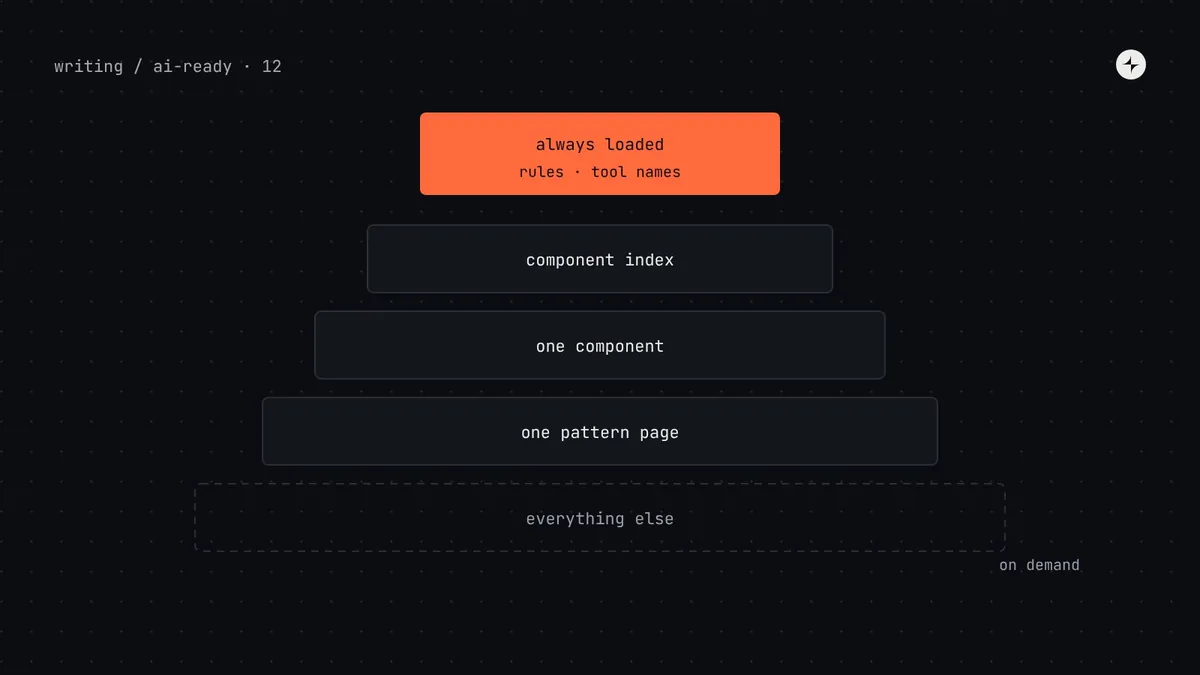
Less than most teams give it, and more precisely. An agent needs a short map loaded every time (a rules file of roughly 50–150 lines: package, never-use list, token rules, where to look, how to check) and exact answers on demand (one component's props and rules, the tokens for one job, one pattern page). It does not need your whole docs site, every component's full API, or a dozen MCP servers loaded at once. Every extra line and every tool definition takes space in the context window and competes for attention, so too much context makes results less consistent, not more. Measure what's loaded, keep the always-on part small, and load the rest only when the task needs it.
- Tool definitions count too: each connected MCP tool's name, description and schema is sent with every request.
- If an agent ignores a rule you know is written down, first check whether it's buried.
- Part 12 of 20 in the series on AI-ready design systems.
"We gave it everything, and it got worse"
Once teams learn that agents need context (part 2), a common next step is to give them all of it: the full component docs pasted into the rules file, the token file attached to every prompt, every MCP server anyone found useful. Results often get worse.
An illustration: the 1,800-line rules file
Kestrel's payroll app has an AGENTS.md that grew to 1,800 lines: Harbor's full docs, the brand guide, API conventions, testing guides. Eleven MCP servers are configured.
Agents follow the "never use ui-old" rule in some runs and not others. Simple tasks take noticeably longer to start. The same prompt gives different component choices from one day to the next.
The ten rules that matter are on lines 900–910, surrounded by text that's irrelevant to most tasks, and the agent is choosing between around 180 tools on every step.
What the context window actually holds
Every time an agent takes a step, the model is sent everything it needs to decide the next one. Understanding what's in that bundle explains why "more" isn't free.
Token (in AI models): the unit models count text in, roughly three-quarters of an English word; not the same as a design token. Context window: the maximum number of tokens a model can consider at once. Progressive disclosure: showing a short summary first and loading detail only when it's needed.
Two separate problems come from overfilling it:
Budget
Large windows are big, but long tasks fill them: a few big files, long lint output and tool results add up. When space runs out, agents summarise or drop earlier context, and early instructions can be lost. Larger contexts also cost more and run slower.
Attention
Even well within the limit, models use information less reliably when it's buried among lots of other text. Research on long contexts has found that facts in the middle are used less well than facts at the start or end. Ten clear rules beat ten rules inside 1,800 lines.
How much is enough: a budget for each layer
There's no universal number, but these targets work well in practice for design system context.
| Layer | Loaded | Target size | Contains |
|---|---|---|---|
| Rules file section for the design system | Every task | 30–80 lines | Package, never-use list, token rules, where to look, helpers, check command |
| Whole rules file | Every task | Under ~150 lines | The design system section plus the repo's own essentials |
| Design system MCP tools | Every request (definitions) | 3–6 tools, short descriptions | Search and get, for components, tokens and patterns |
| Component index | When choosing | One line per component | Name, status, category, purpose |
| One component's detail | When using it | A few hundred words | Props, rules, accessibility, one example |
| One pattern page | When building that kind of screen | 500–1,500 words | Decision table, components used, one full example |
Too many tools is a context problem too
Each MCP server adds its tools' definitions to every request. One design system server with four tools is small. Eleven servers, some with thirty or forty tools each, can add tens of thousands of tokens before the agent reads your prompt, and give the model far more options to choose between on every step. Engineering reports from teams running many servers consistently describe the same pattern: as tool counts grow, the cost rises and the agent picks the wrong tool more often.
Everything, everywhere
- 11 servers configured for every repo
- ~180 tools visible on every step
- Four tools that all "search" something
- Design system tools lost among them
Scoped to the work
- Project config with 3 servers: harbor, figma, the issue tracker
- Others enabled per person, when needed
- Tool names say whose they are:
harbor.search_components - Descriptions say when to call them
Some agent products now load tool definitions on demand when many are configured, searching for the right tool instead of showing all of them up front. That helps, but it still relies on clear tool names and descriptions to find the right one.
Step by step: put your design system context on a diet
Measure what's loaded
Count the lines in every rules file that loads for a typical UI task (root AGENTS.md, nested files, CLAUDE.md, tool-specific rules), and list the MCP servers and tool counts. Many agents show context usage directly; Claude Code, for example, has a
/contextcommand.Sort every rule into three piles
Every task (never use ui-old), some tasks (how to build a data table), reference (the full list of props). Only the first pile stays in the rules file.
Move "some tasks" into on-demand places
Pattern pages the MCP server can return, scoped rules that only apply to matching files (Cursor and Copilot both support path-scoped rules), or skills that load when the task matches their description.
Move "reference" into data
Prop lists and token values belong in the generated manifests from part 4 and part 3, fetched one item at a time.
Trim the tool list
Keep project-level MCP config to the servers the repo's work needs. Merge overlapping tools. Shorten descriptions to what the model needs to decide when to call them.
Shape tool results
Return summaries from search tools and detail from get tools. Strip fields agents don't use. Cap results (five components, eight tokens).
Re-test
Run your eval tasks (part 9) before and after. Consistency between runs is the number to watch.
Before and after: the rules file
# Payroll web app
## About Harbor (copied from docs)
Harbor was created in 2021 to…
## Button
Buttons let users take actions…
### Props
| prop | type | default |…
## Card
…
(60 more components)
## Brand voice
…
## Testing philosophy
…
Mostly reference material, loaded for every task, including tasks that touch no UI.
# Payroll web app
pnpm dev · pnpm check before finishing

## UI: use Harbor
- Import from @kestrel/harbor.
- Look up components with
  harbor.search_components /
  get_component before writing UI.
- Patterns: harbor.get_pattern.

### Never use
- @kestrel/ui-old, src/legacy/
- Modal, AlertDialog, BtnPrimary

### Tokens
- Semantic tokens only;
  harbor.search_tokens to find one.
…
The rules that apply to every UI task, plus where to get everything else.
Long tasks: keeping context healthy as work goes on
Context also fills up during a task. A long session that builds a whole feature opens dozens of files, runs checks many times, and accumulates output. Three habits help:
- One task per session. Start a fresh session for each screen or ticket, so earlier, unrelated context doesn't leak in.
- Quiet checks. Make your check command print only errors, with file, line and message. Pages of passing-test output waste space.
- Put essentials in files, not chat. If agents compact or summarise long conversations, rules typed into chat early on may be summarised away; rules in files are reloaded.
How to tell whether context is the problem
| Sign | Likely cause |
|---|---|
| A rule is followed in some runs and not others | Rule buried in a long file, or contradicted by code the agent read |
| The agent calls the wrong tool, or a similar tool from another server | Too many tools; overlapping names and descriptions |
| Early instructions are forgotten late in a long task | Session too long; essentials only in chat |
| The agent never looks anything up | Too little context: no map telling it where to look (see part 11) |
Common mistakes
Pasting docs into rules files
Docs are reference; rules files are a map. Link to the docs and let the agent fetch the part it needs.
One giant MCP tool response
A get_all_components tool that returns everything fills the context in one call. Search, then get.
Committing everyone's favourite servers
Project config applies to everyone. Keep it to what the repo needs; personal tools go in personal config.
Trimming without testing
Removing a line can remove a rule that mattered. Rerun your eval tasks after each trim.
The short version
- Agents need a short map every time and exact answers on demand, not everything at once.
- Rules files and tool definitions are present on every step, so keep them small.
- Sort rules into every-task, some-tasks and reference; only the first stays in the rules file.
- Configure only the MCP servers a repo needs; shape tool results to be short.
- Measure consistency across runs before and after trimming.
Next: Why is AI-generated UI inaccessible, and how can a design system fix it?
Frequently asked questions
How long should an AGENTS.md or CLAUDE.md file be?
As short as possible while covering what every task needs. Under about 150 lines for the whole file is a good target, with the design system section around 30–80 lines. Link to docs for everything else.
Do too many MCP servers slow down AI agents?
Yes. Every connected tool's definition is sent with each request, which uses context and adds cost, and more tools mean more chances to pick the wrong one. Configure only the servers a project needs.
Should I paste my design system docs into the prompt?
No. Give the agent a short map and a way to fetch exactly what it needs, such as a component index or an MCP tool. Pasting everything makes important rules harder to follow.
What is progressive disclosure for AI agents?
Showing the agent a brief summary first (a rules file, a component index, tool names) and loading detail only when the task needs it (one component's props, one pattern page).
Why does my agent follow a rule sometimes but not always?
Often because the rule is buried in long context, contradicted by code the agent read, or typed in chat early in a long session. Put it near the top of a short rules file and back it with a lint rule.
Further reading
- Anthropic: Effective context engineering for AI agentsWhy smaller, better-chosen context works.
- Anthropic: Writing effective tools for agentsNames, descriptions and response sizes.
- Lost in the Middle (Liu et al.)How models use information in long contexts.
- AGENTS.md, llms.txt and rules filesWhat belongs in the always-on layer.