
The short answer
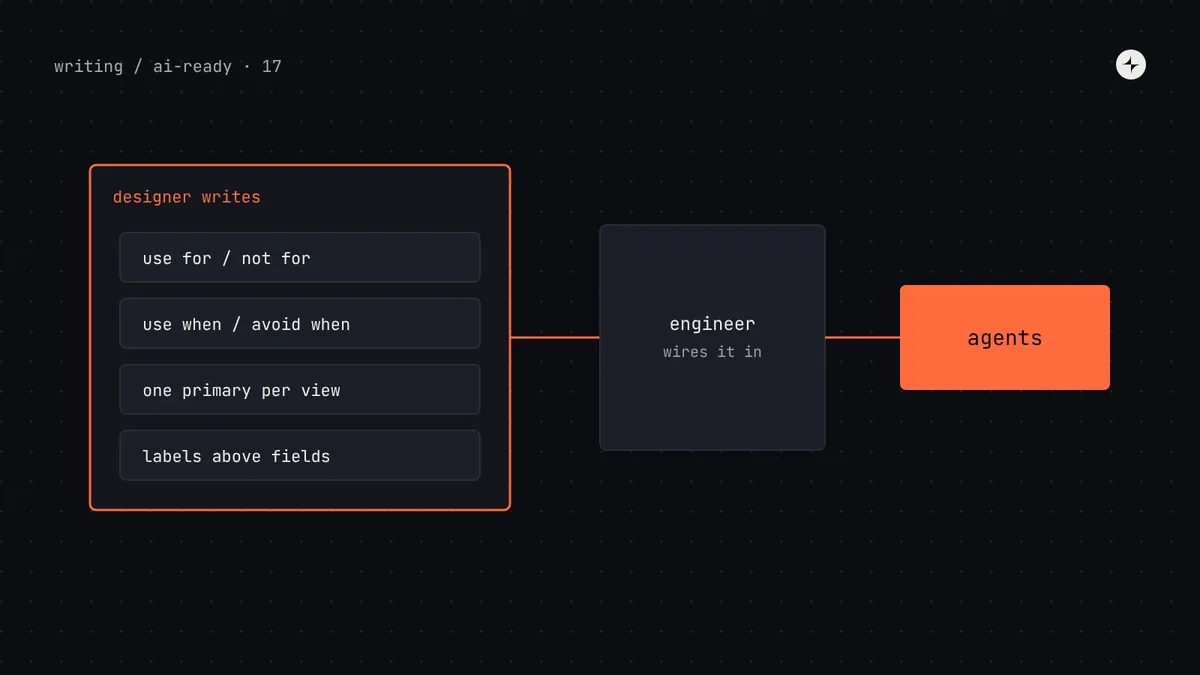
Yes, and designers own the most important part. Making a design system AI-ready is mostly about writing decisions down clearly, and those decisions are design decisions. Without writing code, a designer can: write token descriptions ("Use for… Not for…"), write component purposes and usage rules, prepare the Figma library (variables, properties, descriptions, attached instances), write guidelines for AI prototyping tools, define the test tasks that measure whether agents get it right, and review agent output for judgement that automated checks miss. Engineers then wire these into files, pipelines and tools. Many docs platforms now offer MCP servers too, so documentation written in a no-code editor can reach agents directly.
- Most AI failures in this series trace back to an unwritten design decision. Designers are best placed to write them.
- You don't need to learn JSON. You need a shared template and an engineer who generates files from it.
- Part 17 of 20 in the series on AI-ready design systems.
"I'm a designer. Is this even my job?"
The first sixteen parts of this series are full of JSON, TypeScript and terminal commands, so it's easy to conclude that AI-readiness is an engineering project. It isn't. Look at what actually goes wrong when agents build UI:
| Agent mistake | The missing decision | Whose decision? |
|---|---|---|
| Picked the wrong pale blue | Which blue is for info banners, and which for selection? | Design |
| Primary button on "Delete account" | Which variant for destructive actions? | Design |
| Illustration on a "no search results" state | What does each kind of empty state look like? | Design and content |
| Used Dialog where ConfirmDialog was right | When to use each overlay? | Design |
| Hard-coded a hex from a Figma frame | Was the layer bound to a variable? | Design |
| Imported the legacy package | Is it blocked by lint? | Engineering |
Designers already make these decisions every day. What changes is that they now have to be written somewhere a machine can read, in words precise enough to follow without asking.
Six things designers own
Token descriptions
For each semantic token: what it's for, what it's not for, what to use instead. You know why
text.secondaryexists; write that down. See part 3.Component purposes and usage rules
One sentence of purpose, "use when", "avoid when", and the rules people learn in reviews ("one primary per view"). See part 4.
Pattern pages
How forms, tables, empty states and settings pages are built, with a decision table for variations. See part 5.
The Figma library
Variables named like tokens, properties that mirror code props, component descriptions, and the "ready for build" habits in product files. See part 8.
Guidelines for AI prototyping tools
The written instructions for Figma Make kits, v0 or Lovable. See part 15.
Test tasks and review
The real tasks agents are measured on, what "correct" looks like for each, and reviewing output for judgement: right pattern, right words. See part 9.
How designers and engineers split the work
A template designers can fill in
The easiest way to start is a shared spreadsheet or table with one row per token or component. An engineer writes a small script that turns it into the files agents read. Here's the component version:
| Component | Purpose (one sentence) | Use when | Avoid when → use instead | Rules |
|---|---|---|---|---|
| ConfirmDialog | Asks the user to confirm an action before it happens, especially one that deletes data. | Deleting, removing, cancelling; actions affecting other people | Easy to undo → Toast with Undo. Needs a form → Dialog | Title is a question naming the action. Confirm label repeats the verb. |
| StatCard | Shows 1–4 key figures with an optional action. | Dashboard summaries | More than 4 figures → Table. Trends → Chart | At most one action, secondary unless it's the page's main task. |
| Toast | Briefly confirms something that just happened. | Saved, sent, copied; undoable actions | Errors that need action → InlineAlert. Anything important → not a toast | Disappears after 5s; never the only place information appears. |
Write each rule as if explaining it to a new designer on their first day who can't ask any follow-up questions. If you find yourself writing "it depends", write down what it depends on. That's the rule.
Writing rules an agent can follow
Designers often write guidance that makes sense to other designers but is too vague for an agent. The difference is specificity.
| Too vague | Followable |
|---|---|
| "Use primary buttons sparingly." | "At most one primary button per view. Everything else is secondary or ghost." |
| "Keep forms simple." | "One column. Labels above fields. Group related fields under a heading. Submit button bottom-left." |
| "Use appropriate spacing." | "space.inset.md inside cards; space.stack.lg between page sections." |
| "Errors should be helpful." | "Say what went wrong and how to fix it: 'Enter a date after 1 April 2026.' Never 'Invalid input'." |
| "Follow the brand." | "Use only Harbor tokens. No gradients. Illustrations only on empty states with no data yet." |
Preparing Figma without help from engineers
Most of the Figma work in part 8 is design work:
- Name variables like tokens:
color/feedback/info/bg, matching what engineers use in code. Ask for the token list if you don't have it. - Fill in descriptions on variables and components, using the same sentences as your template.
- Make properties mirror props: Variant = Primary / Secondary / Ghost / Danger, booleans for on/off, text properties for labels.
- Hide primitives from publishing so designers bind layers to semantic variables only.
- Teach the "ready for build" habits: attached instances, auto layout, bound variables, named frames.
- Find raw values: use a linting plugin or library analytics to find hard-coded colours and detached instances in key files.
Documentation tools that reach agents without code
If your team writes docs in a dedicated documentation platform, check whether it offers an MCP server. Several do: zeroheight and Supernova, for example, both offer MCP servers that let tools such as Claude, Cursor and Copilot read the design system documentation you maintain there, and Storybook, Knapsack and others offer their own. Availability, write access and usage limits depend on the vendor and plan.
Designer-maintained docs
Guidelines, patterns and content rules written in a visual editor reach agents without a docs-as-code pipeline.
Two sources of truth
If component facts live in the docs tool and in code, they'll drift. Let the docs tool hold judgement; let code hold props and tokens.
Prompt templates for designers
When designers use AI tools directly, a few reusable prompts make results more consistent. Save them where your team can find them.
A weekly routine
| When | What | Time |
|---|---|---|
| Monday | Read the gaps agents reported ("no component fits…") and zero-result searches; add to the backlog | 20 min |
| Mid-week | Write or sharpen rules for the two components or tokens agents got wrong most often | 1 hour |
| Friday | Review three agent-built screens with an engineer: right pattern, right words, right variant | 30 min |
| Monthly | Look at eval results together; pick next month's focus | 45 min |
Common mistakes
Waiting for engineering to start
Descriptions, rules and Figma cleanup can start today in a spreadsheet and the library. The pipeline can come later.
Rules only in Figma comments
Guidance on canvas sticky notes doesn't reach agents. Put it in descriptions and the shared template.
Accepting AI drafts unread
AI-drafted descriptions sound confident and are sometimes wrong. A designer approves every one.
Judging only how it looks
Agent output that looks right can still use the wrong pattern, words or accessibility. Review behaviour, not just pixels.
The short version
- Most agent mistakes are unwritten design decisions, so designers own the most important part of AI-readiness.
- Designers write token descriptions, component rules, patterns, Figma descriptions, tool guidelines and test tasks.
- Use a shared template; engineers turn it into files, pipelines and checks.
- Write rules that are specific, checkable and name the alternative.
- Docs platforms with MCP servers can carry designer-written docs to agents without code.
Next: Who owns the AI rules? Governance for an AI-ready design system.
Frequently asked questions
Can designers make a design system AI-ready without coding?
Yes. Designers can write token descriptions, component usage rules and pattern guidance, prepare the Figma library, write guidelines for AI prototyping tools and define test tasks. Engineers then turn those into files, pipelines and checks.
What should designers do to prepare a design system for AI?
Write down the decisions agents get wrong: which token for which job, which component and variant for which situation, how common patterns are built, and the content rules. Then clean up the Figma library so variables, properties and descriptions match code.
Do designers need to learn JSON or MCP?
No. A shared template, such as a spreadsheet, is enough. Understanding what JSON and MCP are helps conversations with engineers, but writing them isn't necessary.
How do I write design guidelines AI can follow?
Make each rule specific, checkable and name the alternative: "At most one primary button per view; everything else secondary" rather than "use primary buttons sparingly".
Do design documentation tools support AI agents?
Several do. zeroheight and Supernova, among others, offer MCP servers so AI tools can read the documentation maintained in them. Check each vendor's plans and limits.
Further reading
- zeroheight: using the remote MCP serverConnecting zeroheight docs to AI tools.
- Supernova: MCP for design systemSupernova's MCP server for documentation.
- Figma: write design system guidelinesGuidance written for Figma Make, useful everywhere.
- UX writing in a design systemContent rules agents can follow.