
The short answer
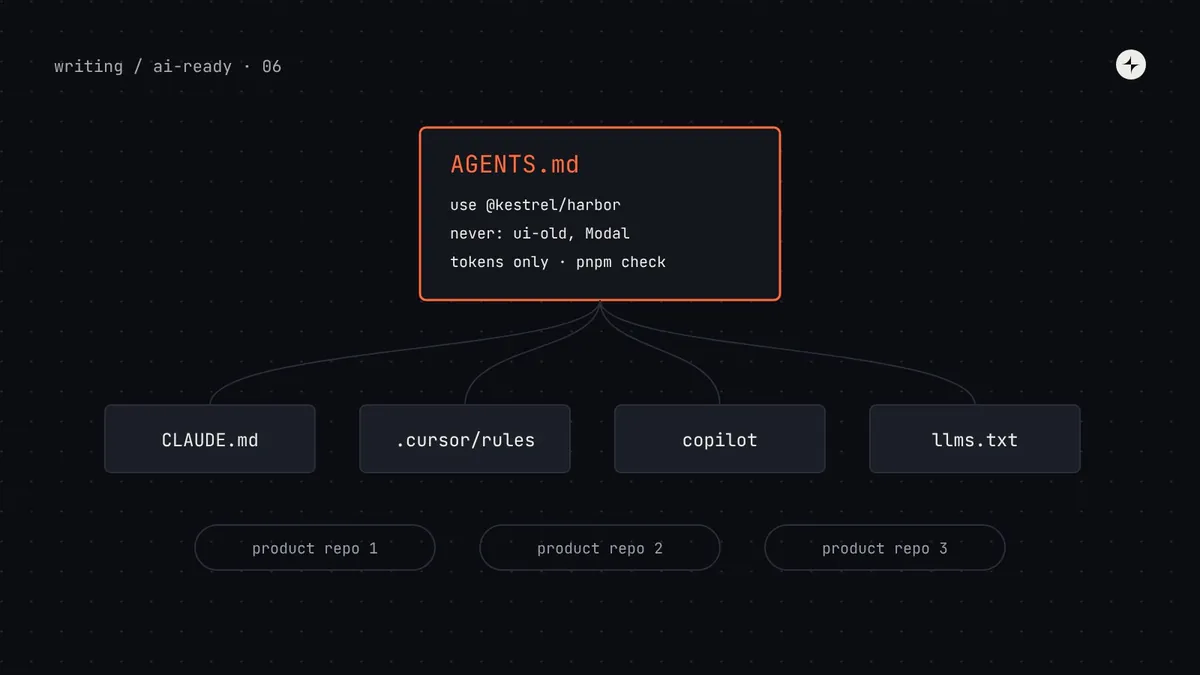
Rules files are plain-text instructions that coding agents load automatically at the start of every task. AGENTS.md is the open, cross-tool format (read by Codex, Cursor, GitHub Copilot, Gemini CLI and many others); Claude Code reads CLAUDE.md, which can import AGENTS.md; Cursor and Copilot also have their own scoped rule files. For a design system, put a short section in every product repo that says which package to use, what never to use, how tokens work, where to look things up and how to check the work. On your public docs site, add an llms.txt file: a Markdown index of your docs written for language models. Keep all of these short, and generate the parts that change (like the deprecated list) from your metadata.
- A rules file is a map, not an encyclopedia. Under 150 lines is a good target.
- Ship the design system's section inside the package, so every repo stays in sync.
- Part 6 of 20 in the series on AI-ready design systems.
The problem: every session starts from zero
In part 2 we saw that agents don't remember anything between sessions, and that the files loaded at the start of a task are the most reliable way to guide them. Without a rules file, here's what working with an agent looks like at Kestrel:
An illustration: the repeated reminder
Engineers who've been burned type "use @kestrel/harbor, not ui-old, and use tokens" at the end of every prompt. Some remember; most don't; nobody types the same thing twice.
Agent output depends on who's asking. The engineer who knows the system gets on-system UI. The new hire gets the legacy button. Review catches some of it.
Write the reminder once, in a file every agent reads automatically, and keep it current from the design system's own data.
Which file does what
There are several file conventions, and the landscape keeps moving. Here's what each is for as of late 2026. You'll likely use two or three of them.
| File | Read by | Lives in | Use it for |
|---|---|---|---|
AGENTS.md | Codex, Cursor, GitHub Copilot, Gemini CLI, Jules, Amp and many more | Repo root, plus optional nested files in subfolders | The main, tool-neutral instructions for any repo |
CLAUDE.md | Claude Code | Repo root and subfolders; also user-level | Claude-specific notes; can import AGENTS.md with @AGENTS.md |
.cursor/rules/*.mdc | Cursor | Repo | Rules applied only to matching files (e.g. *.tsx) |
.github/copilot-instructions.md, .github/instructions/*.instructions.md | GitHub Copilot | Repo | Copilot-wide or path-scoped instructions |
SKILL.md (Agent Skills) | Claude and a growing number of other agents | A skills folder, or a plugin | Step-by-step procedures loaded only when relevant ("migrate Modal to Dialog") |
llms.txt | Agents and tools that read websites | Root of your docs website | An index of your docs for language models |
Rules file (also "instructions file" or "memory file"): Markdown that an agent adds to its context automatically, before your prompt. Scoped rule: a rule that applies only to certain files or folders. Skill: a packaged set of instructions (and optionally scripts) that an agent loads only when the task matches its description, which keeps everyday context small.
Where rules files go in a design system setup
A design system touches three kinds of place, and each needs different instructions.
What to put in a product repo's rules file
The design system section of a product repo's AGENTS.md should answer six questions. Anything else belongs in the docs or metadata, which the file points to.
| Question | Why the agent needs it |
|---|---|
| Which package and import path? | Stops it copying lookalikes from old folders |
| What must never be used? | Deprecated packages, folders and components it will otherwise find and copy |
| How do tokens work here? | Prevents hard-coded values and Tailwind defaults |
| Where do I look things up? | The component index, token manifest, docs folder or MCP tools |
| Which helpers already exist? | Stops it writing its own currency formatter or date helper |
| How do I check my work? | The exact commands that run lint, types and tests |
A complete example
Here's the section Kestrel's payroll app ended up with. Notice it's mostly short, imperative lines, each specific enough to check.
<!-- AGENTS.md (payroll-web) -->
# Payroll web app

React 19 + TypeScript. Run `pnpm dev` to start, `pnpm check` before finishing.

<!-- harbor:start (generated by `npx harbor agents`; edit in the harbor repo) -->
## UI: use the Harbor design system

- Build all UI with `@kestrel/harbor`. Import from the package root:
  `import { Button, StatCard } from "@kestrel/harbor"`.
- Before writing UI, look the component up. Prefer the `harbor` MCP tools
  (`search_components`, `get_component`, `search_tokens`). Without them, read
  `node_modules/@kestrel/harbor/dist/components.agent.json`.
- If no component fits, say so in your reply. Don't build a new one.

### Never use
- `@kestrel/ui-old` and anything in `src/legacy/`. They are being removed.
- `Modal` and `AlertDialog`: use `Dialog`, or `ConfirmDialog` for confirmations.
- `BtnPrimary`: use `<Button variant="primary">`.
- Raw colours, pixel spacing or font sizes in styles or `className`.

### Tokens
- Styles use semantic tokens only: `var(--color-text-secondary)`, `var(--space-inset-md)`.
- Tailwind classes use Harbor's theme (`bg-surface`, `text-danger`). Default
  Tailwind colours like `bg-blue-600` don't exist in this build.
- Never write theme-specific styles (`[data-theme="dark"]`). Tokens switch themes.
- Token list: `node_modules/@kestrel/harbor/dist/tokens.agent.json`.

### Existing helpers
- Money: `formatMoney(amount, currency)` from `@kestrel/harbor/format`.
- Dates: `formatDate()` from the same module. Never call `toLocaleString` directly.

### Check your work
- `pnpm lint` flags deprecated imports and raw values.
- `pnpm typecheck` checks props against Harbor's types.
- Stories for new screens go in `src/**/*.stories.tsx`.
<!-- harbor:end -->

## Payroll domain
- Amounts are integers in minor units (cents). Never use floats for money.
…"If no component fits, say so" is one of the most valuable lines you can add. Without it, agents quietly build a new component, and you discover a fourth date picker in review. With it, you get a clear signal about gaps in your system.
Keeping many repos in sync
A rules file copied by hand into twelve repos will be twelve different files within a quarter. Instead, treat the design system section as a release artifact.
Generate the snippet in the design system build
The "Never use" list comes from components with
status: deprecatedin their metadata (part 4). The helpers list comes from the package's exports. So the snippet updates itself when you deprecate something.Ship it in the package
Publish it as
AGENTS.snippet.mdinside@kestrel/harbor. Every product repo already depends on the package, so every repo already has the right version.Insert it between markers
A small command (
npx harbor agents) replaces whatever sits betweenharbor:startandharbor:endin the repo's AGENTS.md, and leaves the rest of the file alone. Run it after every upgrade, or in a post-install script.Check it in CI
A CI step runs the command and fails if the file changed, which means someone upgraded Harbor without refreshing the instructions.
// bin/harbor-agents.mjs: replace the marked block in ./AGENTS.md
import { readFileSync, writeFileSync, existsSync } from "node:fs";
import { createRequire } from "node:module";

const require = createRequire(import.meta.url);
const snippet = readFileSync(require.resolve("@kestrel/harbor/AGENTS.snippet.md"), "utf8").trim();
const start = "<!-- harbor:start", end = "<!-- harbor:end -->";
const file = existsSync("AGENTS.md") ? readFileSync("AGENTS.md", "utf8") : "";
const block = snippet + "\n" + end;     // the snippet starts with its own start marker
const i = file.indexOf(start), j = file.indexOf(end);
const next = i >= 0 && j > i
  ? file.slice(0, i) + block + file.slice(j + end.length)
  : file + (file ? "\n\n" : "") + block + "\n";
writeFileSync("AGENTS.md", next);
(The package must list the snippet in its exports field for require.resolve to find it.)
Tool-specific files, without duplicating content
Keep AGENTS.md as the one place where content lives, and make the other files point to it, so you never have to edit the same rule in four places.
CLAUDE.md imports AGENTS.md
# CLAUDE.md
@AGENTS.md

Claude-specific notes, if any,
go below the import.
The @path syntax pulls the other file into Claude Code's context.
A scoped rule for UI files
---
description: Harbor UI rules
globs: ["src/**/*.tsx", "src/**/*.css"]
alwaysApply: false
---
Follow the "UI: use the Harbor
design system" section of
AGENTS.md for every UI change.
Cursor reads AGENTS.md too; a scoped rule adds emphasis only where UI is written.
Path-specific instructions
---
applyTo: "src/**/*.tsx"
---
Follow the Harbor section of
AGENTS.md. Never import from
@kestrel/ui-old or src/legacy.
Saved as .github/instructions/ui.instructions.md.
Closer rules for special folders
src/legacy/AGENTS.md

This folder is being removed.
Do not copy patterns from here.
Do not add new files here.
Agents that support nesting read the nearest AGENTS.md for the files they're editing.
The design system repo's own AGENTS.md
Agents also help maintain the system itself: drafting new components, writing stories, migrating props. Those tasks need different instructions, focused on the contribution standard.
# Harbor design system

## Adding or changing a component
Every component lives in `src/<Name>/` with exactly these files:
- `<Name>.tsx`: union types for every option prop; JSDoc on the component and every prop.
- `<Name>.meta.json`: purpose, useWhen, avoidWhen, rules. Must validate against
  `schema/component-meta.schema.json` (`pnpm validate:meta`).
- `<Name>.stories.tsx`: one story per variant and per state in the docs page.
- `<Name>.test.tsx`: behaviour and accessibility (axe) tests.
- `docs/<name>.md`: from `docs/_template.md`. Headings repeat the component name.

## Rules
- Styles use semantic tokens only. New tokens need a `$description`.
- Never remove a prop: deprecate it with `@deprecated Use X` and keep it working.
- Default variant must be the lowest-emphasis option.

## Before finishing
`pnpm check` (lint, types, tests, meta validation, docs examples).
llms.txt for your docs website
llms.txt is a proposal from 2024 for websites to offer a Markdown file at /llms.txt that tells language models what's on the site and where the clean, text versions of pages are. Not every tool reads it automatically, but it costs little, and it's useful whenever an agent (or a person pasting a URL into a chat) needs your docs and can't reach your repo.
The format is simple Markdown: a title, a one-paragraph summary in a blockquote, optional notes, then sections of links with short descriptions. A section called "Optional" marks links that can be skipped when space is short.
# Harbor design system

> Harbor is Kestrel's design system for React: components, design tokens and
> patterns for payroll and HR products. Package: @kestrel/harbor.

Use semantic tokens only. Components marked deprecated must not be used in new code.

## Start here
- [Getting started](https://harbor.kestrel.example/start.md): install, providers, theming
- [Component index](https://harbor.kestrel.example/components.agent.json): every component with status and purpose
- [Token list](https://harbor.kestrel.example/tokens.agent.json): semantic tokens with descriptions

## Components
- [Button](https://harbor.kestrel.example/components/button.md): actions on the current page
- [ConfirmDialog](https://harbor.kestrel.example/components/confirm-dialog.md): confirming destructive actions
- [StatCard](https://harbor.kestrel.example/components/stat-card.md): 1–4 key figures with an optional action

## Patterns
- [Forms](https://harbor.kestrel.example/patterns/forms.md): layout, validation and errors
- [Empty states](https://harbor.kestrel.example/patterns/empty-states.md): no data, no results, no access

## Optional
- [Changelog](https://harbor.kestrel.example/changelog.md)
- [Migration from ui-old](https://harbor.kestrel.example/migrate/ui-old.md)- Link to
.mdversions of pages, not the HTML, so agents get clean text without navigation and scripts. - Generate it from your docs' frontmatter, skipping deprecated pages, so it stays current.
- Consider an
llms-full.txt, a common companion that concatenates all pages into one file, for tools that prefer to load everything. - Keep private docs private. If your docs are internal, put llms.txt behind the same login, or rely on repo files and MCP instead.
Packaging procedures as skills
Some knowledge is a procedure, not a rule: "how to migrate a screen from Modal to Dialog" or "how to build a settings page with Harbor". These are too long for a rules file, which is loaded every time. Agent Skills solve this: a folder with a SKILL.md whose short description is always visible to the agent, and whose full instructions load only when the task matches.
---
name: harbor-migrate-modal
description: Migrate a screen from the deprecated Harbor Modal to Dialog or
  ConfirmDialog. Use when a file imports Modal from @kestrel/harbor or ui-old.
---

# Migrating Modal to Dialog

1. Decide the replacement: confirmation of an action → ConfirmDialog;
   anything with form fields or free content → Dialog.
2. Map props: `isOpen` → `open`, `onRequestClose` → `onOpenChange(false)`,
   `header` → `title`. `footer` becomes Dialog.Actions children.
3. Run `pnpm codemod modal-to-dialog <file>` for the mechanical part,
   then review focus order and the confirm button's label.
4. Run `pnpm check`.
This keeps the always-loaded rules file short (the map) while the detailed steps are one hop away (the guide), which is the progressive disclosure idea from part 2 again.
Writing instructions agents follow
| Instead of… | Write… | Why |
|---|---|---|
| "Try to use the design system where possible" | "Build all UI with @kestrel/harbor" | Hedged rules are treated as optional |
| "Follow our token conventions" | "Styles use semantic tokens only, e.g. var(--color-text-secondary)" | A concrete example shows the exact form |
| "Don't use old components" | "Never use Modal; use Dialog or ConfirmDialog" | The agent needs names and replacements |
| A page of design philosophy | A link to the principles page | Long prose dilutes the rules that matter |
| "Make sure it works" | "Run pnpm check before finishing" | An exact command can actually be run |
How to check your rules file works
Ask the agent to repeat it
In a fresh session: "Before we start, what are the rules for building UI in this repo?" If its answer misses the never-use list, the file is too long or the section is buried.
Rerun the baseline tasks
Use the three tasks from your agent's-eye audit in part 2. Deprecated imports and hard-coded values should drop sharply. This is usually the biggest single improvement in the whole series.
Test across tools
If teams use different agents, run one task in each. A file that works in one tool but not another is often in the wrong place or format for the second.
Watch the length
Every time someone adds a line, ask what it replaces. When the file passes about 150 lines, move procedures into skills and details into docs.
Common mistakes
Pasting the whole docs site
A 2,000-line rules file loads every time and hides the ten rules that matter. Link instead.
Hand-maintained deprecated lists
They fall behind the code within a release. Generate the list from metadata.
Contradicting the codebase
If the file says "never use ui-old" but 60% of files import it, agents get mixed signals. Add lint (part 9) and a nested AGENTS.md in legacy folders.
Secrets and internal URLs in public files
Rules files are often committed to public repos, and llms.txt is public by design. Keep tokens, internal hostnames and credentials out.
The short version
- Rules files load automatically, so they're the cheapest, most reliable way to guide agents.
- Use AGENTS.md as the single source; point CLAUDE.md, Cursor and Copilot files at it.
- Answer six questions: package, never-use, tokens, where to look, helpers, how to check.
- Generate the design system section, ship it in the package and insert it between markers.
- Add llms.txt and .md pages to your docs site; package long procedures as skills.
Next: Build an MCP server for your design system, so agents can look up exactly the component or token they need instead of searching files.
Frequently asked questions
What is AGENTS.md?
An open format for giving instructions to AI coding agents: a Markdown file at the root of a repository (and optionally in subfolders) that agents such as Codex, Cursor, GitHub Copilot and Gemini CLI read automatically. It's stewarded by the Agentic AI Foundation under the Linux Foundation.
What's the difference between AGENTS.md and CLAUDE.md?
They serve the same purpose. CLAUDE.md is read by Claude Code; AGENTS.md is the cross-tool convention. A common setup keeps content in AGENTS.md and imports it from CLAUDE.md with a line containing @AGENTS.md.
What is llms.txt?
A proposed standard for a Markdown file at /llms.txt on a website that summarises the site for language models and links to clean text versions of its pages. Support varies by tool, but it's cheap to add and useful for docs sites.
What should a design system put in AGENTS.md?
Which package to import, what never to use (with replacements), how tokens work, where to look up components and tokens, which helpers already exist, and the commands that check the work. Keep it short and link to everything else.
How long should AGENTS.md be?
As short as possible while covering the essentials. Under about 150 lines is a good target. Move long procedures into skills and detailed guidance into docs that the file links to.
Further reading
- AGENTS.mdThe format, examples and list of supporting tools.
- llms.txtThe proposal and the file format.
- Claude Code: memory and CLAUDE.mdHow CLAUDE.md files and imports work.
- GitHub Copilot: repository instructionsRepo-wide and path-specific instruction files.
- Agent SkillsThe open format for packaged agent procedures.