
The short answer
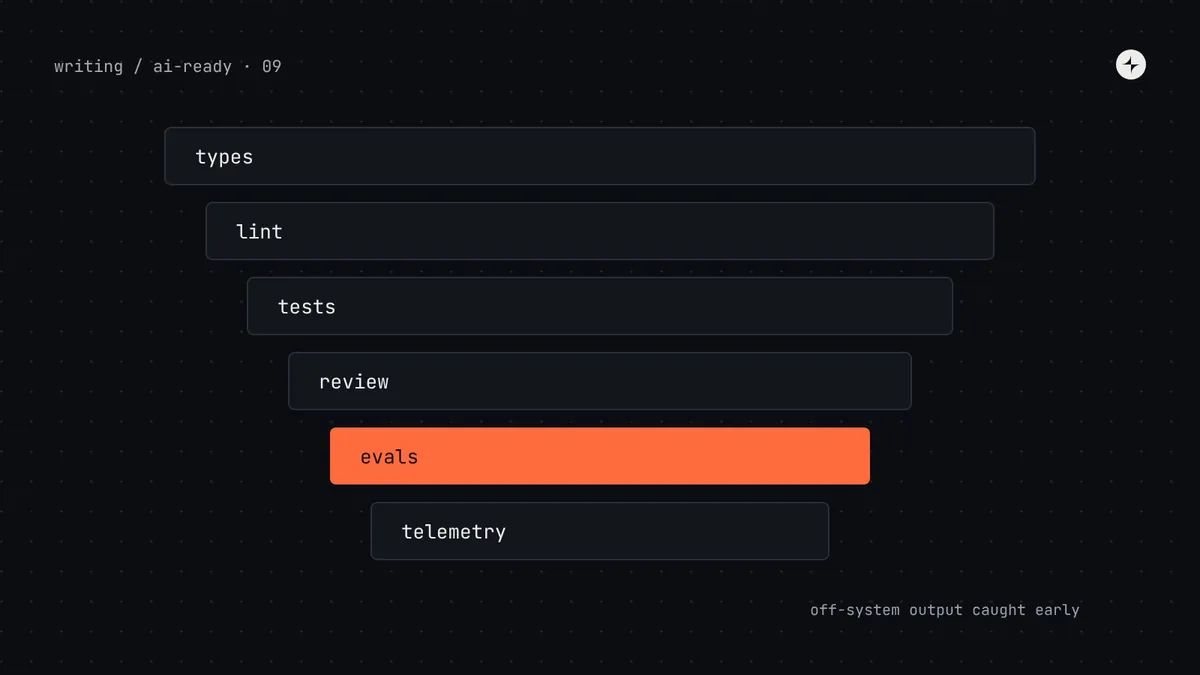
Guardrails for AI-generated UI are automated checks that catch off-system output before a person has to, and tell the agent exactly how to fix it. Layer them: strict types reject invalid props; lint rules (ESLint, Stylelint) block deprecated imports, raw colours, pixel values and Tailwind defaults, with error messages that name the replacement; tests check accessibility (axe) and appearance (visual regression); one check command runs everything so agents run it before finishing; and evals (a fixed set of real tasks, run repeatedly and scored automatically) measure how often agents stay on-system as you improve tokens, metadata, docs and tools. Treat every failure as feedback about the system, not just the code.
- A lint message is an instruction the agent will follow: "Use Select from @kestrel/harbor" beats "Import not allowed".
- Run each eval task several times. Agents vary, and one good run proves little.
- Part 9 of 20 in the series on AI-ready design systems.
The problem: silent success at scale
In part 2, the agent's first attempt passed every check and reported "Done!" with a legacy card, a hard-coded blue and its own currency formatter. That's the most damaging failure, because it moves the work of checking onto reviewers, and reviewers miss things, especially when agents produce several times more code than before.
An illustration: review fatigue
Three months after Kestrel's engineers adopted coding agents, the number of UI pull requests has roughly doubled. Reviewers skim. The two Harbor maintainers can't look at everything.
A Harbor audit finds 140 new hard-coded colours, 22 new imports from @kestrel/ui-old, and four new date pickers, all merged since the agents arrived.
Make the machine say no, clearly, every time: lint rules with fix-it messages, a check command agents run before finishing, and a weekly eval that shows whether things are getting better.
Defence in depth: six layers
No single check catches everything. Stack cheap, fast checks first and slower, broader ones later. Each layer catches what the previous one can't.
pnpm check before finishingLayer 1: types that refuse wrong answers
Covered in part 4: union types for every option prop, required props where the component can't work without them (an icon-only button's aria-label), and @deprecated tags. Make sure the type checker actually runs in the agent's loop: put it in the check command, and say so in AGENTS.md. Also make sure your tsconfig is strict enough to catch mistakes; "strict": true is the baseline.
Layer 2: lint rules that explain the fix
Lint is the most valuable guardrail for agents, for a simple reason: agents read error messages and act on them. A rule that says what to do instead turns a failure into a correction in the same session, with no person involved.
Block deprecated imports
// eslint.config.js (flat config)
export default [
  {
    files: ["src/**/*.{ts,tsx}"],
    rules: {
      "no-restricted-imports": ["error", {
        paths: [
          { name: "@kestrel/ui-old",
            message: "ui-old is being removed. Use @kestrel/harbor. Look components up with harbor.search_components." },
          { name: "@kestrel/harbor", importNames: ["Modal", "AlertDialog"],
            message: "Deprecated. Use Dialog, or ConfirmDialog to confirm an action." },
          { name: "@kestrel/harbor", importNames: ["BtnPrimary"],
            message: "Deprecated. Use <Button variant=\"primary\">." },
        ],
        patterns: [
          { group: ["**/legacy/**"], message: "Don't import from legacy folders. Use @kestrel/harbor." },
        ],
      }],
    },
  },
];Generate the deprecated-component part of this config from your component metadata (every entry with status: deprecated and its replacedBy), the same way the rules file's "Never use" list is generated in part 6. Then deprecating a component updates the docs, the rules file and the lint rule in one release.
Block raw values in JSX
ESLint's built-in no-restricted-syntax rule matches code patterns using selectors, including regular expressions. Two selectors catch the most common agent habits: hex colours in inline styles, and Tailwind's default palette in class names.
{
  rules: {
    "no-restricted-syntax": ["error",
      {
        selector: "JSXAttribute[name.name='style'] Literal[value=/#[0-9a-fA-F]{3,8}\\b|rgba?\\(/]",
        message: "Raw colour in style. Use a semantic token, e.g. var(--color-text-secondary). Find one with harbor.search_tokens.",
      },
      {
        selector: "JSXAttribute[name.name='className'] Literal[value=/\\b(bg|text|border|ring)-(slate|gray|zinc|red|orange|amber|yellow|green|emerald|teal|sky|blue|indigo|violet|purple|pink|rose)-\\d{2,3}\\b/]",
        message: "Tailwind default colour. Use Harbor theme classes such as bg-surface or text-danger.",
      },
    ],
  },
}
Block raw values in CSS
For stylesheets, the Stylelint plugin stylelint-declaration-strict-value requires chosen properties to use variables or functions instead of literal values:
// stylelint.config.mjs
export default {
  plugins: ["stylelint-declaration-strict-value"],
  rules: {
    "scale-unlimited/declaration-strict-value": [
      ["/color$/", "background", "fill", "stroke", "/^padding/", "/^margin/", "gap", "border-radius", "font-size"],
      {
        ignoreValues: ["inherit", "transparent", "currentColor", "0", "auto", "none"],
        message: "Use a Harbor token (var(--…)) for ${property}. Find one with harbor.search_tokens.",
      },
    ],
  },
};Roll out lint without blocking everyone
An existing codebase will have hundreds of violations. Don't let that stop you:
Start as warnings on existing code
Report everything; fail nothing yet. The count becomes your baseline.
Errors on changed lines only
Run lint as errors on files changed in each pull request, so new code (including all agent code) is held to the standard while old code waits.
Burn down with codemods
Fix the mechanical cases in bulk (renamed imports, known colour-to-token swaps), then switch the rules to errors everywhere. See part 10.
Layer 3: tests that check what lint can't
Lint reads code; tests look at the result. Two kinds matter most for AI-generated UI.
Automated axe checks
import { test, expect } from
  "@playwright/test";
import AxeBuilder from
  "@axe-core/playwright";

test("payslip page is accessible",
  async ({ page }) => {
  await page.goto("/payslips/2026-10");
  const { violations } =
    await new AxeBuilder({ page })
      .analyze();
  expect(violations).toEqual([]);
});
Catches missing labels, low contrast and invalid ARIA. It finds a portion of accessibility issues, not all; keyboard and screen reader checks still need people.
Visual regression
test("payslip summary", async ({ page }) => {
  await page.goto(
    "/storybook/iframe.html" +
    "?id=payslips-summary--default");
  await expect(page)
    .toHaveScreenshot();
});
Compares screenshots with approved ones. Catches a component that "works" but looks wrong in dark mode. Hosted services such as Chromatic do the same at scale for Storybook.
More on testing components in design system testing and accessibility in a design system.
One check command
Agents follow instructions like "run pnpm check before finishing" very reliably. Give them one command that runs everything relevant and prints clear output.
// package.json
{
  "scripts": {
    "lint": "eslint . && stylelint \"src/**/*.css\"",
    "typecheck": "tsc --noEmit",
    "test:ui": "playwright test --project=a11y",
    "check": "pnpm lint && pnpm typecheck && pnpm test:ui"
  }
}
Some agents can also run a command automatically after every edit (Claude Code's hooks are one example), which catches problems even earlier. Either way, run the same command in CI, so nothing merges without passing it.
Layer 4: what people should still review
Automation handles the mechanical checks so people can focus on judgement. A short checklist for reviewing AI-generated UI:
- Right pattern for the job? A table where a list would be clearer; a dialog where an inline edit would do.
- Right words? Labels, errors and empty states follow the content guidelines. See UX writing.
- Did it build something new? Any new component or helper needs a reason. Often a system component already does the job.
- Did it flag what it couldn't map? Read the agent's summary. Gaps it reports are design system backlog items.
- Keyboard and screen reader basics on anything interactive: tab order, focus, announcements.
Layer 5: evals, measuring agents on your system
Everything above checks one change at a time. An eval (short for evaluation) answers a different question: across realistic tasks, how often does an agent build on-system UI with our design system, and is that number going up? It's how you know whether the work in parts 3 to 8 is paying off, and which part to improve next.
Eval: a repeatable test of an AI system: fixed inputs, run several times, scored the same way each time. Golden task: one of those inputs, with a known good outcome. Pass rate: the share of runs that meet the scoring criteria.
Write 10–20 golden tasks
Use real work: the baseline tasks from part 2 plus tasks from recent tickets. For each, write the prompt and what a correct result must contain ("uses ConfirmDialog with tone=danger", "no new components").
Run each task several times
Start each run from a clean copy of a sample repo, in a fresh session, using the agent's non-interactive mode (for example
claude -porcodex exec). Three to five runs per task shows how consistent the agent is.Score automatically
A script inspects each run's changes: lint and type results, deprecated imports, raw values, whether expected components appear, axe violations. People spot-check a sample.
Track the numbers over time
Rerun after every change to tokens, metadata, docs, rules or the MCP server, and on each new agent or model version.
// evals/score.mjs: score one run from its diff (simplified)
import { execSync } from "node:child_process";

export function score(runDir, task) {
  const sh = (cmd) => { try { execSync(cmd, { cwd: runDir, stdio: "pipe" }); return true; } catch { return false; } };
  const diff = execSync("git diff HEAD", { cwd: runDir, encoding: "utf8" });
  const added = diff.split("\n").filter((l) => l.startsWith("+") && !l.startsWith("+++")).join("\n");
  return {
    task: task.id,
    lint: sh("pnpm -s lint"),
    types: sh("pnpm -s typecheck"),
    deprecatedImports: (added.match(/@kestrel\/ui-old|\/legacy\//g) ?? []).length,
    rawColours: (added.match(/#[0-9a-fA-F]{6}\b/g) ?? []).length,
    expectedComponents: task.expect.every((name) => added.includes(`<${name}`)),
    newComponentFiles: (diff.match(/^\+\+\+ b\/src\/components\//gm) ?? []).length,
  };
}| Stage of Harbor's work | Runs passing lint + types | Expected components used | Raw colours per run |
|---|---|---|---|
| Baseline (part 2) | 38% | 41% | 4.6 |
| + AGENTS.md (part 6) | 61% | 58% | 2.1 |
| + token descriptions and Tailwind theme (part 3) | 70% | 60% | 0.4 |
| + metadata and MCP server (parts 4, 7) | 84% | 83% | 0.3 |
| + lint with fix-it messages (this part) | 96% | 87% | 0.0 |
Don't tune your docs to the eval tasks until the numbers look good: that's teaching to the test. Keep a few tasks aside that you never look at when making changes, and refresh the task set every quarter from recent real work.
Layer 6: telemetry across every repo
The same measures that track design system adoption track agent behaviour, because agent code is now a large share of all code. Count these weekly across product repos:
| Measure | How | Tells you |
|---|---|---|
| Share of UI imports from Harbor | Static analysis of imports | Whether new code uses the system |
| Deprecated imports, trend | The lint rule's count, per week | Whether migration is moving or going backwards |
| Raw values, trend | The lint and Stylelint counts | Token adoption |
| New local components | Files added under components/ in product repos | Gaps in the system, or agents ignoring it |
| Zero-result MCP searches | Server logs (hosted) or eval transcripts | What people ask for that you don't have |
Close the loop: fix the system, not just the code
When a guardrail catches a mistake, it's tempting to fix the code and move on. The bigger win is asking why the agent made it, and fixing the cause in the design system.
Common mistakes
Error messages without a fix
"Restricted import" makes the agent guess. Name the replacement and the tool to find it.
Checks that only run in CI
If the agent never runs them, it finishes with errors and someone else has to fix them. Put the command in AGENTS.md.
Judging from one run
Agents vary run to run. Decide from several runs per task, not a lucky demo.
Treating evals as a one-off
Models, agents and your system all change. An eval that isn't rerun stops telling you anything within a quarter.
The short version
- Layer guardrails: types, lint, tests, review, evals, telemetry.
- Write lint messages as instructions: the replacement, and the tool to find it.
- Give agents one check command and tell them to run it; run the same in CI.
- Measure with evals: real tasks, several runs each, scored automatically, rerun after every change.
- When a check fails repeatedly, fix the design system's source, not only the code.
Next: How to make a legacy design system AI-ready, putting all of this into a phased plan for a system that's already in use.
Frequently asked questions
How do I stop AI from generating off-system UI?
Combine guidance with enforcement: rules files, described tokens and component metadata guide the agent; strict types and lint rules with clear fix-it messages catch what slips through; accessibility and visual tests check the result. Agents read error messages and fix their own work.
What lint rules should a design system have for AI-generated code?
At minimum: block imports from deprecated packages and components (no-restricted-imports), block raw colours in styles and default Tailwind palette classes (no-restricted-syntax), and require tokens for colours, spacing and type in CSS (stylelint-declaration-strict-value).
What is an eval for a design system?
A repeatable test of how well AI agents build with your system: a fixed set of realistic tasks, each run several times, with results scored automatically for things like lint errors, deprecated imports, raw values and expected components.
Can automated tests check accessibility of AI-generated UI?
Partly. Tools like axe-core catch many issues (missing labels, contrast, invalid ARIA) but not all. Keyboard behaviour and screen reader experience still need human checks.
How do I measure whether AI agents use my design system?
Track the share of UI imports from the system, deprecated imports and raw values over time, new local components in product repos, and pass rates on a regular eval run.
Further reading
- ESLint: no-restricted-importsPaths, import names, patterns and custom messages.
- ESLint: selectorsHow the no-restricted-syntax patterns work.
- stylelint-declaration-strict-valueRequiring variables for chosen CSS properties.
- Playwright: accessibility testingUsing axe with Playwright.
- Anthropic: Create strong empirical evaluationsHow to design test cases and grade them.