
The short answer
When Figma variables and code tokens drift apart (different names, different values, tokens that exist on one side only), AI makes it worse: design-to-code agents read Figma's version, coding agents read code's version, and both produce "correct" output that doesn't match. Fix it in four steps. Pick one source of truth (usually the DTCG token files in code). Reconcile once: export both sides, compare them with a script, and decide every difference. Automate one direction: generate Figma variables from the token files, using Figma's DTCG import, a plugin such as Tokens Studio, or the Variables REST API. Check for drift in CI, so any new difference is caught within a day. Never let people edit both sides by hand.
- Same structure, different separators:
color/bg/surfacein Figma,color.bg.surfacein tokens,--color-bg-surfacein CSS. - Check what your sync tool keeps: descriptions and some token types don't survive every export or import.
- Part 14 of 20 in the series on AI-ready design systems.
The problem: two sources of truth, two kinds of agent
Almost every mature design system has some drift between Figma and code. A designer adjusted a grey in Figma last spring; an engineer added a token for a new chart that never made it into the library; a rename happened on one side only. People work around it. Agents can't, because each kind of agent only sees one side.
There are four kinds of drift, and each causes a different agent failure:
| Kind | Example | What agents do |
|---|---|---|
| Name drift | Text/Subtle vs color.text.secondary | Can't map the Figma variable to a token, so copy the hex value |
| Value drift | Same name, #6B7280 vs #5A606B | Output looks "wrong" to designers even when the agent used the right token |
| Missing on one side | Chart colours only in code | Design-to-code invents colours; designers detach and hard-code |
| Structure drift | Modes in Figma (light, dark, compact) don't match themes in code | Generated code ignores a theme, or applies the wrong one |
Step 1: choose one source of truth
The single most important decision. Two-way sync, where people edit both sides and a tool tries to merge, sounds ideal and usually becomes a third source of conflicts. Choose one side people edit, and generate the other.
Code is the source
DTCG token files in the design system repo. Changes are reviewed in pull requests, versioned with releases, and generate CSS, native platforms, the agent manifest and Figma variables. Best when engineers ship tokens and you need releases to be exact.
Figma is the source
Designers edit variables in Figma; a pipeline exports them to DTCG files, which go through review before release. Best for design-led teams, as long as the export is automated and reviewed, not copied by hand.
Either way, the token files in the repo are what ships, what agents read, and what releases version. The question is only where people make edits. More on the wider practice in keeping Figma and code in sync.
Step 2: reconcile once, with a script
Before automating anything, make the two sides agree. Export both to the same format and compare them mechanically. Comparing by eye misses things.
Export Figma variables as DTCG JSON
Figma can export variables in the DTCG format natively (export works per mode), and plugins such as Tokens Studio can export too. Save one file per mode, e.g.
figma-light.json.Build the code tokens for the same mode
Resolved values, not aliases, so you compare final colours.
Normalise names
Convert both to dot-separated lowercase (
Text/Subtle→text.subtle) and apply a rename map for known differences.Compare and list differences
Only in Figma, only in code, same name with different values.
Decide every difference
A designer and an engineer go through the list together. Each line gets one decision: keep code, keep Figma, rename, add, or delete.
// scripts/token-drift.mjs: node token-drift.mjs figma-light.json dist/tokens-light.json
import { readFileSync } from "node:fs";

const RENAME = { "text.subtle": "color.text.secondary", "surface.raised": "color.bg.raised" };

// Flatten DTCG JSON into { "color.bg.surface": "#ffffff", … }
function flatten(node, path = [], out = {}) {
  for (const [key, val] of Object.entries(node)) {
    if (key.startsWith("$")) continue;
    const p = [...path, key.toLowerCase().replace(/\s+/g, "-")];
    if (val && typeof val === "object" && "$value" in val) out[p.join(".")] = normalise(val.$value);
    else if (val && typeof val === "object") flatten(val, p, out);
  }
  return out;
}
// Colours may be hex strings or DTCG colour objects; compare as lowercase hex.
const normalise = (v) => (typeof v === "object" && v?.hex ? v.hex : String(v)).toLowerCase();

const load = (f) => flatten(JSON.parse(readFileSync(f, "utf8")));
const figma = Object.fromEntries(Object.entries(load(process.argv[2])).map(([k, v]) => [RENAME[k] ?? k, v]));
const code = load(process.argv[3]);

const rows = [];
for (const k of new Set([...Object.keys(figma), ...Object.keys(code)])) {
  if (!(k in code)) rows.push(["only in Figma", k, figma[k]]);
  else if (!(k in figma)) rows.push(["only in code", k, code[k]]);
  else if (figma[k] !== code[k]) rows.push(["value differs", k, `${figma[k]} (Figma) vs ${code[k]} (code)`]);
}
console.table(rows);
process.exit(rows.length ? 1 : 0);
Adjust flatten to match how your exports are nested (some exports put the collection name at the top level). The output is the decision list for the reconciliation meeting, and later the CI check.
| Difference | Token | Detail | Decision |
|---|---|---|---|
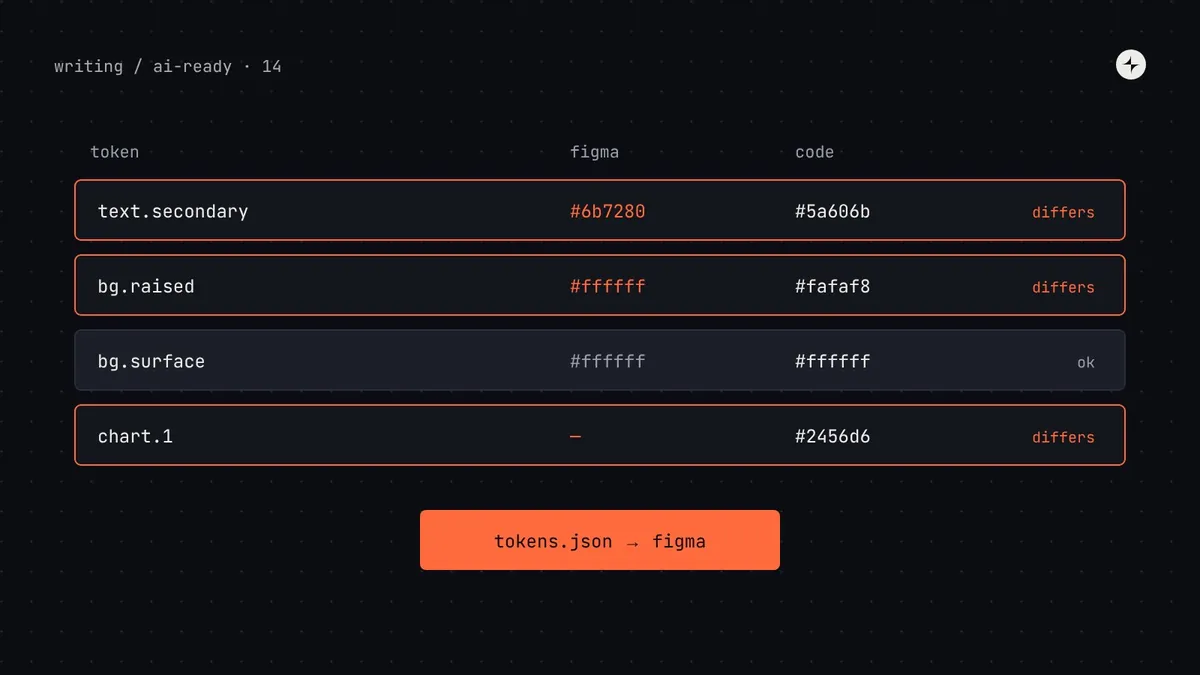
| value differs | color.text.secondary | #6b7280 (Figma) vs #5a606b (code) | Keep code: Figma's fails 4.5:1 on raised surfaces |
| value differs | color.bg.raised | #ffffff vs #fafaf8 | Keep Figma: the change was intended, never shipped |
| only in code | color.chart.1…8 | Added for reports | Add to Figma |
| only in Figma | color.promo.gradient-start | Used on one marketing banner | Delete; not a system decision |
Step 3: automate one direction
With the sides agreed, set up the pipeline so the generated side can't be edited by hand. For code as the source, there are three common ways to get tokens into Figma variables:
| Method | How | Good for | Check |
|---|---|---|---|
| Figma's native DTCG import | Import token JSON files into a variable collection in Figma | Simple setups; occasional updates | Manual step; check which fields and types are kept |
| A plugin (e.g. Tokens Studio) | The plugin reads token files from your Git repo and writes variables | Teams that want Git sync without writing code | Plugin settings decide naming and modes; review them once |
| Figma Variables REST API | A CI job creates and updates variables on release | Fully automated pipelines | Requires an Enterprise plan; you maintain the script |
Whichever you choose, make the generated side clearly read-only for people:
- Label the collection in Figma: "Generated from harbor/tokens. Don't edit here; request changes in #harbor."
- Restrict edit access to the variables file to the people who run the sync.
- Set code syntax on every variable as part of the sync, so Dev Mode and agents see
var(--color-bg-surface)(part 8). - Copy descriptions into the variable description field, if your sync method supports it, so designers see the same guidance agents do (part 3).
Step 4: catch drift in CI
Drift comes back the moment someone edits the wrong side. Make it visible within a day.
If you can't automate the Figma export, a monthly manual export and a script run is still far better than nothing.
Name and structure rules that keep both sides aligned
| Concept | Tokens (DTCG) | Figma | CSS |
|---|---|---|---|
| Hierarchy | Nested groups: color.bg.surface | Slashes: color/bg/surface | Hyphens: --color-bg-surface |
| Themes | Token sets or resolver contexts: light, dark | Modes on the semantic collection | [data-theme="dark"] |
| Primitives | A separate file or group, marked as primitive | A separate collection, hidden from publishing | Variables used only by semantic ones |
| Descriptions | $description | Variable description | Agent manifest; docs |
What changes for agents once drift is gone
Design-to-code
color: #6B7280; /* Text/Subtle */The agent couldn't map Figma's name to a token, so it copied the value.
Design-to-code
color: var(--color-text-secondary);The Figma variable's name and code syntax match the token, so the agent writes the token.
Common mistakes
Two-way sync with two editing sides
Conflicts multiply. One side is edited; the other is generated.
Reconciling by eye
Two greys a few points apart look identical in a meeting. Compare values with a script.
Assuming every field survives export
Descriptions, composite types and aliases may be dropped or flattened. Diff a round trip once before relying on it.
Fixing drift without a check
A one-off cleanup drifts again within months. The CI check is what keeps it fixed.
The short version
- Drift between Figma and code means design-to-code and coding agents produce different "correct" answers.
- Choose one side people edit; generate the other. Usually DTCG token files in code are the source.
- Reconcile once with a script, and decide every difference with a designer and an engineer.
- Automate sync through Figma's DTCG import, a plugin or the Variables API, and make the generated side read-only.
- Run a drift check on a schedule so new differences surface within a day.
Next: How do I make Figma Make, v0 and Lovable use my design system?
Frequently asked questions
How do I keep Figma variables and design tokens in sync?
Choose one source people edit (usually DTCG token files in code), generate the other with Figma's DTCG import, a plugin such as Tokens Studio or the Variables REST API, and run a scheduled comparison that flags any differences.
Can Figma export variables as DTCG JSON?
Yes. Figma supports importing and exporting variables in the DTCG format, with export done per mode. Check which fields are kept for your files, as some details may not survive a round trip.
Should Figma or code be the source of truth for tokens?
Either can work if only one side is edited by people. Code is the more common choice because changes are reviewed, versioned and released together, and agents read the code side.
Why does AI copy hex values from Figma instead of using tokens?
Usually because the layer isn't bound to a variable, or the variable's name and code syntax don't match a code token, so the agent has no way to map it. Bind values to variables named like your tokens and set code syntax.
How do I find differences between Figma and code tokens?
Export both to DTCG JSON for the same mode, flatten them to name-value pairs with normalised names, and compare with a script that lists tokens only on one side and values that differ.
Further reading
- Design Tokens Technical Reports 2025.10The format both sides should share.
- Tokens Studio documentationSyncing token files in Git with Figma variables.
- Figma REST API: variablesReading and writing variables programmatically.
- Keeping Figma and code in syncThe broader practice beyond tokens.