
The short answer
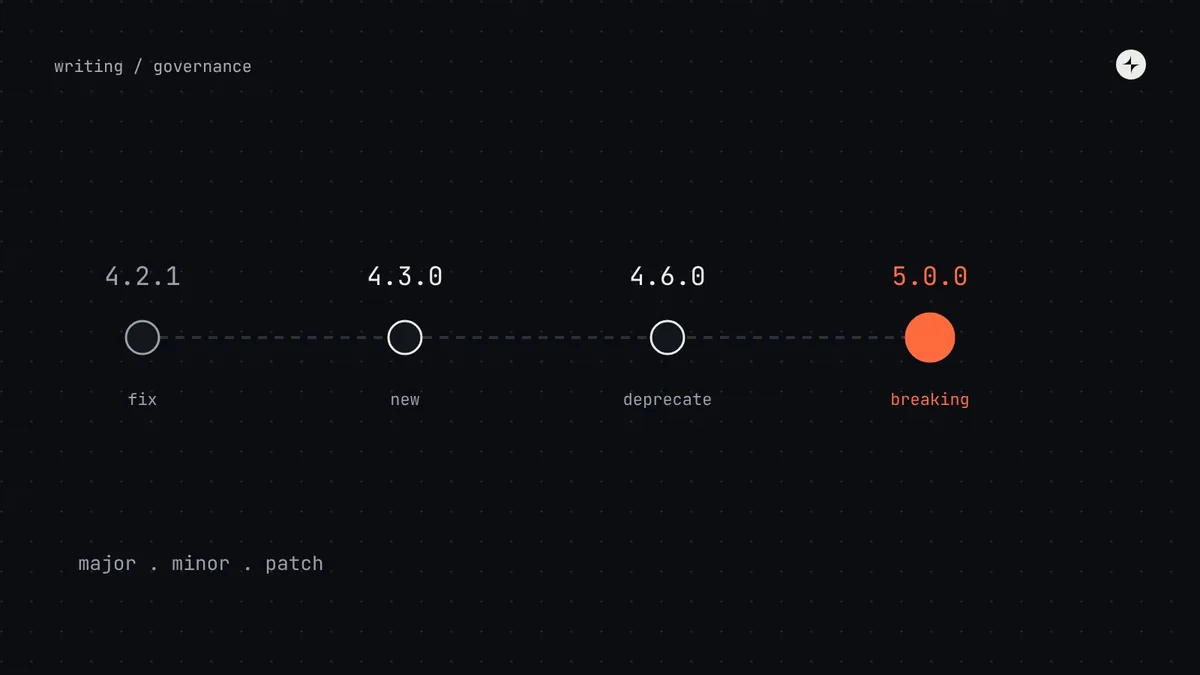
Version a design system with semantic versioning (major.minor.patch): patch for fixes that are safe to take, minor for new things that change nothing existing, and major for anything that could make a product look wrong or stop working. In a design system, that includes visual changes, like padding that no longer fits a table row, not just renamed props. Retire old parts by deprecating them first, with a replacement, a migration guide and a notice period, and remove them only in the next major release.
- Decide in advance which visual changes count as breaking, and write it down.
- Announce breaking changes at least one release cycle ahead, ideally four to eight weeks.
- Track who still uses deprecated parts, and offer a codemod where the change is mechanical.
Why design systems break products
An illustration: the Friday padding change
The system team gives buttons slightly more rounded corners and a little more padding. It's a small visual tweak, shipped on a Friday as a minor release.
On Monday three teams report broken screens: buttons no longer fit in table rows, a toolbar wraps onto two lines, and a checkout button pushes the price off small phones.
A layout-affecting size change is a major release: announced ahead, with before-and-after screenshots, a beta period and a checklist for teams.
Nothing in the code "broke". But the products did. Nathan Curtis wrote a whole article about exactly this: changes to colour, size and spacing can break a product as surely as a change to an API.
Semantic versioning, in plain words
Most design systems label releases with a three-part number like 4.2.1, following the Semantic Versioning convention. Each number tells teams how careful they need to be when updating.
| Which number changes | What it means for teams | Design system examples |
|---|---|---|
| Major · 4 → 5 | "Careful: check or change your work." | A component renamed or removed; a token removed; button sizes changed in a way that affects layouts; a prop renamed. |
| Minor · 4.2 → 4.3 | "New things added; nothing you use should change." | A new component, a new variant, a new icon, a new optional prop. |
| Patch · 4.2.1 → 4.2.2 | "Fixes only. Safe to update." | A bug fix; an accessibility fix that doesn't change size or layout; a docs correction. |
What counts as a breaking change
Code-level breaking changes are well understood: removing a component, renaming or removing a prop, changing a default. Design systems add a second category, which is where most surprises come from.
- A component, prop or token removed or renamed
- A prop's default value changed
- An event or callback changed shape
- A dependency's major version raised (framework, peer libraries)
- Size, padding or height changed in a way that affects layout
- Typography metrics changed (line height, font, size)
- A colour change that alters meaning, not just shade
- A component's outside margin added or removed
Write your own rule list and publish it. A common, workable rule: if a change can move anything around it, it's major. A colour that gets slightly darker inside a fixed space is a minor change, announced. A button that gets 4px taller is major.
A breaking change is any update that could make something stop working or look wrong in a product, so teams need to check or change their own work before taking it.
Release cadence
Predictable timing is itself a form of communication. When teams know releases come every other Tuesday and breaking changes are announced at least a release cycle ahead, they can plan.
| What | When |
|---|---|
| Minor and patch releases | On a regular release day, early in the working week, never late on a Friday |
| Breaking change: first notice | At least one full release cycle before, ideally 4–8 weeks, with the migration guide ready |
| Breaking change: reminders | One week before, and on release day |
| Major releases | Rarely, and bundled: two or three a year beats one a month |
| Critical fixes | Immediately, as a patch |
Bundling matters. Every major release asks every team to stop and check their screens. Group breaking changes into a few planned majors a year, and use the time between them to deprecate.
Deprecation: retiring things gracefully
Sooner or later you'll replace a component. Doing it suddenly breaks things; never doing it leaves two ways to do the same job forever. The healthy middle path:
Use the DTCG format's $deprecated property for tokens, a lifecycle label on documentation pages, and a console warning in development builds for components. Make sure the deprecation shows up wherever people meet the old part.
Migrations: make switching cheap
- A migration guide with before-and-after code and screenshots for every breaking change.
- A codemod: a script that rewrites code automatically for mechanical changes like renamed props.
- A visual diff of affected components, so teams know what to check.
- Extra office hours in the weeks around a major release.
- A beta of the major version, so a couple of pilot teams can try it first.
An illustration: renaming a prop across 600 uses
Button's kind prop is renamed to variant, so every component in the library uses the same word.
About 600 uses across seven products. A rename posted once in a busy channel will be missed.
variant is added in a minor release alongside kind; kind is deprecated with a codemod; it's removed in the next major, with reminders and extra office hours.
That pattern, add the new thing in a minor, deprecate the old, remove in a major, turns most breaking changes into routine maintenance.
Supporting old versions
Decide how long a major version is supported after the next one ships. A common policy: the previous major gets critical fixes and security updates for six to twelve months; older versions get nothing. Publish the policy and track version spread: how many products are on each major. If many products are stuck on old versions, your majors are too frequent or too expensive to adopt.
The short version
- Use semantic versioning: patch for fixes, minor for additions, major for anything that can break a product.
- Visual changes that move layouts are breaking. Write your rules down.
- Bundle breaking changes into a few planned majors; announce them four to eight weeks ahead.
- Add the new in a minor, deprecate the old, remove in a major, with guides and codemods.
- Publish a support policy for old versions and track version spread.
Frequently asked questions
Should design and code share one version number?
It helps if they release together. Many teams version the code package and tag the Figma library release with the same number, so "4.6" means the same thing in both.
Is a colour change a breaking change?
Usually not, if it keeps the same meaning and passes contrast. It becomes breaking if it changes meaning (a warning becoming red) or affects layouts or images that depend on it. Announce it either way.
How long should a deprecation period be?
At least one major release cycle, typically two to six months, depending on how many uses there are and whether a codemod exists.
How often should a design system ship a major version?
Rarely: one to three times a year is common. Each major asks every team to check their work, so bundle breaking changes.
What's a codemod?
A script that rewrites code automatically, for example changing every kind= to variant=. It turns a migration from hours of manual work into one command.
Further reading
- Semantic Versioning 2.0.0The convention behind major.minor.patch.
- Visual Breaking Change in Design SystemsNathan Curtis, EightShapes.
- Versioning Design SystemsNathan Curtis, part of his series on releasing design systems.
- Design system release notes: templatesHow to announce each kind of change.