
The short answer
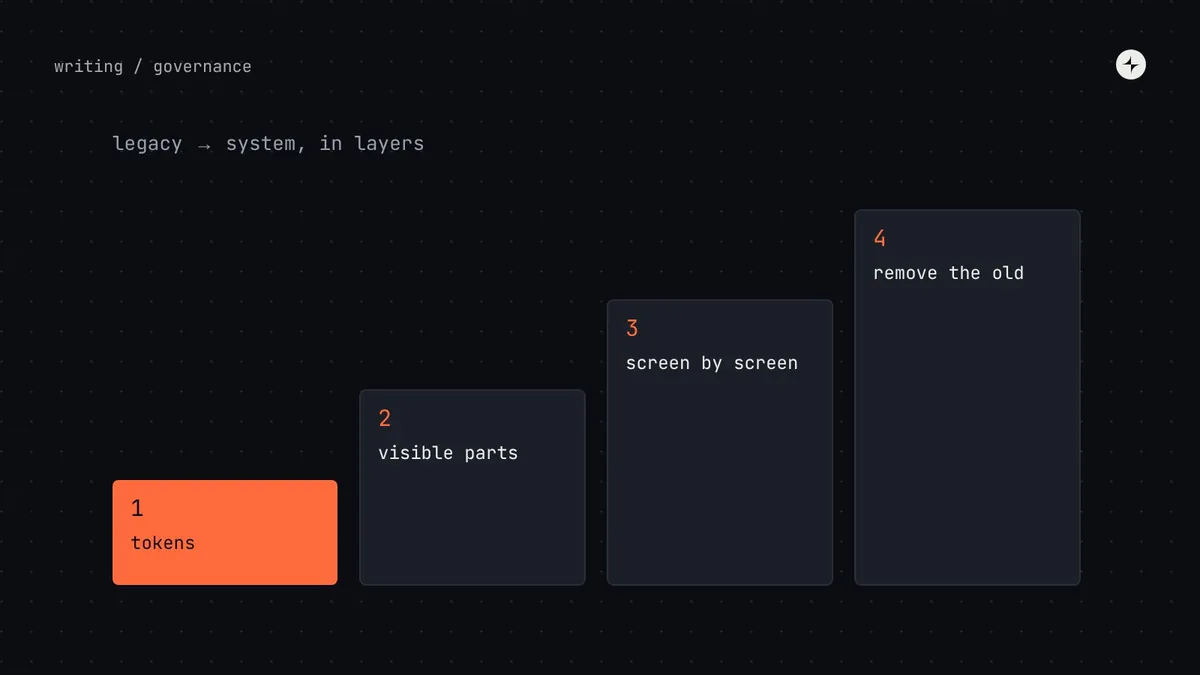
Don't migrate a legacy product onto a design system with a big-bang rewrite. Migrate in layers: tokens first (ship colours, type and spacing into the old product as CSS variables or a theme file, so it looks part of the family within weeks), then replace the most visible components as screens are touched (navigation, buttons, forms), with codemods for mechanical changes and warnings on old components. Track every product on one adoption dashboard, and agree an end state for each legacy product openly: full adoption, tokens only, or retirement.
- Migrate as screens are touched for feature work, not in a separate project nobody funds.
- Make the new way the easy way: a migration guide, an automated codemod and someone to ask.
- Every deprecated component gets a replacement, a guide and a removal date.
Why big-bang migrations fail
Every company with a design system has an older product that can't adopt it quickly: different technology, no team assigned, or a rewrite planned "next year". The tempting answer is a migration project: freeze features, rebuild every screen on the new system, launch. It almost never works. The project competes with feature work, takes longer than planned, and gets cancelled halfway, leaving a product with two systems instead of one.
An illustration: the rewrite that stalled
A team plans a six-month project to rebuild its admin product on the new design system, starting with a full screen inventory.
In month three, a customer deadline pulls half the team back to features. The project pauses with 40% of screens migrated. Users now see two buttons, two tables and two date pickers.
Tokens shipped in two weeks so the whole product looks consistent; then each screen migrated when a feature touches it, with codemods doing the mechanical work. Slower on paper, finished in practice.
A codemod is a script that rewrites code automatically: renaming a prop across a whole codebase, or swapping an old component import for a new one. Tools such as jscodeshift make them practical for JavaScript and TypeScript codebases.
Migrate in layers
Layer 1 works even when the legacy product uses a completely different framework. Tokens are just values; the token pipeline can generate them as CSS variables, a Sass file or a JavaScript theme for whatever the old product uses. See design tokens.
A migration plan across products
Decide an end state for every product
For each legacy product, decide openly what "done" means. A clear plan is better than an endless "someday".
Products with a future
Actively developed, used by many customers. Migrate screen by screen until no old components remain.
Stable products
Rarely changed, but customers still see them. Tokens make them look part of the family; no component migration.
Products on the way out
Leave alone, or tokens only if retirement is far away. Don't spend migration effort on something being switched off.
Make the new way the easy way
Teams migrate when it's easier to migrate than not to. Each deprecated component should come with four things:
A replacement that's actually better
If the new component is missing something the old one did, teams won't move. Find out what before you deprecate.
A migration guide
Old props mapped to new ones, before-and-after code, and the visual differences to expect. Short, with examples.
A codemod for the mechanical part
Renames, import changes and prop mappings done automatically; people review the result and handle the judgement calls.
A warning and a date
A console or lint warning when the old component is used, and a removal date announced well ahead in the release notes.
// The old component still works, but says what to do
export function Dropdown(props) {
  warnOnce("Dropdown is deprecated and will be removed in 6.0. Use Select. Guide: /docs/migrate/select");
  return <Select {...mapDropdownProps(props)} />;
}
Notice the trick in that example: the old component is re-implemented on top of the new one. Teams that haven't migrated still get the new behaviour and accessibility fixes, and the eventual switch is just a rename, which a codemod handles. More on deprecation and version numbers in design system versioning.
Measure the whole portfolio
Leadership needs to see migration progress across the company, not just in the newest product. One simple dashboard is enough:
Track two numbers per product: the share of screens (or component usages) on the system, and the number of deprecated components still in use. The second one tells you whether you can keep your removal dates.
At CARS24, changes were documented in Figma and Storybook and announced with a changelog and migration steps, as part of a governance model with one front door for requests. Read the case study.
The short version
- Avoid big-bang rewrites; migrate in layers.
- Tokens first: the fastest way to make a legacy product look part of the family.
- Migrate screens as feature work touches them, with codemods for the mechanical part.
- Every deprecated component gets a replacement, a guide, a warning and a date.
- Agree an end state per product and track the whole portfolio on one dashboard.
Frequently asked questions
How do you migrate a legacy product to a design system?
Start with tokens, shipped into the old product as CSS variables or a theme file. Then replace the most visible components, migrate screens as feature work touches them, and remove old components on published dates.
Can a legacy product use the design system if it's built in a different framework?
Yes, at the token level. The token pipeline can generate values for any technology. Components may need wrappers or a later rebuild, but colours, type and spacing can align immediately.
How long should a deprecated component stay available?
Long enough for teams to plan the change: typically at least one or two release cycles, announced in advance, with usage tracked so you know when it's safe to remove.
Who pays for migration work?
Usually product teams do the migration as part of feature work, while the system team provides guides, codemods and support. Large migrations can justify dedicated help from the system team.
Further reading
- Strangler Fig ApplicationMartin Fowler, on replacing a system gradually.
- jscodeshiftA toolkit for writing codemods.
- Design system versioningDeprecation and breaking changes.