
The short answer
AI is useful in design system work today for drafting and checking: first drafts of documentation and release notes, flagging off-system colours, spacing and components in designs and code, answering "which component should I use?" from your docs, and helping with migrations. It needs a person for judgement: accuracy, what counts as breaking, when a deviation is deliberate, and accessibility. And it's only as good as what it's given: a well-structured system with named tokens, consistent props and current docs is the best preparation for using AI well.
- Review everything AI produces. A wrong statement in a design system spreads to every product.
- Generated components often look right but miss keyboard behaviour. Test them like any other.
- Use tools your company has approved for unreleased designs and internal code.
A grounded view
AI tools are changing design system work quickly, and it's easy to either overhype them or dismiss them. The useful question isn't "will AI build our design system?" but "which repetitive parts of running one can it take on, and where must a person stay in the loop?"
This is partly first-hand. At JPMorgan Chase, Layer One's founder works on exactly this kind of tooling: an AI agent that does early research and drafts company-wide design patterns for designers to review, and checkers that compare design files and code against the design system for 500+ designers and 1,000+ engineers. See the patterns project and the system checks.
This article is the overview. For step-by-step implementation (described tokens, component metadata, AGENTS.md, an MCP server, Figma and Code Connect, guardrails and a migration plan), see the ten-part course Making your design system AI-ready.
Where AI helps today
| Use | How it helps | Keep a human… |
|---|---|---|
| Drafting documentation | Turns a component's code, props and examples into a first draft of its page | …to check accuracy and add the "when not to use" judgement |
| Writing release notes | Summarises merged changes into plain-language notes | …to judge what's breaking and what teams must do |
| Checking against the system | Flags off-system colours, spacing or components, and suggests the system equivalent | …to decide when a deviation is deliberate and fine |
| Answering "which component?" | An assistant that has read your docs answers everyday questions in chat | …to keep the docs it reads accurate |
| Migrations | Helps write and apply codemods for renames and replacements | …to review every change before it merges |
| Drafting patterns | Proposes a first pattern write-up from examples across products | …to bring research, evidence and taste |
There's a pattern in that table: AI is good at drafting and checking, and the judgement stays with people.
Structure is the best preparation
A well-structured system turns out to be excellent input for AI tools. A messy one gives messy results.
- Tokens named by job, in one source file
- Consistent props across components
- Documentation with "when to use" and "when not to use"
- Written rules: what's breaking, what's allowed
- Hundreds of hard-coded colours with no names
- Three different prop names for the same idea
- Out-of-date docs that contradict the code
- Rules that live only in people's heads
Ask an AI to "build a settings page" with poor input and it will invent its own components and colours. Point it at a well-structured system and it can assemble screens from your parts, which you can then check against the system automatically.
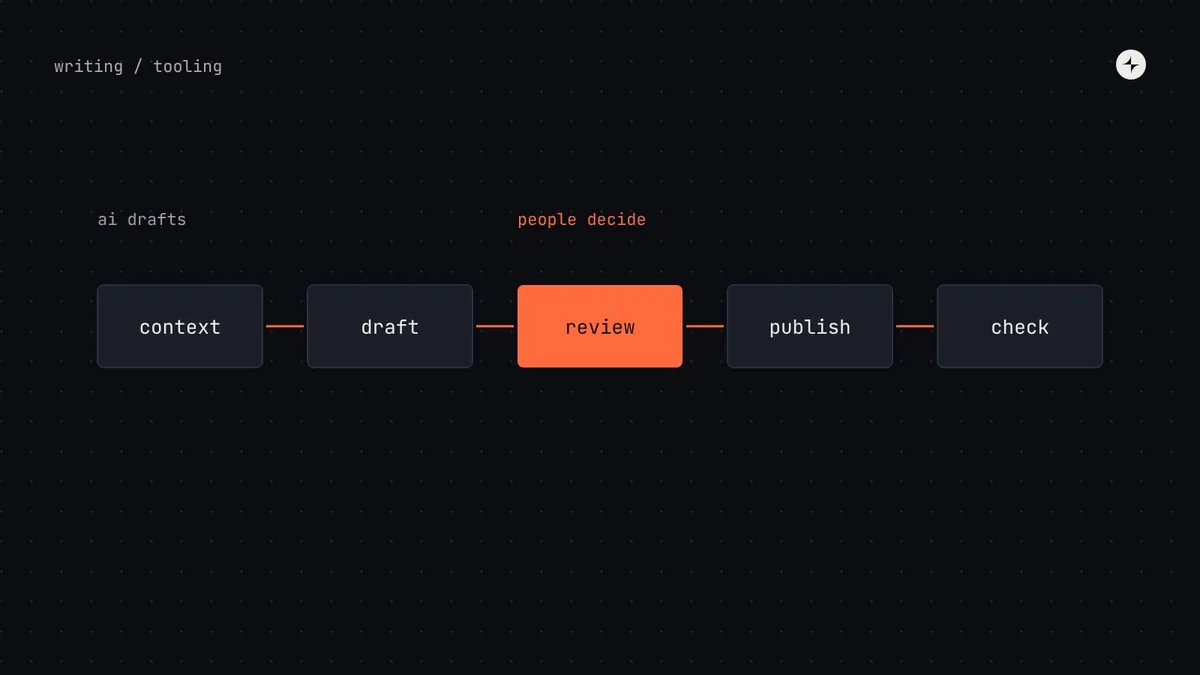
A workflow that works: draft, review, publish
Cautions that matter
The cost of a design system mistake is multiplied across every product that uses it. Four risks deserve real attention:
Confident mistakes
AI tools can produce plausible but wrong documentation or code. In a system used by hundreds of people, a wrong statement spreads quickly. Review everything.
Accessibility by assumption
Generated components often look right but miss keyboard behaviour, focus management or announcements. Test them like any other component.
Inventing new things
Without your system as context, AI invents components and colours. Point it at your system and check the result against it.
Confidentiality
Unreleased designs and internal code are sensitive. Use tools your company has approved, with appropriate data protections.
Before adopting any tool
- What problem does it solve that we actually have today?
- Who will own it and keep it current?
- Does it work with our existing files, repositories and formats, or lock our decisions in?
- How will we know, in three months, whether it was worth it?
- What happens to our work if we stop using it?
Keep your decisions portable either way: tokens in the vendor-neutral DTCG format, components in your own repository. Tools come and go; your decisions shouldn't be locked inside any one product.
Where to start
If you're new to this, start with the automations that pay back first, with or without AI: a token pipeline and lint rules for hard-coded values. Then try AI on release note drafts and documentation drafts, where a human edit is already part of the process. Checking designs and code against the system comes next, once your rules are written down clearly enough for a tool to apply them.
The short version
- AI helps with drafting and checking; people keep the judgement.
- A well-structured system is the best input; a messy one gives messy results.
- Review everything, test generated components for accessibility, protect confidential work.
- Fit AI into the existing process: draft, review, publish, check.
- Keep tokens and components portable, whatever tools you use.
Frequently asked questions
Can AI build a design system?
It can draft parts of one: documentation, release notes, pattern write-ups, code. Deciding what the system should be, and checking the quality and accessibility of what's produced, still needs people.
Can AI check designs against the design system?
Yes, and it's one of the most useful applications: flagging off-system colours, spacing and components and suggesting the system equivalent. A person decides when a deviation is deliberate.
Will AI replace design system teams?
It changes the work more than it replaces it: less writing from scratch and policing by hand, more reviewing, deciding and helping teams.
What's the first AI use case to try?
Drafting release notes from merged changes. The input is structured, a human edit is already part of the process, and the time saved is immediate.
Further reading
- Design Tokens Format Module 2025.10Portable tokens any tool can read.
- ARIA Authoring Practices GuideWhat to test generated components against.
- Design system documentationThe structure that makes AI answers accurate.