
The short answer
Every design system component has two twins: one in Figma and one in code. They drift apart unless you work at keeping them identical. Five habits do most of the work: one vocabulary (the same component names, prop names and values in both); one token source feeding Figma variables and code; one definition of done that only counts a component finished when both twins match; a monthly twin check, an hour comparing recently changed components side by side; and links between the twins (Figma to code, code to docs), so drift is easy to spot. Tools help, but the habits matter more.
- Agreed differences are fine, as long as they're written down. Undocumented ones are drift.
- Release the Figma library and the code package together, with one set of release notes.
- Detach data in Figma and override data in code show where the twins fail people.
Why twins drift
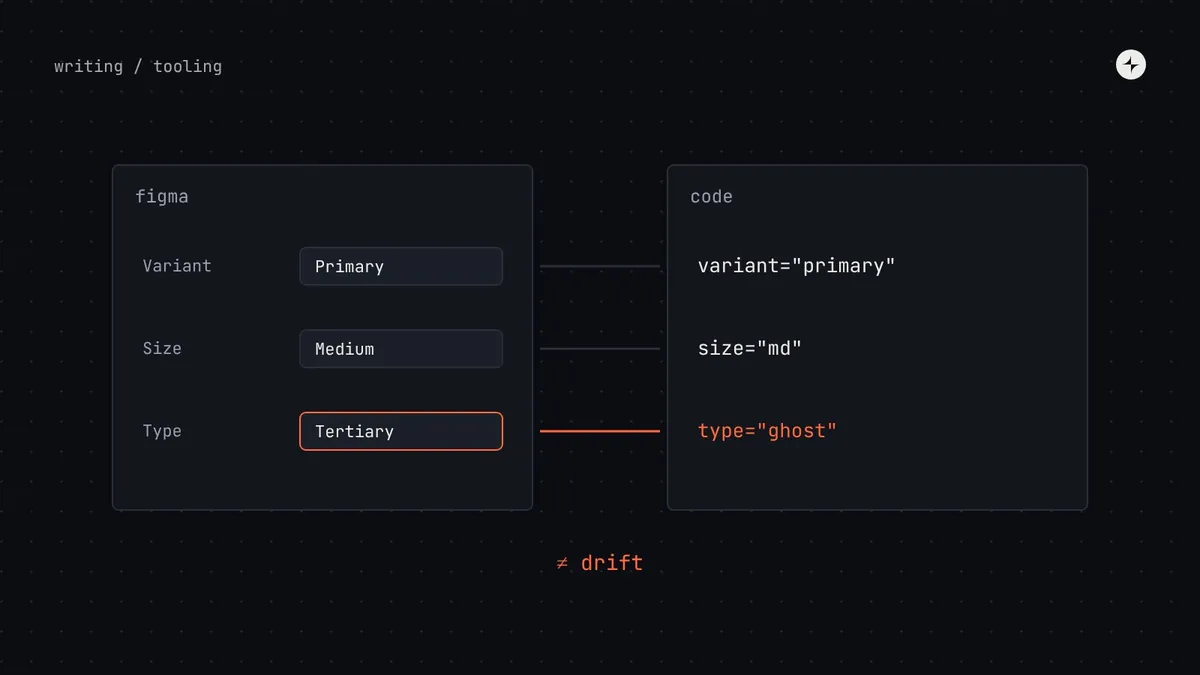
Drift rarely starts with a big decision. A designer adds a "tertiary" variant in Figma for one project; an engineer adds a ghost variant in code for another. A colour is tweaked in a Figma style but not in the token file. Six months later, designers hand over screens using options that don't exist in code, engineers rebuild them locally, and nobody's sure which twin is right.
An illustration: three dropdowns, all called "Dropdown"
Over two years, three engineering teams each built a dropdown: one wraps an old library, one is custom, one was copied from the system and modified. Figma has a fourth.
A keyboard accessibility bug exists in all three coded versions and is fixed differently in each. A design update to the dropdown takes three projects. New engineers don't know which to use.
One dropdown, matching Figma exactly; a migration guide; an automatic warning when the old ones are used; a date after which they're deleted.
Five habits that keep the twins identical
1 · One vocabulary
The simplest and most effective rule: the names and options in Figma match the names and options in code, exactly. If the design file says "Variant: Primary / Secondary / Danger", the code says variant="primary" | "secondary" | "danger". Not "kind", not "solid / outline".
| In Figma | In code | Status |
|---|---|---|
| Variant = Primary | variant="primary" | Match |
| Size = Medium | size="md" | Match (agreed short form, documented) |
| State = Disabled | disabled | Match (Figma shows it as a state; code as a switch; documented) |
| Type = Tertiary | variant="ghost" | Mismatch: rename one of them |
| Has icon = Yes + Icon = Send | icon="send" | Match (two Figma properties, one prop; documented) |
More on naming props in component props best practices.
2 · One token source
If colours, spacing and type live separately in Figma styles and in code, they will diverge. Keep tokens in files in the vendor-neutral DTCG format in your repository, and generate both sides from them: CSS variables or platform values for code, and Figma variables for design. Changes then go through review like any code change.
3 · One definition of done
Most design–engineering friction comes from one question: when is a component actually done? If designers think "done" means the Figma file is published and engineers think it means the code is merged, nothing is ever really finished. Agree one definition, for both twins:
- Figma and code components have the same name, props and values.
- Every variant and state exists in both, and in the component workshop.
- Styles use tokens only; lint passes.
- Keyboard and screen reader behaviour tested by a person.
- Visual, behaviour and automated accessibility tests pass.
- Documentation page complete.
- Release note written; Figma library and code package released together.
4 · A monthly twin check
Once a month, a system designer and a system engineer spend an hour going through recently changed components side by side: Figma on one screen, the coded version in the workshop on the other. List every difference and decide which twin is right. It's tedious, and it's the cheapest way we know to stop drift. Practitioner view
5 · Links between the twins
Link each Figma component to its code and documentation, and each documentation page back to Figma and the workshop. Many teams use Figma's Dev Mode and Code Connect to show the real code snippet for a component right inside the design file, which also makes mismatched props obvious the moment an engineer inspects a design.
Reading the trail the twins leave
Both twins leave usage data, and the gaps between them show up there first.
Inserts and detaches
Library analytics show how often each component is inserted, and how often designers detach it to customise it. Frequent detaches mean the component doesn't do something people need.
Imports, versions and overrides
A simple script counts which components each product imports, which package version it uses, and where styles are overridden or components copied.
An illustration: what the detach numbers revealed
The alert component is inserted 900 times and detached 310 times.
Almost every detached copy adds a second button: "Retry" next to "Dismiss". The component allowed only one.
They add an optional second action to both twins, release it as a minor update, and the detach rate falls. No survey needed.
Use the data to learn, not to police. If a team detaches a component a lot, the first question is "what does the component fail to do for you?", not "why aren't you following the rules?"
Which twin leads?
Teams often ask whether design or code should be the source of truth. In practice, it's different for different things:
| What | Source of truth | Why |
|---|---|---|
| Tokens | Token files in the repository | Reviewed, versioned and generated for every platform |
| Behaviour, accessibility, props | Code | It's what users actually get; Figma can only describe it |
| Visual design of new work | Figma, until it's built | Exploration is faster in design; once shipped, code and Figma must match |
| Usage guidance | The documentation site | One place for "when to use it", linked from both twins |
At JPMorgan Chase, two tools point out where a design file or a piece of code doesn't match the design system, so problems are fixed before review. See the project.
The short version
- Same names, props and values in Figma, code and docs. Document agreed differences.
- One token source generates both Figma variables and code.
- A component is done when both twins match and are released together.
- Run a one-hour twin check every month.
- Link the twins, and read detach and override data as feedback.
Frequently asked questions
How do you keep Figma and code in sync?
Use the same names and props in both, generate Figma variables and code values from one token source, agree a shared definition of done, release both together, and compare recently changed components side by side every month.
Should Figma or code be the source of truth?
Tokens live in files in the repository; behaviour and props are defined by code; new visual design starts in Figma. Once a component ships, both twins must match.
Can tokens be synced to Figma automatically?
Yes. Token files in the DTCG format can be turned into Figma variables by a plugin or a script using Figma's API, from the same source that generates code.
What's a twin check?
A regular one-hour session where a system designer and engineer compare recently changed components in Figma and code, list differences and decide which side is right.
Further reading
- Design Tokens Community GroupThe shared format for tokens.
- Code ConnectFigma. Real code snippets inside design files.
- Component props best practicesDesigning props both twins can share.
- Design system tools by stageThe toolchain behind both twins.