
The short answer
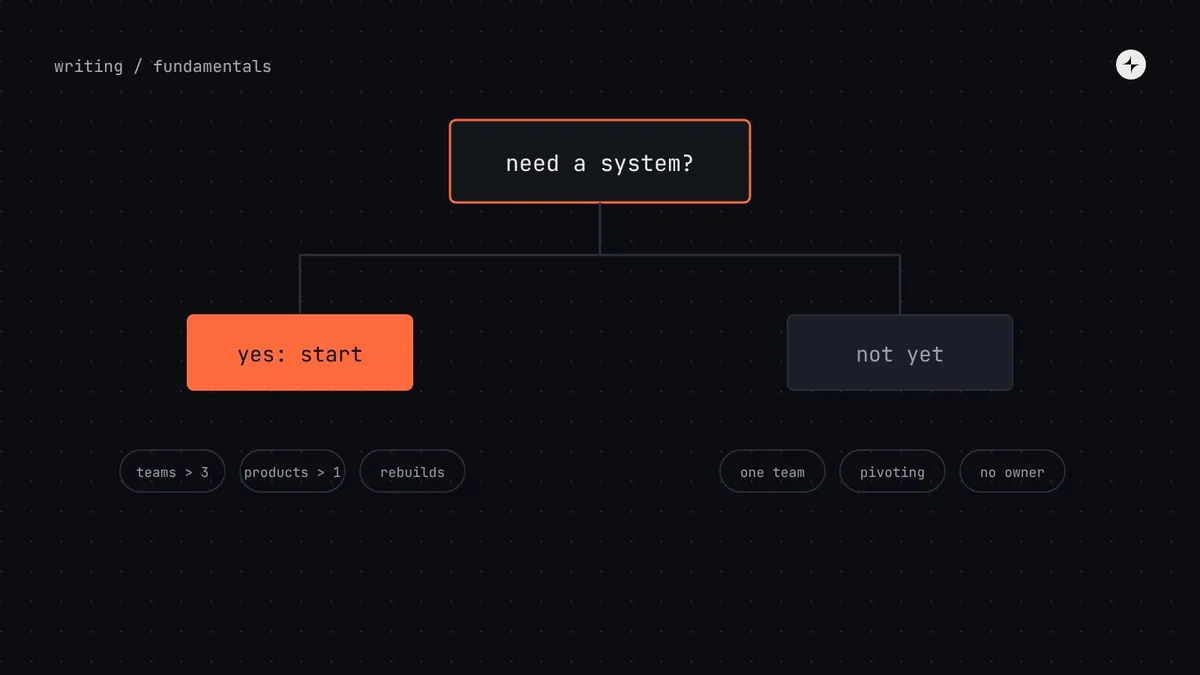
Every product already has a design system: it's usually just unwritten, inconsistent and living in a few people's heads. The real question is how much of it to write down, and when. You need a formal design system when UI is being built in more than one codebase, product or platform, or by more than about three squads, and engineering will commit to using it. Before that, name your foundations as tokens and theme an open-source component library.
- Count engineers, products and platforms, not just designers.
- If design and code disagree more than designers disagree with each other, a UI kit is no longer enough.
- It's too early if nobody will own it, nobody will use it, or the UI will be rebuilt within six months.
Seven questions founders and leaders ask
When we sit down with founders and product leaders, the same seven questions come up almost every time. Here are our honest answers, including when the answer would change.
1. Does every company need a design system?
Every company needs consistent design decisions. Not every company needs a formal system with its own team. Two people sitting side by side can stay consistent just by talking. Once decisions are being made by people who don't talk every day, the unwritten system starts to split.
2. Isn't this only for big enterprises?
No. Small companies run them too, just smaller. zeroheight's 2025 survey found teams averaging about three people at companies with fewer than 100 employees, and about nine at companies with 500 or more. (People who answer a design systems survey usually have one, so treat that as a lean towards larger numbers.) What big companies need more of isn't system, it's coordination.
3. Should a startup wait until it finds product–market fit?
Wait on the big system. Don't wait on the basics. Before product–market fit your product will change shape, so a large custom component library is likely wasted effort. But naming your colours, type and spacing takes days, and it makes pivots cheaper: restyling a product built on named values is a quick change instead of a rebuild.
4. We have five or six designers. Is that enough to justify one?
Usually yes, but count engineers and products too. Five designers on one product with eight engineers can stay consistent with a good UI kit. Five designers supporting forty engineers across a web app, a mobile app and an admin panel cannot: they'll spend half their week answering "which grey is it?" in Slack.
5. When is a UI kit enough?
When designers disagreeing with each other is the main problem, rather than design and code disagreeing. A UI kit is often enough for one product, on one platform, in one codebase, built by fewer than about three squads, with engineering already using a well-styled off-the-shelf library.
6. How do we know we've outgrown what we have?
When inconsistency starts costing you time in delivery, not just debates in design reviews. The checklist of signs below is a practical test.
7. When is it too early, or unnecessary?
When nobody will own it, nobody will use it, or the product won't live long enough to benefit. Hold off if you expect to rebuild your UI within six months, if one designer and one or two engineers build everything together, if it's a short-lived marketing site, or if engineering leadership hasn't agreed to use it.
Where are you today? Five stages of design system maturity
Design systems grow in stages, like a staircase. The most useful thing you can do is work out which step you're on and aim for the next one, not the top. Jumping straight to the top usually means building approval processes for components nobody uses yet.
| Stage | You'll recognise it when… | The next step | What it takes |
|---|---|---|---|
| 0 · Unwritten | Designers ask each other for hex codes; engineers measure screenshots. | Write down the basics; publish a UI kit. | 1–3 weeks of one designer |
| 1 · Shared styles | Designs look consistent, but the code is full of colours that "look about right". | Name the values once and share them with code; build the most-used components. | 1–3 months, a designer and an engineer, part-time |
| 2 · Basics in code | New screens use the package, older ones don't, and nobody owns incoming requests. | Give it owners, documentation, releases and a way to contribute. | A small dedicated team (1.5–3 people) |
| 3 · Looked after | Several teams contribute; updates ship on a rhythm; usage is tracked. | Themes, multiple platforms, decision-making across the company. | A dedicated team plus contributors in product teams |
| 4 · Platform | The system is treated like infrastructure, with its own roadmap and targets. | Keep it healthy; make change cheaper; automate checks. | An ongoing product budget |
A decision tree for your next planning meeting
If you only have ten minutes with your leadership team, walk through these four questions in order. Notice that they ask about engineering and products before they ask about design. That's on purpose.
Will this product's interface still exist, in roughly this shape, a year from now?
No → just the basics. Name your colours, text and spacing; style an off-the-shelf library. Come back to this after product–market fit. Yes → next question.
Is UI being built in more than one codebase, platform or product, or by more than about three squads?
No → a UI kit plus shared values in code (stages 1–2), with one owner who has about a day a week of protected time. Yes → next question.
Will engineering leadership commit to actually using a shared component package?
No → stop and get aligned first. A system that design builds and engineering ignores will fail. An audit is often the best way to build a shared case. Yes → next question.
Do you need dark mode, several brands, white-labelling or several platforms?
No → a core system (stages 2–3): a small dedicated team, 15–25 components, documentation and regular releases. Yes → a platform (stages 3–4): a careful token structure, output for every platform and shared ownership with product teams.
Question 3 is the one teams most often skip, and it's the most common root cause of failed systems we see in audits. A design system that only designers use is an expensive UI kit.
Signs you've outgrown what you have
You don't need a consultant to tell you whether you have a consistency problem. Most of the evidence is sitting in your code and your calendar. Every item below can be counted or observed, which matters, because these become your "before" numbers later.
- A search for colour codes finds hundreds of different values.
- There's more than one button component (or dialog, or table).
- The same accessibility bug has been fixed in several places.
- Engineers think a brand colour change would take weeks, not hours.
- Code reviews regularly turn into debates about spacing and styling.
- Design review has become a bottleneck before every release.
- New designers or engineers take weeks to learn "how we do UI here".
- Customers or sales say your products feel like different companies.
- A second product, platform, brand or acquisition is on the roadmap.
- Enterprise customers now ask for accessibility compliance.
An illustration: the dark mode request that exposed everything
A B2B product gets its most-requested feature for the third quarter running: dark mode. The PM estimates two sprints.
Engineering finds 340 colour values typed directly into the code, many of them nearly identical greys. Nothing says which grey is for text and which is for borders, so nothing can be switched. Two sprints become two quarters.
With colours named by their job (text, border, background), dark mode is a second set of values for the same names. It becomes a design and testing task, not a rewrite. See dark mode with design tokens.
Four companies, four different answers
To make this concrete, here are four situations we see again and again. They're composites, not real clients, but you'll probably recognise one of them. Illustration
3 designers, 4 engineers, still finding its feet
The founder wants "a proper design system". The product changes direction every month or two.
Needs: about a week to name colours, type and spacing, plus an open-source component library styled to match. Custom components would be redesigned with every pivot; named values survive them. Revisit when a second squad forms.
7 designers, 45 engineers, 2 products
A main web app plus an acquired analytics product on different code. Three button styles in production. Customers keep asking for dark mode.
Needs: a two-week audit, then shared tokens that can style both products and 15–20 shared components, run by a core team of about two people with a named designer and engineer in each squad.
30+ tools built by different vendors
Every tool looks different. Accessibility is now a legal requirement. Nobody owns the interface centrally.
Needs: tokens and accessibility rules first, not components, because those can be added to old tools. A central team sets the rules, with a clear process vendors must follow to contribute.
Rebuilt every two or three years
The marketing team asks for "a design system for the website". An agency builds and maintains it.
Needs: a style guide and reusable page sections in the CMS, sharing the product's named colours and fonts. Not a product-grade system for a site that will be thrown away in two years.
Company C is close to a real one: at CARS24, the design system for more than thirty internal tools started with an audit of twenty of them, then tokens and Storybook. You can read how in one design system for 30+ internal tools.
When the answer is "not yet"
Saying "not yet" is a legitimate, often smart, decision. But "not yet" shouldn't mean "nothing". Here's what to do instead, so you're ready when the time comes:
Name your foundations
Colours, type sizes, spacing and radius as tokens or CSS variables, used in code from day one. It costs days and survives every pivot.
Theme a good open-source library
Radix, React Aria, MUI or similar, styled with your tokens. You get accessible components without building them.
Agree one habit
Before building a new piece of UI, check whether it exists. If you build something reusable, put it in the shared place.
Set a trigger to revisit
A second squad, a second product, a native app, a rebrand or an enterprise accessibility requirement. Write it down so the decision gets made on purpose.
Are you ready? A checklist
Run through this before you commit budget. A "no" doesn't mean stop. It means that item becomes the first thing to work on.
- A sponsor. A leader with budget who will defend the system in planning meetings.
- Engineering on board. Engineering leadership agrees teams will use the shared code.
- An owner. A named person with protected time, written into their role.
- An audit. You know what exists today: styles, components, values, accessibility gaps. See how to run one.
- A pilot team. One product team volunteers to build with the system first and give honest feedback.
- A baseline. You've measured something you expect to improve: build time, colour count, accessibility issues.
What to do next at each stage
| If you're at… | Do this in the next quarter | Read next |
|---|---|---|
| Stage 0–1 | Name foundations as tokens; theme an open-source library; publish a small UI kit. | Design tokens guide |
| Stage 1–2 | Audit; agree the 10–15 most-used components; build them in design and code with a pilot team. | How to build a design system |
| Stage 2–3 | Name owners; set up a request process, documentation and a release rhythm. | The operating model |
| Stage 3–4 | Themes and platforms; decision rights across departments; adoption metrics. | Governance |
The short version
- Every product has a design system; the question is how much to write down, and when.
- Don't wait on the basics: named foundations cost days and make pivots cheaper.
- You need a formal system when UI is built in several places by several teams, and engineering commits to using it.
- Find your stage and aim one step up, not for the top.
- "Not yet" is fine, as long as you set a trigger to revisit.
Frequently asked questions
At what company size do you need a design system?
Size alone doesn't decide it. The trigger is how many places UI is built: more than one codebase, product or platform, or more than about three squads. That often happens somewhere between 20 and 60 engineers.
Should a startup build a design system?
A light one. Name foundations as tokens and theme an open-source component library. Save custom components and formal process for after product–market fit.
Can we just use Material, Shadcn or another open-source system?
Yes, as the component layer. You'll still need your own tokens to make it look like your brand, documentation for how your team uses it, and someone who owns the decisions. Open source gives you parts, not agreements.
Who should own the design system first?
A designer and an engineer, together, each with about a day a week of protected time. Ownership by design alone usually produces a UI kit that never reaches code.
How much does a small design system cost?
For a startup, roughly 6–7 FTE-months in the first year: half a designer and half an engineer for three months, then a day a week each to run it. See design system ROI and cost for the full model.
Further reading
- The Design System Maturity ModelBen Callahan, Sparkbox. A complementary maturity model for the system itself.
- Design Systems Report 2025zeroheight. Survey data on team sizes and how systems are run.
- Design That ScalesDan Mall. On building a sustainable design system practice.
- Design system ROI: an honest modelWhat it costs, and how big your team needs to be before it pays back.