
The short answer
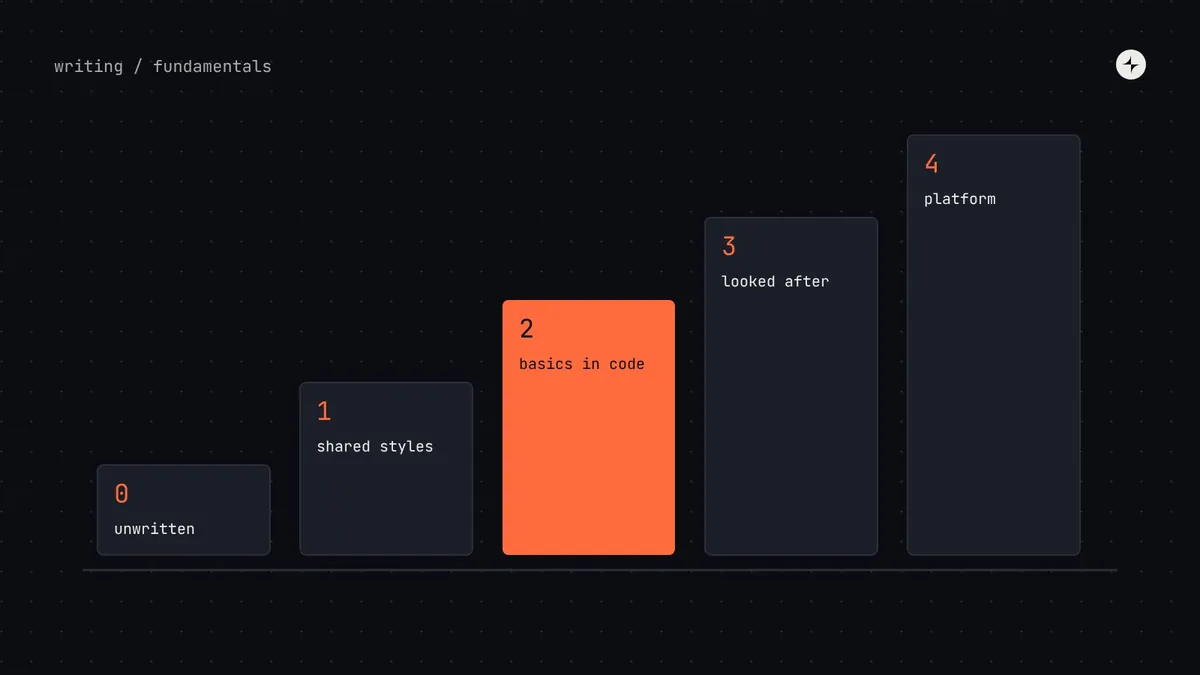
A design system maturity model describes the stages a company's design system usually moves through. Ours has five: 0 · Unwritten, 1 · Shared styles, 2 · Basics in code, 3 · Looked after and 4 · Company platform. Each stage solves the problems of the one before and costs more to run. The useful question isn't "how mature are we?" but "what's the next step, and is it worth it now?"
- Aim for the next stage, not the top. Jumping ahead means building process for components nobody uses yet.
- Stage 2, named values shared by design and code plus 10–25 core components, is where most growing product companies get the best return.
- Stages describe your company's relationship with the system, not the quality of its buttons.
Why a maturity model is useful
Every product already has a design system. It's usually just unwritten: decisions live in old screens and in a few people's heads. The question teams actually face is how much of it to write down, share and look after, and when.
A maturity model turns that vague question into a concrete one. Instead of debating whether you "have a design system", you can agree where you are, what's holding you back, and what the next stage would take in people and months. It's also a good antidote to copying a tech giant: their stage 4 setup would suffocate a team at stage 1.
The five stages
Stage 0: Unwritten
Designers ask each other for hex codes. Engineers measure screenshots. Nothing is wrong yet, because one or two people make every decision and can keep them consistent by talking. It stops working the moment decisions are made by people who don't talk every day.
Stage 1: Shared styles
A Figma library or UI kit exists, and maybe a handful of colours are shared in code. Designs look consistent, but the code is full of values that "look about right". This stage stops designers drifting apart. It does nothing to stop code drifting away from design.
Stage 2: Basics in code
Colours, type and spacing are named as design tokens that design and code both read, and engineers import 10–25 core components from a shared package. New screens use the system; older ones don't yet. The typical gap: nobody owns incoming requests.
Stage 3: Looked after
The system has named owners, documentation, versioned releases and a way for teams to contribute. Usage is measured. Several teams use it and some contribute back. This is where a design system starts to behave like a product rather than a project.
Stage 4: Company platform
Several brands and platforms run on one source of decisions. There are clear rules across departments, and the system's health is tracked like any other product, with its own roadmap and budget. Most companies never need this stage, and that's fine.
How to tell which stage you're at
Each stage has tell-tale signs. Read down the second column and stop at the first row that sounds like your team.
| Stage | You'll recognise it when… | The next step | What it takes |
|---|---|---|---|
| 0 · Unwritten | Designers ask each other for hex codes; engineers measure screenshots. | Write down the basics; publish a UI kit. | 1–3 weeks of one designer |
| 1 · Shared styles | Designs look consistent, but the code is full of colours that "look about right". | Name the values once and share them with code; build the most-used components. | 1–3 months, a designer and an engineer, part-time |
| 2 · Basics in code | New screens use the package, older ones don't, and nobody owns incoming requests. | Give it owners, documentation, releases and a way to contribute. | A small dedicated team (1.5–3 people) |
| 3 · Looked after | Several teams contribute; updates ship on a rhythm; usage is tracked. | Themes, multiple platforms, decision-making across the company. | A dedicated team plus contributors in product teams |
| 4 · Platform | The system is treated like infrastructure, with its own roadmap and targets. | Keep it healthy; make change cheaper; automate checks. | An ongoing product budget |
Company size is a poor guide. A 30-person company selling a white-labelled product to banks might need stage 3, because every client is a new brand. A 300-person company with one simple product may be perfectly served by stage 2.
The system has its own maturity curve too
The stages above describe your company's relationship with its design system. Ben Callahan at Sparkbox describes a complementary model for the system itself: it starts with building version one, then growing adoption, before settling into a long-lived product. The two views fit together. Whatever stage your company is at, a new system goes through a hard early phase where it has to prove it's worth using.
That early phase is where many systems stall. They reach stage 2 technically, with tokens and components in a package, but adoption stays flat because nobody is helping teams switch. Moving up a stage is as much about adoption work (pilots, documentation, office hours, champions) as about building.
How to move up one stage
0 → 1: write the basics down
Collect the colours, text styles and spacing values actually in use, pick the ones to keep, and publish them as a small UI kit. One designer, a few weeks.
1 → 2: connect design to code
Name foundations as tokens in one source that feeds Figma variables and code. Build the 8–10 most-used components in both, inside a real product project. Start with an audit so you build the right ones.
2 → 3: give it an operating model
Named owners with protected time, a docs site, versioned releases, one front door for requests and a contribution process. See the operating model.
3 → 4: scale on purpose
Only when a real change needs it: a second brand, native apps, several business units. Add brand layers, platform outputs and cross-department governance. See multi-brand design systems.
Signs you're aiming too high
Process before users
An approval council exists before more than two teams use the system. Every change waits for a meeting that has nothing to decide.
A roadmap of components nobody asked for
The backlog is driven by what the system team finds interesting, not by what product teams are building next.
Multi-brand architecture for one brand
Three tiers of tokens and a theming engine for a single product with one theme. It's flexibility you pay for every day and never use.
A docs platform with nothing to document
A polished portal launched before the components it describes are stable. It goes out of date in months.
The rule we use: use the lightest setup that keeps the system trusted and moving. Add the next piece of structure when a real problem appears, such as requests waiting too long, decisions stalling or quality slipping.
Measuring progress between stages
Each step up should show up in a few numbers. Baseline them before you start:
| Moving to… | Watch |
|---|---|
| Stage 1 | Number of distinct colours and text styles in design files |
| Stage 2 | Hard-coded values in code (falling); share of new screens built with the package |
| Stage 3 | Adoption per team; time to first response on requests; contributions per quarter; satisfaction |
| Stage 4 | Adoption per brand and business unit; version spread; cost of a cross-brand change |
The full set of metrics, and how to measure each, is in how to measure design system success.
The short version
- Five stages: unwritten, shared styles, basics in code, looked after, company platform.
- Find your stage by its symptoms, then aim one step up, not for the top.
- Stage 2 is where most growing product companies get the best return.
- Moving up is as much about adoption and operating model as about building.
- Add structure only when a real problem calls for it.
Frequently asked questions
What is a design system maturity model?
A description of the stages a design system typically moves through, from unwritten decisions to a company-wide platform, with the signs of each stage and what it takes to move to the next.
Which stage should a startup aim for?
Usually stage 1, moving to stage 2 as the team grows: named foundations in code and a themed open-source component library. Owners and process come with more teams.
Can you skip a stage?
You can build the parts of a later stage, but you can't skip the adoption that each stage depends on. A stage 3 operating model around components nobody uses yet is just overhead.
How long does it take to move up a stage?
Roughly: weeks for stage 0 to 1, a few months for 1 to 2, and six to twelve months for 2 to 3, depending on team size and how many products need to adopt.
Is stage 4 the goal?
No. Stage 4 is right for organisations with several brands, platforms or business units. For most product companies, a healthy stage 3 is the goal.
Further reading
- The Design System Maturity ModelBen Callahan, Sparkbox. Maturity from the system's point of view.
- Design That ScalesDan Mall. Pilots and adoption in the early stages.
- Do you need a design system?A decision tree for whether to start at all.