
The short answer
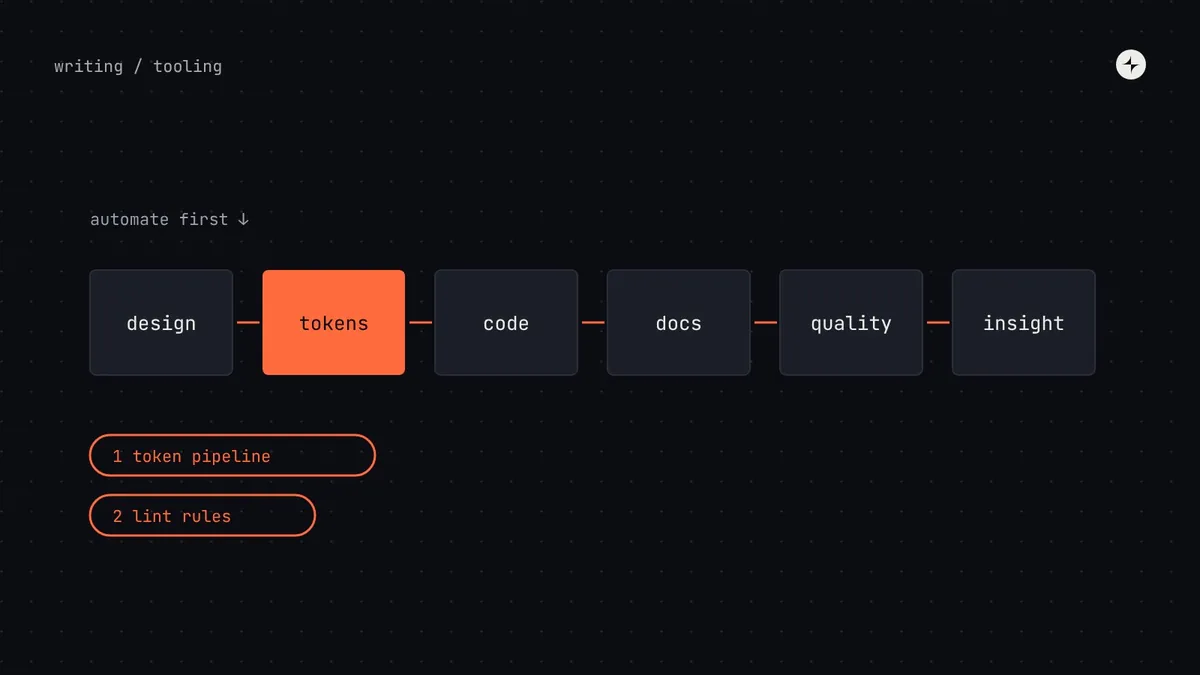
A design system uses tools in six areas: design (Figma libraries and variables), tokens (files in the DTCG format plus a build tool such as Style Dictionary), code (your package and a workshop such as Storybook), documentation, quality (lint, visual regression and accessibility tests) and insight (usage data). Match the tool set to your stage: a startup needs one Figma library and a shared file of values; a platform needs multi-brand tokens, a docs site with search and a health dashboard. If you automate only two things, automate the token pipeline and lint rules for raw values: they're cheap and prevent the most common problems.
- Decide how the system works first, then pick tools that make that easier.
- Keep tokens in a vendor-neutral format and components in your own repository, so tools stay replaceable.
- Every tool needs an owner. An unowned tool becomes an out-of-date mirror.
Tools serve the process
It's tempting to start a design system by choosing tools: a documentation platform, a token manager, a component workshop. Tools feel like progress. But a tool without an owner and a process quickly becomes an expensive, out-of-date mirror of what's really happening.
An illustration: the documentation site nobody updated
A company buys a polished documentation platform and spends a month filling it with beautiful pages for every component.
Nobody's job includes keeping it current. Within six months half the pages describe old versions. Teams stop trusting it and ask in chat instead.
Docs in the definition of done, with props tables and examples generated from code, so updating them is part of shipping rather than a separate chore.
So the order matters: decide how the system will work, then pick tools that make that way of working easier. And build where the system lives: put it into the files, repositories and tools teams already use every day, rather than asking them to visit somewhere new.
The toolchain, mapped
| Area | What it does | Typical tools | Connects to |
|---|---|---|---|
| Design | Shared components and variables for designers | Figma libraries and variables | Tokens (variables), docs (links) |
| Tokens | One source of decisions, translated for every platform | Token files in the DTCG format; a build tool such as Style Dictionary | Design variables, code packages |
| Code | The components, packaged and versioned | Your framework, a package registry, a workshop such as Storybook | Tokens, tests, docs |
| Documentation | How and when to use everything | A docs platform, or a docs site generated from the code | Code (live examples), design (links) |
| Quality | Catch problems before they ship | Lint rules, visual regression tests, automated accessibility checks | Code, pull requests |
| Insight | Know what's used and where | Figma library analytics; scripts that scan product code | The health scorecard |
The right tools for your stage
A startup doesn't need an enterprise toolchain, and an enterprise can't run on a shared spreadsheet. Here's the minimum tool set we'd suggest at each stage of the maturity model. Add more only when a real problem calls for it. Practitioner view
| Stage | Design | Tokens | Code | Docs | Quality and insight |
|---|---|---|---|---|---|
| 1 · Shared styles | One Figma library | A shared file of values | A themed off-the-shelf library | A single page | Design reviews |
| 2 · Basics in code | Library + variables | Token files + build tool | Your package + workshop | Workshop pages | Lint for raw values |
| 3 · Looked after | Libraries split by purpose | Light and dark modes | Versioned releases | A docs site | Visual and accessibility tests; usage scripts |
| 4 · Platform | Brand and platform libraries | Multi-brand, multi-platform | Several packages and platforms | Docs platform with search | Health dashboard; automated migrations |
Automation that pays for itself
Every hour the system team spends on repetitive upkeep is an hour not spent helping product teams. These automations, roughly in the order we'd build them, give the best return.
| # | Automation | What it saves | Effort |
|---|---|---|---|
| 1 | Token pipeline | Hand-copying values into code and design, and the mismatches that follow | Days |
| 2 | Lint rules for raw values | Hard-coded colours and spacing slipping in; reviewers policing by hand | Days |
| 3 | Visual regression tests | Accidental visual changes; nervousness about every release | 1–2 weeks |
| 4 | Automated accessibility checks | Common accessibility mistakes reaching products (a person still tests keyboard and screen reader use) | Days |
| 5 | Release notes from changes | Writing release notes from memory at the last minute | Days |
| 6 | Usage dashboard | Guessing which components and versions are used where | 1–2 weeks |
| 7 | Codemods for migrations | Teams rewriting code by hand for breaking changes | Per change |
A lint rule for raw values can be as simple as this, in a stylesheet linter:
/* stylelint: colours must come from tokens */
"declaration-property-value-disallowed-list": {
  "/color|background|border/": ["/#[0-9a-f]{3,8}/i", "/rgb\\(/"]
}
Where AI fits
AI tools are good at drafting and checking, and only as good as the information they're given: drafting documentation from props and examples, summarising changes into release notes, flagging off-system colours in designs and code, answering "which component?" questions from your docs, and helping write codemods. A well-structured system (named tokens, consistent props, documented components) turns out to be excellent input for them. We cover this in detail, with the cautions that matter, in AI in design systems.
At JPMorgan Chase, two tools point out where a design file or a piece of code doesn't match the design system, so problems are fixed before review. See the project.
Questions to ask before adopting any tool
- What problem does it solve that we actually have today?
- Who will own it and keep it current?
- Does it work with our files, repositories and formats, or does it lock our decisions in?
- How will we know in three months whether it was worth it?
- What happens to our work if we stop using it? If the answer is "we lose it", keep looking.
The short version
- Six areas: design, tokens, code, docs, quality, insight.
- Decide how the system works first; tools make that easier.
- Match the tool set to your stage. More tools aren't better.
- Automate the token pipeline and lint rules first.
- Keep decisions portable: tokens in DTCG, components in your repository.
Frequently asked questions
What tools do you need for a design system?
At minimum, a shared Figma library and a place for shared values. As the system grows: token files with a build tool, a coded component package with a workshop such as Storybook, a documentation site, automated tests and usage data.
Do we need a dedicated documentation platform?
Not at first. Workshop pages or a simple docs site generated from the code are enough for most teams until stage 3 or 4. What matters most is that updating docs is part of shipping.
What should we automate first?
The token pipeline and lint rules for raw values. Both take days and prevent the most common design system problems.
How do we avoid tool lock-in?
Keep tokens in the vendor-neutral DTCG format and components in your own repository, and check before adopting a tool what happens to your work if you stop using it.
Further reading
- Style DictionaryAn open-source token build tool.
- StorybookA widely used component workshop.
- Design Tokens Community GroupThe vendor-neutral token format.
- Keeping Figma and code in syncThe habits the tools support.