
The short answer
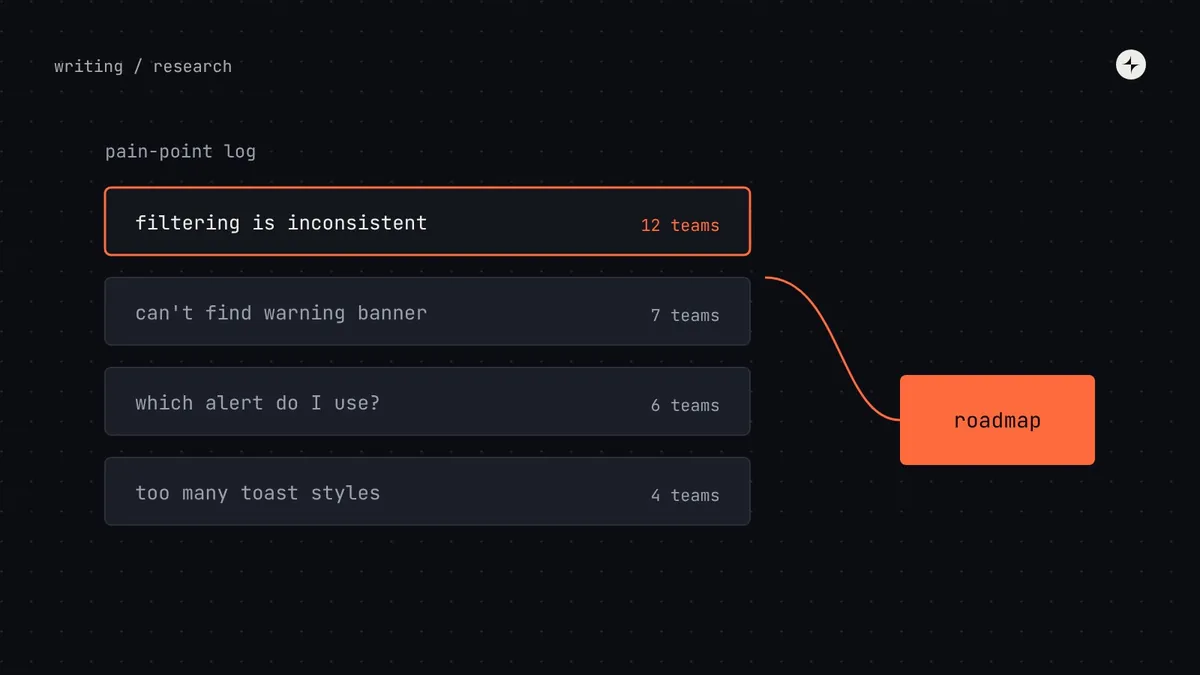
A design system's users are the designers, engineers, product managers and content designers in your own company, so research them like any product's users. Combine numbers (usage data, detaches, support questions, survey scores) with conversations (interviews and watching people work): data tells you what is happening, conversations tell you why. Keep one pain-point log, group findings into themes, score them, and publish a roadmap that shows the evidence behind each item. A light rhythm (15 minutes a week, a few hours a month, a survey twice a year) is enough to keep the roadmap based on evidence rather than opinion.
- Ask about specific recent events ("the last time you…"), not general opinions ("do you like…?").
- Testing a component or a docs page with about five people surfaces most of the big problems.
- Close the loop: tell participants what you learned and what you're doing about it.
Your users are in the building
Design system teams research their customers' customers all the time, then forget to research their own. That's a missed advantage: system users are easy to reach, happy to talk, and you can watch them work. Teams that plan from instinct instead often build things that look impressive and solve the wrong problem.
An illustration: the table nobody needed, and the filter everybody did
A system team spends a quarter building an advanced data table with column resizing, grouping and pivoting, because "tables are important".
Five interviews would have shown that most teams needed only simple tables. What every team struggled with was filtering, and each had built its own filter bar.
Two weeks of interviews and usage analysis before planning. The quarter goes on a filter pattern used by twelve teams, not a table feature used by one.
Research also builds relationships. People who are asked about their needs, and then see those needs on the roadmap, become the system's strongest supporters.
The methods, and when to use each
| Method | Answers questions like… | Effort | Best used |
|---|---|---|---|
| Interviews | What's hard about building UI here? Where do you work around the system, and why? | Medium | Before planning; when adoption stalls |
| Watching people work | How do people actually find and use components? Where do they get stuck? | Medium | When you suspect hidden friction |
| Surveys | How satisfied and confident are people? What are the top pain points? | Low | Twice a year, for trends |
| Usability testing | Can people use this component, or find this answer in the docs? | Medium | Before calling a component stable; after redesigning docs |
| Usage analysis | What's used, detached or overridden? Where are hard-coded values? | Low once set up | Monthly |
| Support log analysis | Which questions come up again and again? | Low | Quarterly |
| Inventory audit | What exists in the product, and how consistent is it? | Medium–high | Yearly; before big initiatives |
Interviews and watching people work
Talk to a mix: designers and engineers, heavy users and people who avoid the system, new joiners and veterans, people at head office and in other locations. The people who don't use the system are often the most valuable, because they'll tell you what's in the way.
| Part | Questions |
|---|---|
| Their work | Walk me through the last piece of UI you built. Where did you start? Where did you get stuck? |
| Using the system | When did you last look something up in the system? What happened? When did you last build something yourself instead? |
| Gaps | What do you rebuild over and over? What do you wish the system did? |
| Process | Have you ever asked for something or contributed? What was that like? |
| Wrap-up | If you could change one thing about how the system works, what would it be? |
Then watch. Ask a designer or engineer to share their screen while they build something real for 30–60 minutes, thinking aloud. You'll see things nobody mentions in interviews: the three places they search before finding a component, the workaround they no longer notice, the docs page they skip because it's too long. It's the most uncomfortable method for system teams, and the most revealing.
A five-minute survey
A short survey twice a year gives you trends to track and share with leadership. Keep it to five minutes, or response rates collapse.
| # | Question | Answer format |
|---|---|---|
| 1 | What's your role, and which product or team do you work on? | Choice |
| 2 | "The design system makes my work faster." | Agree–disagree scale |
| 3 | "I can find what I need in the design system quickly." | Agree–disagree scale |
| 4 | "I trust the system's components to work correctly in production." | Agree–disagree scale |
| 5 | How confident are you at: finding a component · using tokens · requesting something · contributing? | Confidence scale per task |
| 6 | What's the most frustrating thing about working with the system? | Free text |
| 7 | What's one thing the system should add or change next? | Free text |
A survey that disappears into silence teaches people not to answer the next one. Share a short summary of what you heard and what you'll do about it within a few weeks.
Testing components and documentation
Give people a realistic task
"Build this filter bar using the system." Watch where three to five designers or engineers hesitate, misunderstand the props or work around something. Do it during beta, before the API is locked.
Ask people to find answers
"How would you show an error on a field?" "Which token is for secondary text?" Note where they look first, how long it takes and whether they find the right answer.
For finding problems, testing with about five people from different teams surfaces most of the big issues; fix them, then test again with five more. Small and frequent beats large and rare. Practitioner view This follows the long-standing usability guidance from Nielsen Norman Group about small, iterative tests.
From findings to roadmap
Publish each roadmap item with the evidence behind it: "Filter pattern: needed by 12 teams; 4 local versions exist; most common support question." Then close the loop with the people who took part. It's the best way to get them to take part again. The scores feed the same prioritisation used for requests and contributions.
Making research continuous
| How often | Activity | Owner | Time |
|---|---|---|---|
| Weekly | Log insights from office hours, triage and the support channel | Office hours hosts | 15 min |
| Monthly | Two short interviews or one observation session; review usage data | System designer (rotating) | 2–3 hours |
| Quarterly | Turn the pain-point log into themes; feed planning | Lead + designer | Half a day |
| Twice a year | Survey; share results | Lead | A day |
| Yearly | Inventory audit; deeper research on the biggest open question | Whole team | 1–2 weeks |
Make feedback effortless to give, too: a feedback link on every docs page, a request form, and a standing question at the end of every office hours. The easier it is to say something, the earlier you hear about problems.
At CARS24, the new mobile component system tested look and feel on real screens and picked its first components from teams' roadmaps, before it was adopted in India, the UAE and Australia. Read the case study.
The short version
- Your users are the designers, engineers and PMs in your own company. Research them.
- Combine usage data (what) with interviews and observation (why).
- Test components and docs with about five people at a time, early and often.
- One pain-point log, grouped into themes, scored, and published with evidence.
- Research a little every week and month, and always close the loop.
Frequently asked questions
How do you do user research for a design system?
Treat the designers, engineers and product managers who use it as your users. Interview them about recent work, watch them build something real, survey them twice a year, test components and docs with about five people, and review usage data monthly.
What should a design system survey ask?
A few scored statements kept identical each time (it makes me faster, I can find things, I trust the components), confidence ratings for core tasks, and two free-text questions about frustrations and what to change next.
How many people should we test a component with?
About five people from different teams usually surfaces most of the big problems. Fix them and test again with five more.
How do we turn research into a roadmap?
Keep one pain-point log, group findings into themes, score each theme by how many teams it affects and how badly, validate the top themes, and publish roadmap items with their evidence.
Further reading
- Why You Only Need to Test with 5 UsersNielsen Norman Group.
- How to run a design system auditThe yearly inventory.
- Design system metricsThe numbers that sit alongside research.