
The short answer
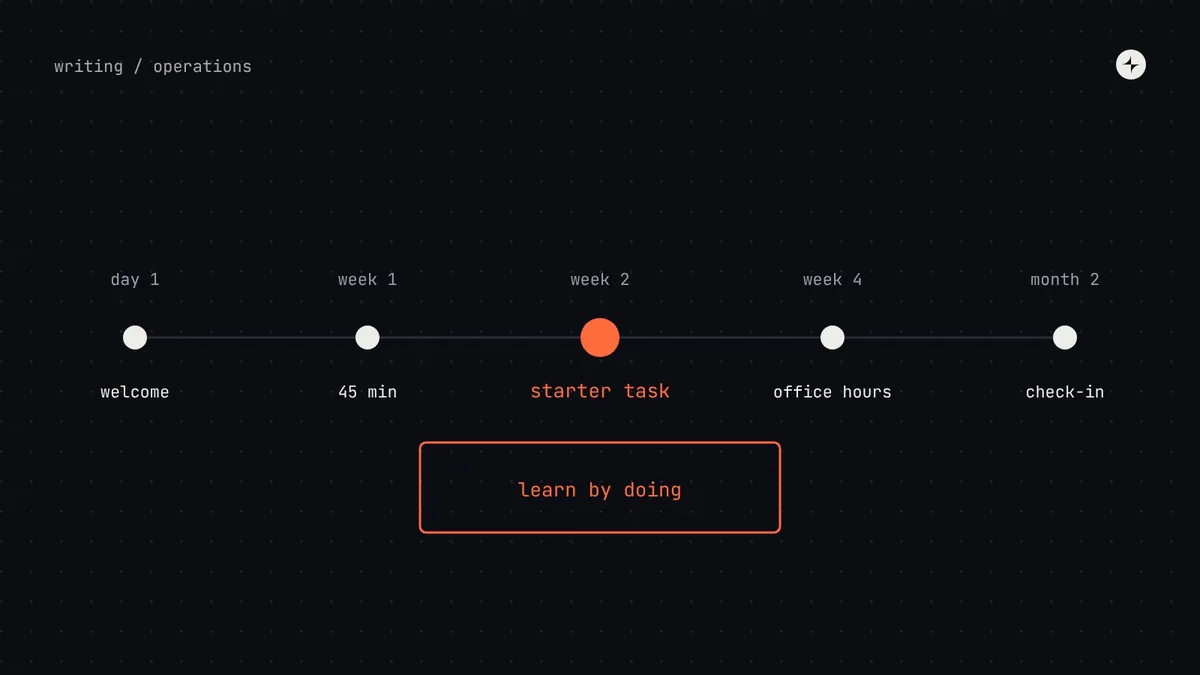
A design system only creates value when people know how to use it, and teaching it isn't a launch event. Because people keep joining and moving teams, enablement must be continuous. Put the system into every designer's and engineer's first week: a welcome note, a 45-minute session, a real starter task and a buddy. Then offer short learning paths by role (use it, use it well, contribute), training in short recorded clips placed next to the docs, and look for knowledge gaps in the traces confusion leaves: repeated questions, detaches, lint warnings and low confidence scores.
- The starter task matters most: using the system for something real teaches far more than reading about it.
- A 45-minute recording is rarely watched; a three-minute clip called "How to add a new icon" is watched again and again.
- Counting system contributions in career frameworks often does more for contribution than any amount of encouragement.
Why enablement decides the value
Adoption is the multiplier on every benefit a design system has. A system can have excellent components and still fail if designers don't know they exist, engineers don't know how to install them, and product managers don't understand why they matter. Enablement is how you grow adoption.
An illustration: the launch nobody remembered
A company launches its design system with an all-hands presentation and a link to the documentation. Everyone claps.
Six months later, half the designers hired since launch have never heard of it. Engineers who tried it hit a setup problem and gave up. Adoption is stuck at a third of the product.
A permanent programme: the system in every new joiner's first week, short regular training, worked examples and champions in each team. Teaching never stops, because hiring never stops.
Enablement is everything you do to help people use the system well: onboarding, training, examples, support and encouragement.
The first month for a new joiner
The cheapest moment to teach someone the system is their first week, before they've formed habits. Make it a standard part of onboarding for every designer and front-end engineer, owned by the system team and scheduled automatically.
| When | Designers | Engineers | Format |
|---|---|---|---|
| Day 1–2 | Welcome note: the docs link, the channel, office hours times | Same, plus the package install guide | Automated message |
| Week 1 | "The system in 45 minutes": principles, foundations, finding components in Figma | "The system in 45 minutes": tokens, the package, the workshop, contributing | Live session or recording, monthly cohort |
| Week 1–2 | Starter task: rebuild a real screen using only system components | Starter task: fix a "good first issue" or migrate a small screen | Guided, with a buddy |
| Week 2–4 | Bring a real question to office hours | Same | Office hours |
| Month 2 | Check-in: what's confusing? | Same | 15-minute chat or form; feeds research |
The starter task matters most. It teaches by doing, and it shows the new joiner, on their first project, that the system makes them faster. That first impression is hard to change later, in either direction.
Learning paths by role
A product manager doesn't need to understand token architecture; an engineer doesn't need to know how Figma variants are organised. Learning paths give each role a route from "I've heard of it" to "I can contribute to it".
| Role | Level 1 · Use it | Level 2 · Use it well | Level 3 · Contribute |
|---|---|---|---|
| Product designer | Find and use components; foundations basics | Patterns, states, accessibility, writing guidance | Propose and design new components; run a workshop |
| Engineer | Install the package; use components and tokens | Props, composition, theming, testing, migrations | Fix bugs; build components to the definition of done |
| Product manager | What the system is and why it matters | How to request things; planning system work into features | Champion system work in planning |
| Content designer | Voice, vocabulary, message formulas | Writing component guidance | Own content standards for an area |
| Leadership | Value, costs and maturity | Reading the health metrics | Sponsoring and funding |
Training formats that work
| Format | Length | Best for | How often |
|---|---|---|---|
| Onboarding session | 45 min | New joiners; the big picture | Monthly cohort |
| Component workshop | 60–90 min | Hands-on practice with a new or complex component | With each major component |
| Docs walkthrough | 30 min | Where things are and how to find answers | Quarterly, and when the docs change |
| Release demo | 10 min | What's new and what to do about it | Every release, recorded |
| Lunch and learn | 30–45 min | Deeper topics: accessibility, theming, "how we built the date picker" | Monthly |
| Team visit | 30 min | Tailored help in a team's own meeting | On request; rotating |
| Short video | 2–5 min | One task: "theming a card", "using the table filters" | As needed; kept next to the docs |
Record everything, keep it short. Cut every live session into task-sized clips and put each clip on the documentation page it belongs to, not in a separate video library nobody browses.
Learning content worth making
Documentation tells people what each component is. Learning content teaches them how to work with the system.
Step-by-step tasks
"Build an invoice list page in 20 minutes." Real tasks, real components, a working result at the end.
Real screens, explained
A screen from your product, annotated: which components, which patterns, which decisions, and why.
Copyable solutions
Common combinations ready to copy, like a filter bar or a settings section.
One-page summaries
Token names, the spacing scale, text styles, the rules most often forgotten.
Try it live
Interactive examples in the workshop where people change props and see the result.
Behind the scenes
Short write-ups of how a complex component was designed. They build trust and teach thinking.
Use your own product in examples whenever you can: people learn much faster from screens they recognise. And give every piece of content an owner and a "last reviewed" date, because outdated tutorials do more harm than no tutorials.
Finding knowledge gaps
People rarely know what they're missing, so asking directly doesn't work well. Look at the traces confusion leaves behind instead.
| Signal | What it suggests | Response |
|---|---|---|
| The same question asked repeatedly in the channel | Docs missing, unclear or hard to find | Add or rewrite the doc; pin an answer |
| Components detached often in Figma | A capability gap, or people don't know an option exists | Check which; fix the component or teach the option |
| Lint warnings for raw values in one team | That team hasn't learned the tokens | A team visit; a cheat sheet |
| One team's adoption lagging | Missing onboarding, or a real blocker | Talk to the champion; research |
| Low confidence scores in the survey | People use it but don't feel sure | Learning paths, workshops |
| Requests for things that already exist | A findability problem | Improve search, naming and docs structure |
A simple addition to the twice-yearly survey: ask people to rate their confidence ("I know how to…") for five or six core tasks, such as finding a component, using tokens, requesting something and contributing. The lowest-scoring tasks become next quarter's enablement focus.
Enablement by company size
| Startup | Growing company | Large enterprise | |
|---|---|---|---|
| Onboarding | A 20-minute chat with the owner | Monthly cohort session + starter task | Self-paced course + live cohorts in each region |
| Training | Learning by doing, pairing | Component workshops; lunch and learns | Full learning paths; train-the-trainer |
| Content | One "how we build UI" page | Tutorials and recipes in the docs | A content library with owners |
| Who does it | The owners | System team + champions | An enablement lead or developer advocate + champions |
At IBM in Bangalore, several product design systems were built and launched with a contribution process other teams could follow, regular releases and training. Read the case study.
The short version
- Enablement is continuous, because the people building your product keep changing.
- Put the system in every new joiner's first week, with a real starter task and a buddy.
- Offer short learning paths by role: use it, use it well, contribute.
- Record sessions and cut them into short clips next to the docs.
- Find gaps from repeated questions, detaches, lint warnings and confidence scores.
Frequently asked questions
How do you onboard people to a design system?
Make it part of every designer's and front-end engineer's first week: a welcome note with links, a short session on the system, a real starter task with a buddy, and a first visit to office hours. Check in after a month.
How do you increase design system adoption?
Continuous enablement: onboarding for every new joiner, short role-based learning paths, task-sized training clips, champions in each team, and fixing the gaps that repeated questions and detaches reveal.
Who should run design system training?
The system team at first, with champions sharing the load as the company grows. Large organisations often have a dedicated enablement lead or developer advocate.
Should design system contribution count towards promotion?
It helps a great deal. When contribution counts in career frameworks, it stops being extra work done for free.
Further reading
- Design That ScalesDan Mall, on adoption and support.
- Design system championsThe people who make enablement scale.
- Design system documentationThe reference every learning path points to.