
The short answer
Translation touches components, patterns and code, so getting ready for other languages is a design system job. Six habits cover most of it: leave room for longer text (components wrap or grow, never cut text off); support right-to-left with logical CSS properties (start and end, not left and right); never build sentences from pieces; use the platform's plural rules; format dates, numbers and money by locale with built-in tools; and give translators context for every string. Do them now, even with one language, and a later launch is configuration rather than a rebuild.
- In right-to-left languages such as Arabic and Hebrew, layouts and directional icons mirror; most other things don't.
- "1,00,000" in India is "100,000" in many other places. Hand-written formats break.
- Test every component with long text, right-to-left text and the tallest script you support.
Why it's a design system problem
Most of what breaks in a translated product breaks in shared parts: a button that can't fit a longer label, a navigation that doesn't mirror, a date written by hand in one format, a sentence assembled from fragments. Fix those in the system and every product inherits the fix. Leave them to each product team and each team discovers the same problems, separately, during a launch.
An illustration: the launch that found every shortcut
A product built for one English-speaking market is launching in the UAE, in English and Arabic, in three months.
Buttons truncate. Icons point the wrong way. Prices show in the wrong format. "You have 1 invoices" appears in English, and the Arabic plurals are worse. Each team fixes its own screens differently.
Components built on logical properties, a mirroring rule for icons, formatting helpers for dates and money, and a long-text and RTL check in the definition of done. The next market takes weeks, not months.
Localisation is adapting a product for a language and region: words, formats, layout direction, sometimes imagery. Internationalisation is building the product so localisation is possible without rewriting it. A design system's job is mostly the second.
Six habits that make a system ready
| Habit | Why it matters | In the system |
|---|---|---|
| Leave room for longer text | Many languages need noticeably more space than English for the same message | Components wrap or grow; nothing has a fixed text width; truncation only with a tooltip or full text nearby |
| Support right-to-left | Arabic, Hebrew, Persian and Urdu read right to left; layouts and directional icons should mirror | Logical CSS properties everywhere; a mirroring flag on icons |
| Never build sentences from pieces | "You have " + count + " invoices" breaks in languages with different word order | Whole sentences with placeholders, in components and docs examples |
| Handle plurals properly | Some languages have several plural forms; Arabic has six | Use the platform's plural rules (Intl.PluralRules on the web) |
| Format by locale | Dates, numbers, currencies and separators differ by region | Formatting helpers built on Intl; no hand-written formats in components |
| Give translators context | "Post" could be a verb or a noun; "Save" might mean store or rescue | A description and a screenshot for every string; character limits where they're real |
Right-to-left: what mirrors and what doesn't
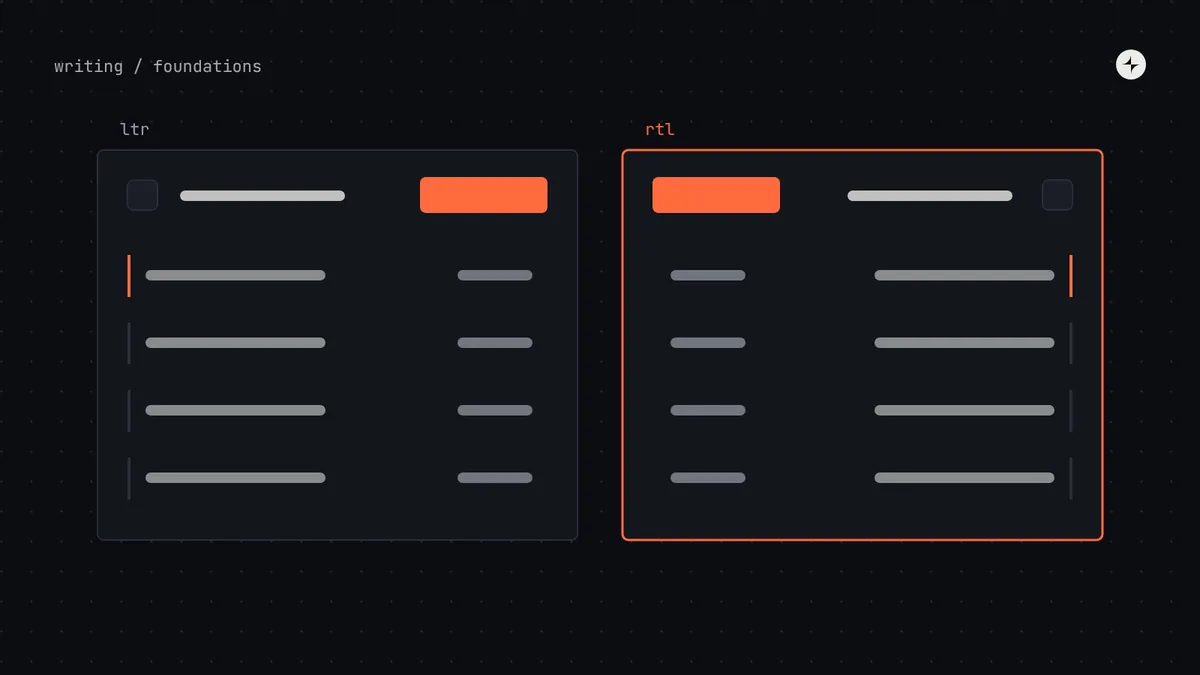
When a layout switches to right-to-left, its reading direction flips: navigation starts on the right, a "back" arrow points right, progress fills from right to left. But not everything mirrors.
dir attribute changes: the icon, the title, the button and the accent edge all move to the other side. The invoice numbers stay left to right inside the mirrored row, as numbers and codes do. IllustrationThings that show direction or order
Page layout and navigation, back and forward arrows, chevrons in lists, progress bars and steppers, sliders, text alignment, the side a panel opens from.
Things that show the real world
Numbers and phone numbers, media playback controls, clocks, checkmarks, logos, charts with a time axis (usually), and icons of physical objects like a phone or a camera.
Logical properties do most of the work
CSS logical properties describe layout relative to the reading direction instead of the screen. Use them in every component and most right-to-left support comes for free:
| Instead of | Use | What it means |
|---|---|---|
margin-left | margin-inline-start | The side where reading starts |
padding-right | padding-inline-end | The side where reading ends |
border-left | border-inline-start | An accent edge that follows the text |
text-align: left | text-align: start | Aligned to the reading direction |
left: 0 | inset-inline-start: 0 | Positioning that mirrors |
width / height | inline-size / block-size | Size along and across the text |
Set the direction on the page with the HTML dir attribute (and the language with lang), not with CSS alone, so browsers, screen readers and text input all behave correctly. For icons, add a property to the icon component (for example mirrored) and set it once per icon in the library, so product teams never decide it screen by screen.
Text that grows
A label that fits comfortably in English may not fit in German, Finnish or Tamil. Components should cope by design:
- Buttons and tabs grow with their label; on narrow screens, labels wrap rather than truncate.
- Navigation has a plan for long items: wrap, or move into a "more" menu.
- Tables allow header text to wrap onto two lines.
- Line height leaves room for scripts with tall marks above and below the line, such as Arabic, Thai and Devanagari. Test with the tallest script you support.
- Fonts cover every script you ship, with a tested fallback, and numbers that line up in tables.
Add a "pseudo-locale" to your component workshop: a fake language that makes every string about a third longer and wraps it in brackets ("[Ŝéñð íñvóíçé ţóðáý]"). Truncation, hard-coded strings and fixed widths become visible in seconds, long before a real translation arrives.
Dates, numbers and money
Never format these by hand inside components. The same amount is written differently across regions, and the browser already knows the rules.
| Locale | One hundred thousand rupees | Date (10 November 2026) |
|---|---|---|
English (India), en-IN | ₹1,00,000.00 | 10/11/2026 |
English (US), en-US | ₹100,000.00 | 11/10/2026 |
German (Germany), de-DE | 100.000,00 ₹ | 10.11.2026 |
Intl.NumberFormat and Intl.DateTimeFormat. Exact output can vary slightly between browsers and versions, which is one more reason not to hard-code it.// In a shared formatting helper, never inline in a component
const money = new Intl.NumberFormat(locale, { style: "currency", currency: "INR" });
money.format(100000); // "₹1,00,000.00" in en-IN
const plural = new Intl.PluralRules("ar");
plural.select(2); // "two": Arabic has zero, one, two, few, many and otherTesting for other languages
Add direction and locale controls to the workshop
Every component story can be viewed right to left, in a pseudo-locale and in each supported language.
Add checks to the definition of done
Long text, right-to-left, and the tallest script, for every new or changed component.
Lint for physical properties and hard-coded formats
Automated rules catch
margin-left, string concatenation and hand-written dates in review.Review with native speakers
Automated checks find layout problems; only people who read the language find awkward, wrong or offensive results.
At CARS24, the mobile component system had to work in India, the UAE and Australia, with every UAE screen in Arabic, reading right to left. Every component got right-to-left checks with the UAE team, and every market's longest price had to fit the same slot. Read the case study.
The short version
- Internationalisation is a design system job: fix it once in shared parts.
- Use logical properties and the
dirattribute; mirror layout and directional icons, not numbers or media controls. - Let components grow with text; test with a pseudo-locale and the tallest script.
- Format dates, numbers, money and plurals with the platform's built-in tools.
- Give translators context, and review with native speakers.
Frequently asked questions
How do I make a design system support right-to-left languages?
Build components with CSS logical properties (start and end instead of left and right), set direction with the HTML dir attribute, mark which icons mirror, and test every component in a right-to-left view.
Do all icons need to be flipped in right-to-left layouts?
No. Mirror icons that show direction or order, like arrows, chevrons and progress. Don't mirror icons of real-world objects, media playback controls, checkmarks or logos.
Should we prepare for translation if we only support one language?
Yes, at least the cheap habits: logical properties, components that grow with text, whole sentences with placeholders and built-in formatting. They cost little now and save a rebuild later.
How much longer does translated text get?
It varies by language and string; short labels often grow the most. Rather than designing for one percentage, make components wrap or grow and test with a pseudo-locale.
Further reading
- CSS logical properties and valuesMDN.
- Structural markup and right-to-left text in HTMLW3C Internationalization.
- IntlMDN. Dates, numbers, plurals and more.
- Content design in a design systemWriting words that translate well.